KUNST
SCHÖNHEIT & WELLNESS
HANDWERK
KULTUR & GESCHICHTE
UNTERHALTUNG
UMFELD
ESSEN & GETRÄNKE
REVERSE ENGINEERING
WISSENSCHAFTEN
SPORT
TECHNOLOGIE
WEARABLES
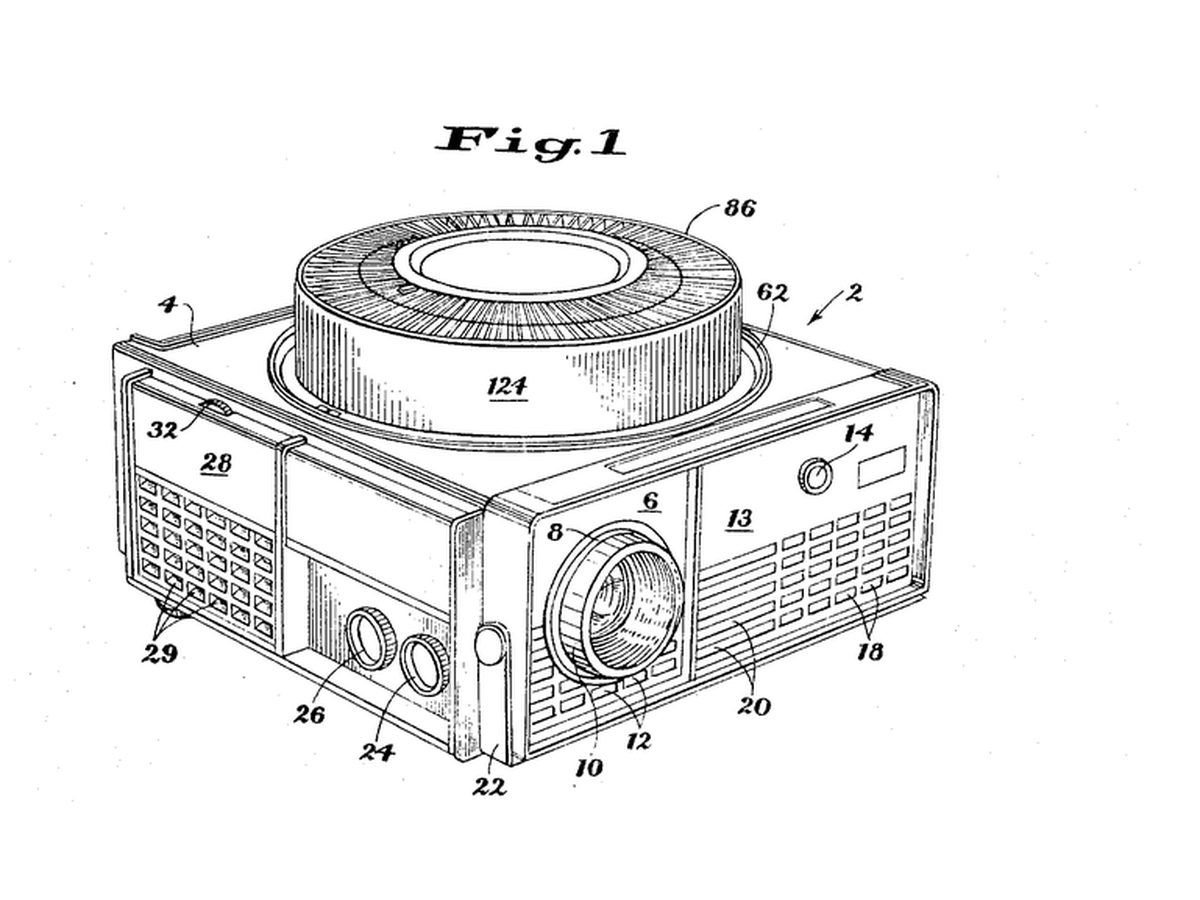


Rotary Gravity Slide Projector
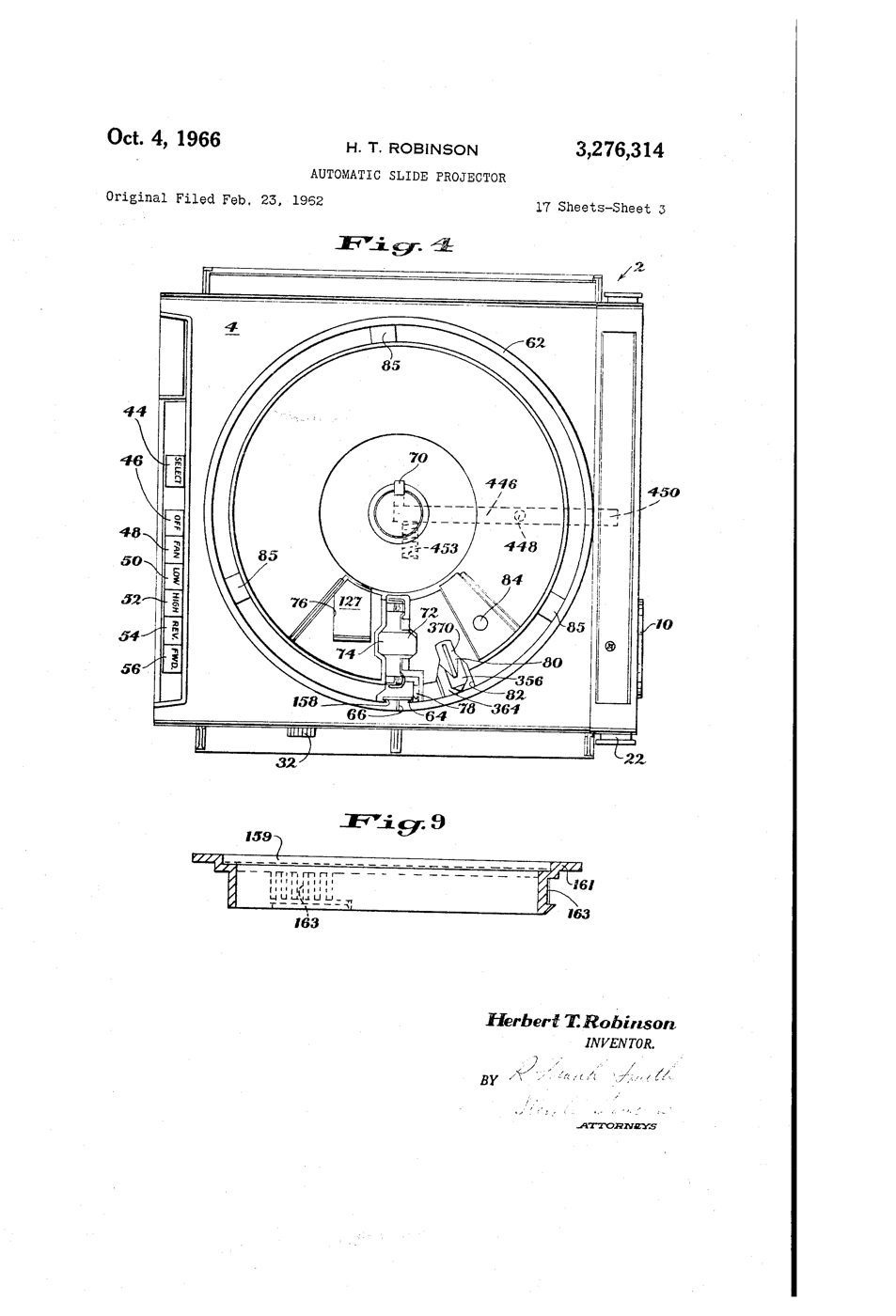
Straight slide magazines pushed slides sideways and jammed. Kodak's round tray, designed by David E. Hansen, stood the slides on edge in a ring above the projector: each one fell into the gate by gravity when it reached the drop point and was lifted back when the tray moved on, so nothing had to push a slide sideways.
**US 3,276,314**, "Automatic slide projector", Herbert T. Robinson, assigned to Eastman Kodak, filed 1. June 1965 (continuing an application of 23. February 1962), granted 4. October 1966: a tray of two relatively movable portions with a passageway "through which the slides are adapted to pass substantially vertically, one at a time, in coordination with relative movement of the portions".
**You build the mechanism**: a 12-slot tray turned by a stepper, a servo that lifts each slide back, a torch and a lens to project it.
Erfahren
6 hours
Anweisungen
1
1
Make twelve slides
Make twelve slides
Cut 50 x 50 mm frames from black card with a 36 x 24 mm window. Draw or print images on transparency film and tape one behind each window. Number them 0 to 11.
Materialien für diesen Schritt:
 Schwarzer Karton2 Blätter
 Inkjet-Folie2 Blätter
Benötigte Werkzeuge:
 Bastelmesser
 Permanentmarker
 Lineal
2
2
Build the tray
Build the tray
Glue two 240 mm foam-board discs together. Cut 12 radial slots 4 mm wide and 55 mm long, 30 degrees apart, open underneath so a slide can fall through. Glue a hub on the motor shaft and the tray on the hub.
Materialien für diesen Schritt:
 Foamboard für den Modellbau2 Blätter
 Schrittmotor1 Stück
Benötigte Werkzeuge:
Bastelmesser Heißklebepistole
3
3
Base, gate and lift
Base, gate and lift
On a plywood base cut one drop slot under the tray. Below it, build a foam-board gate channel that holds a dropped slide upright between the torch and a 100 mm convex lens. Mount the servo so its arm, raised, pushes the slide back up into the tray.
Materialien für diesen Schritt:
 Sperrholzplatte1 Stück
 Mikroservomotor SG90 (5 Stück)1 Packung
 Satz Sammellinsen1 Set
Benötigte Werkzeuge:
 HandsägeHeißklebepistole
 LED-Inspektionsleuchte
4
4
Wire and flash
Wire and flash
EasyDriver STEP to D3, DIR to D4, motor coils to A and B, 12 V supply to its power input, GND shared with the Uno. Servo signal D9. Button between D2 and GND. Set the EasyDriver current adjuster low - the tray is light. Turn the tray by hand so slot 0 is over the gate before powering up.
rotary_slide_tray.inocpp
Materialien für diesen Schritt:
 Schrittmotortreiber1 Stück
 Mikroschalter (mit Hebel)1 Stück
 Dupont-Steckkabelsatz (Stecker-Buchse)1 Set
Benötigte Werkzeuge:
 Arduino Uno R3
 Gleichstromnetzgerät
 Steckbrett
 USB-B-Kabel
5
5
Why the steps must not drift
Why the steps must not drift
Jupyter-Notebook wird geladen …
6
6
Show
Show
Load the slides upside down and reversed (a projector inverts the image). Darken the room, focus the lens on a wall, and press to advance. Count misfeeds over two full turns.
Benötigte Werkzeuge:
 Bandmaß (Rollmeter)
7
7
History & Context
History & Context
**What the patent specifies:** a projector for a tray of two relatively movable portions, slides passing substantially vertically through a passageway one at a time in step with the tray's movement. **Modern build (derived):** foam-board tray, stepper, servo lift and a torch.
Kodak made Carousel projectors from 1961 until 2004; a round tray held 80 slides. The limits: bent or thick mounts jam the gate, and the gravity drop needs the projector level.
Materialien
10- 2 BlätterPlatzhalter
- 2 BlätterPlatzhalter
- 2 BlätterPlatzhalter
- Platzhalter
- 1 StückPlatzhalter
- 1 PackungPlatzhalter
- 1 SetPlatzhalter
- Platzhalter
- 1 StückPlatzhalter
- Platzhalter
Benötigte Werkzeuge
11- Platzhalter
- Platzhalter
- Platzhalter
- Platzhalter
- Platzhalter
- Platzhalter
- 1 vendor sell this, none ship to you yetPlatzhalter
- Platzhalter
- 1 vendor sell this, none ship to you yetPlatzhalter
- 1 vendor sell this, none ship to you yetPlatzhalter
- 1 vendor sell this, none ship to you yetPlatzhalter
Verwandte Blueprints
Diese Blueprints teilen Wissen — Techniken, Materialien oder Prinzipien

CC0 Gemeinfrei
Dieser Blueprint ist unter CC0 veröffentlicht. Sie dürfen dieses Werk für jeden Zweck frei kopieren, ändern, verbreiten und verwenden, ohne um Erlaubnis zu fragen.
Unterstützen Sie den Maker, indem Sie Produkte über seinen Blueprint kaufen, wo er eine Maker-Provision von Anbietern festgelegt, verdient. Oder erstellen Sie eine neue Iteration dieses Blueprints und verbinden Sie ihn in Ihrem eigenen Blueprint, um Einnahmen zu teilen.