ARTE
BELLEZA Y BIENESTAR
ARTESANÍA
CULTURA E HISTORIA
ENTRETENIMIENTO
MEDIO AMBIENTE
COMIDA Y BEBIDAS
INGENIERÍA INVERSA
CIENCIAS
DEPORTES
TECNOLOGÍA
TECNOLOGÍA VESTIBLE
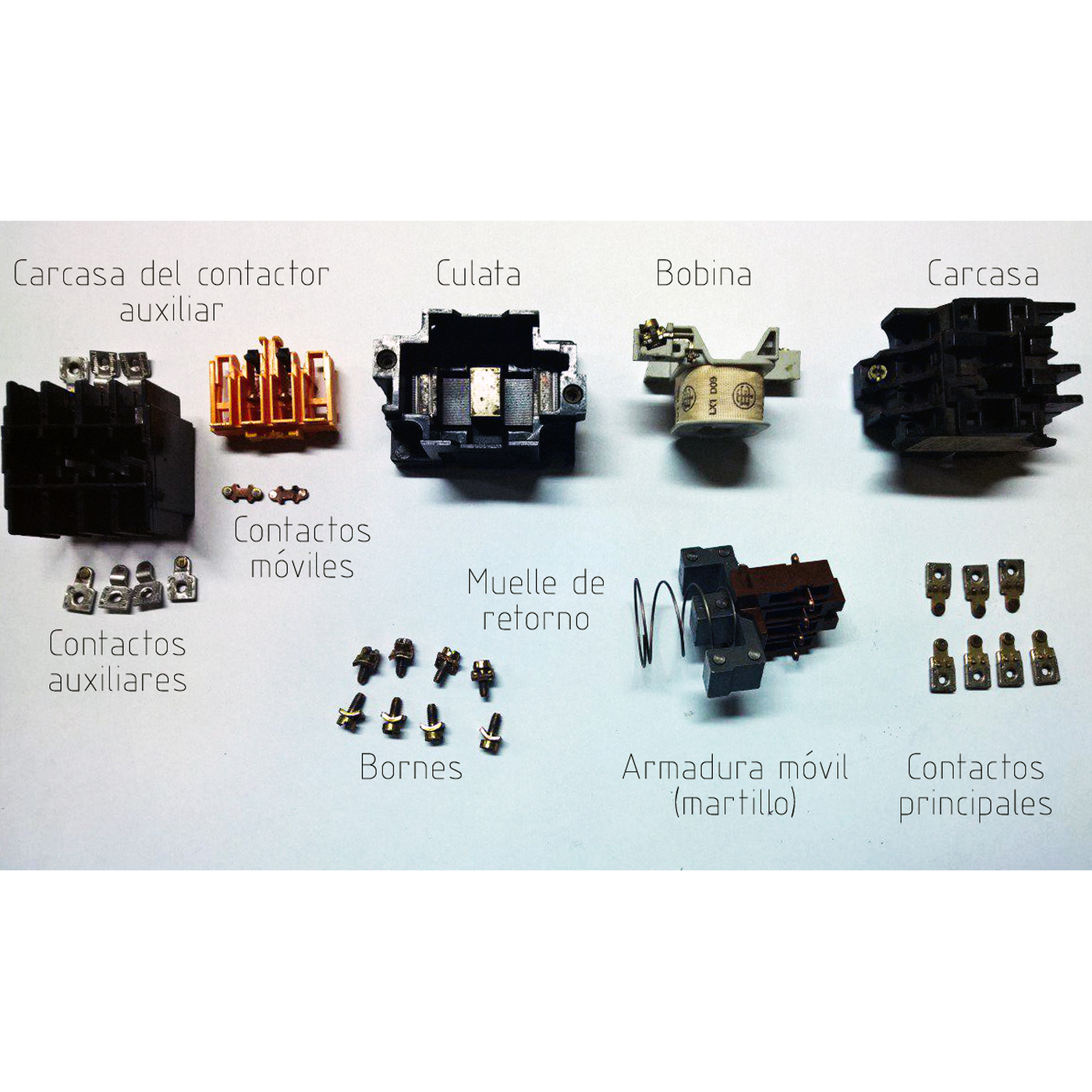


The Contactor: A Relay That Remembers to Stay Off
A motor's supply is too heavy for a hand switch to make and break safely, and a machine that starts by itself when the power returns can kill. The contactor answers both: a heavy relay whose main contacts switch the motor, controlled by a start button, a stop button and one of its own auxiliary contacts that holds it in once started.
That one extra contact — the seal-in — turns the relay into a memory. Press Start and it latches. Press Stop, or lose the supply for a moment, and it drops out and stays out until someone presses Start again. The same circuit, with an overload relay added, is the motor starter on almost every machine.
This rung simulates two- and three-wire control through a power cut, works out why a contactor holds at a lower voltage than it needs to pull in, and wires a working start/stop station on the bench.
Principiante
About 3 hours
Instrucciones
1
1
Seal-in logic, power cuts and pull-in voltage
Seal-in logic, power cuts and pull-in voltage
Cargando el cuaderno de Jupyter…
2
2
The start/stop station, step by step
The start/stop station, step by step
Espacio de trabajo Blockly
Loading Blockly workspace...
3
3
The seal-in is an OR with memory
The seal-in is an OR with memory
Start OR seal-in, AND NOT Stop: the starter is relay logic. The embedded blueprint builds the gates it is made of.
4
4
Wire a start/stop station at 12 V
Wire a start/stop station at 12 V
Use a 12 V relay with a changeover contact as the contactor: its coil is the contactor coil, one contact carries the load, and — for the seal-in — use a second relay driven from the same coil supply, or a relay with two sets of contacts.
Wire, from the 12 V supply: the **Stop** button (normally closed) → then **Start** (normally open) and the seal-in contact in parallel → the relay coil → 0 V. Wire the load contact to a geared DC motor through its own fused 12 V feed.
Press Start: the motor runs and keeps running when you let go. Press Stop: it stops. Start it again, then switch the power supply off and on: it stays stopped. Now remove the seal-in wire and wire a toggle switch in place of Start and Stop — two-wire control — and repeat the power cut: this time it restarts by itself.
Materiales para este paso:
 Relé SPDT2 piezas
 Pulsador2 piezas
 Motorreductor de corriente continua1 pieza
 Cables de puente1 pieza
 Portafusibles de CC1 pieza
Herramientas necesarias:
 Fuente de alimentación de corriente continua
 Multímetro
 Soldador de estaño
 Cables de prueba con pinzas de cocodrilo
5
5
A starter that will not start or will not stay in
A starter that will not start or will not stay in
Motor starter faults, from the control circuit outwards.
Flow
Loading...
6
6
Context and honest limits
Context and honest limits
Magnetic motor starters with start and stop push buttons and a hold-in contact became the standard way to control industrial motors in the first half of the twentieth century, and the three-wire circuit is still drawn the same way in every motor-control manual.
**Honest limits.** A 12 V relay shows the logic, not the job: a real contactor's main contacts must break motor current, and mains and three-phase supplies must be wired only by someone qualified to do it. The pull-in figures in the notebook use the same air-gap-only magnet model as the solenoid valve and overstate the pull.
Materiales
5- 2 piezasMarcador de posición
- Marcador de posición
- Marcador de posición
- Marcador de posición
- 1 piezaMarcador de posición
Herramientas requeridas
4- Marcador de posición
- Marcador de posición
- 2 vendors sell this, none ship to you yetMarcador de posición
- Marcador de posición
Este plano hace
Blueprints relacionados
Estos blueprints comparten conocimiento — técnicas, materiales o principios

CC0 Dominio público
Este Blueprint se publica bajo CC0. Eres libre de copiar, modificar, distribuir y usar este trabajo para cualquier propósito, sin pedir permiso.
Apoya al Maker comprando productos a través de su Blueprint, donde gana una Comisión del Maker establecida por los vendedores, o crea una nueva iteración de este Blueprint e inclúyela como conexión en tu propio Blueprint para compartir ingresos.