ART
BEAUTÉ ET BIEN-ÊTRE
ARTISANAT
CULTURE ET HISTOIRE
DIVERTISSEMENT
ENVIRONNEMENT
NOURRITURE ET BOISSONS
INGÉNIERIE INVERSE
SCIENCES
SPORTS
TECHNOLOGIE
TECHNOLOGIE PORTABLE
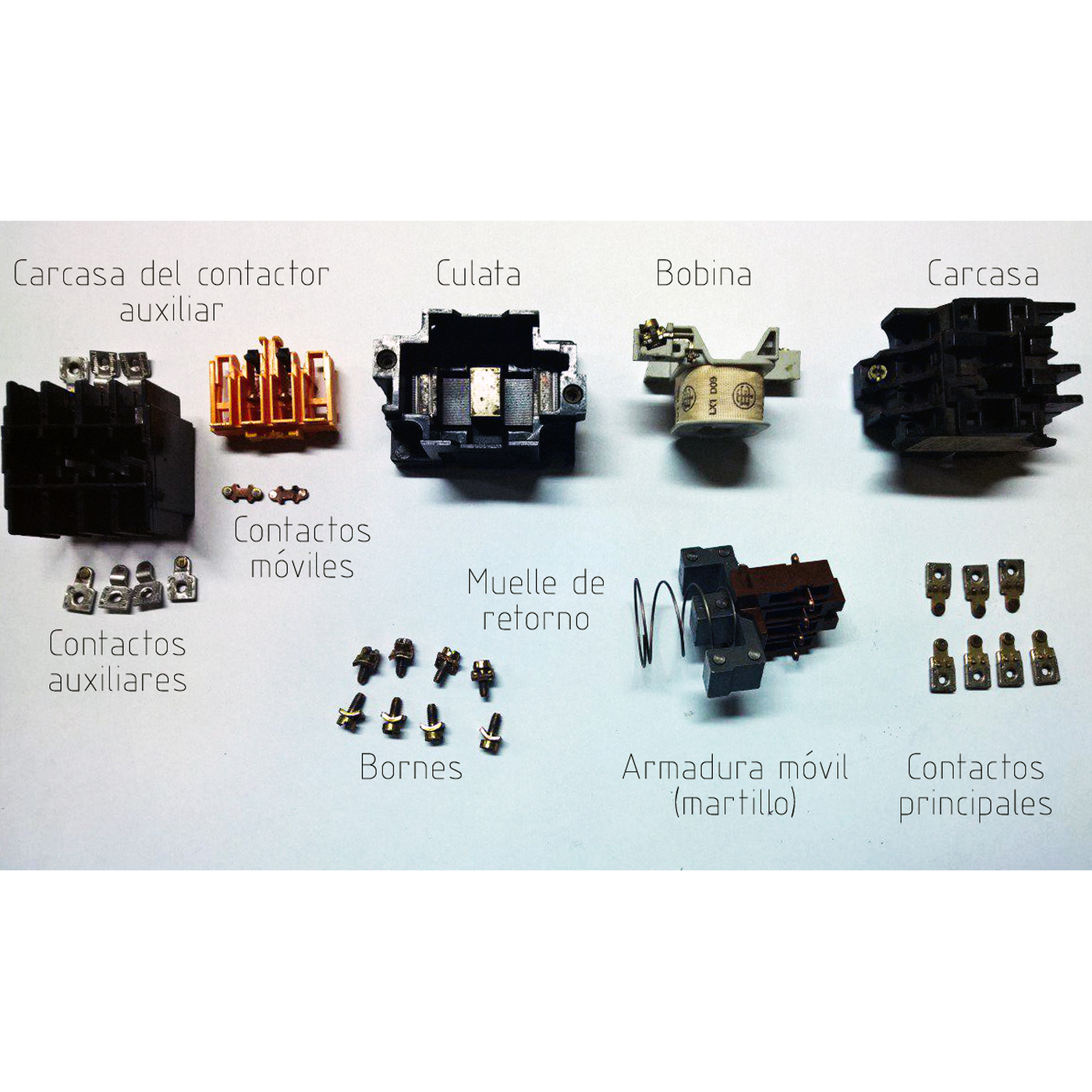


The Contactor: A Relay That Remembers to Stay Off
A motor's supply is too heavy for a hand switch to make and break safely, and a machine that starts by itself when the power returns can kill. The contactor answers both: a heavy relay whose main contacts switch the motor, controlled by a start button, a stop button and one of its own auxiliary contacts that holds it in once started.
That one extra contact — the seal-in — turns the relay into a memory. Press Start and it latches. Press Stop, or lose the supply for a moment, and it drops out and stays out until someone presses Start again. The same circuit, with an overload relay added, is the motor starter on almost every machine.
This rung simulates two- and three-wire control through a power cut, works out why a contactor holds at a lower voltage than it needs to pull in, and wires a working start/stop station on the bench.
Débutant
About 3 hours
Consignes
1
1
Seal-in logic, power cuts and pull-in voltage
Seal-in logic, power cuts and pull-in voltage
Chargement du notebook Jupyter…
2
2
The start/stop station, step by step
The start/stop station, step by step
Espace de travail Blockly
Loading Blockly workspace...
3
3
The seal-in is an OR with memory
The seal-in is an OR with memory
Start OR seal-in, AND NOT Stop: the starter is relay logic. The embedded blueprint builds the gates it is made of.
4
4
Wire a start/stop station at 12 V
Wire a start/stop station at 12 V
Use a 12 V relay with a changeover contact as the contactor: its coil is the contactor coil, one contact carries the load, and — for the seal-in — use a second relay driven from the same coil supply, or a relay with two sets of contacts.
Wire, from the 12 V supply: the **Stop** button (normally closed) → then **Start** (normally open) and the seal-in contact in parallel → the relay coil → 0 V. Wire the load contact to a geared DC motor through its own fused 12 V feed.
Press Start: the motor runs and keeps running when you let go. Press Stop: it stops. Start it again, then switch the power supply off and on: it stays stopped. Now remove the seal-in wire and wire a toggle switch in place of Start and Stop — two-wire control — and repeat the power cut: this time it restarts by itself.
Matériaux pour cette étape :
 Relais SPDT2 pièces
 Bouton-poussoir2 pièces
 Motoréducteur à courant continu1 pièce
 Fils de liaison1 pièce
 Porte-fusible CC1 pièce
Outils nécessaires :
 Alimentation en courant continu
 Multimètre
 Fer à souder
 Cordons de test à pinces crocodile
5
5
A starter that will not start or will not stay in
A starter that will not start or will not stay in
Motor starter faults, from the control circuit outwards.
Flow
Loading...
6
6
Context and honest limits
Context and honest limits
Magnetic motor starters with start and stop push buttons and a hold-in contact became the standard way to control industrial motors in the first half of the twentieth century, and the three-wire circuit is still drawn the same way in every motor-control manual.
**Honest limits.** A 12 V relay shows the logic, not the job: a real contactor's main contacts must break motor current, and mains and three-phase supplies must be wired only by someone qualified to do it. The pull-in figures in the notebook use the same air-gap-only magnet model as the solenoid valve and overstate the pull.
Matériaux
5- 2 piècesEspace réservé
- Espace réservé
- Espace réservé
- Espace réservé
- 1 pièceEspace réservé
Outils requis
4- Espace réservé
- Espace réservé
- 2 vendors sell this, none ship to you yetEspace réservé
- Espace réservé
Ce plan fabrique

Blueprints liés
Ces blueprints partagent des connaissances — techniques, matériaux ou principes

CC0 Domaine public
Ce blueprint est publié sous CC0. Vous êtes libre de copier, modifier, distribuer et utiliser ce travail pour tout usage, sans demander la permission.
Soutenez le Maker en achetant des produits via son Blueprint où il perçoit une Commission Maker définie par les Vendeurs, ou créez une nouvelle itération de ce Blueprint et incluez-le comme connexion dans votre propre Blueprint pour partager les revenus.