कला
सौंदर्य और कल्याण
हस्तशिल्प
संस्कृति और इतिहास
मनोरंजन
पर्यावरण
खाद्य और पेय
रिवर्स इंजीनियरिंग
विज्ञान
खेल
प्रौद्योगिकी
पहनने योग्य
अनुवादित
BLUEPRINT NFT


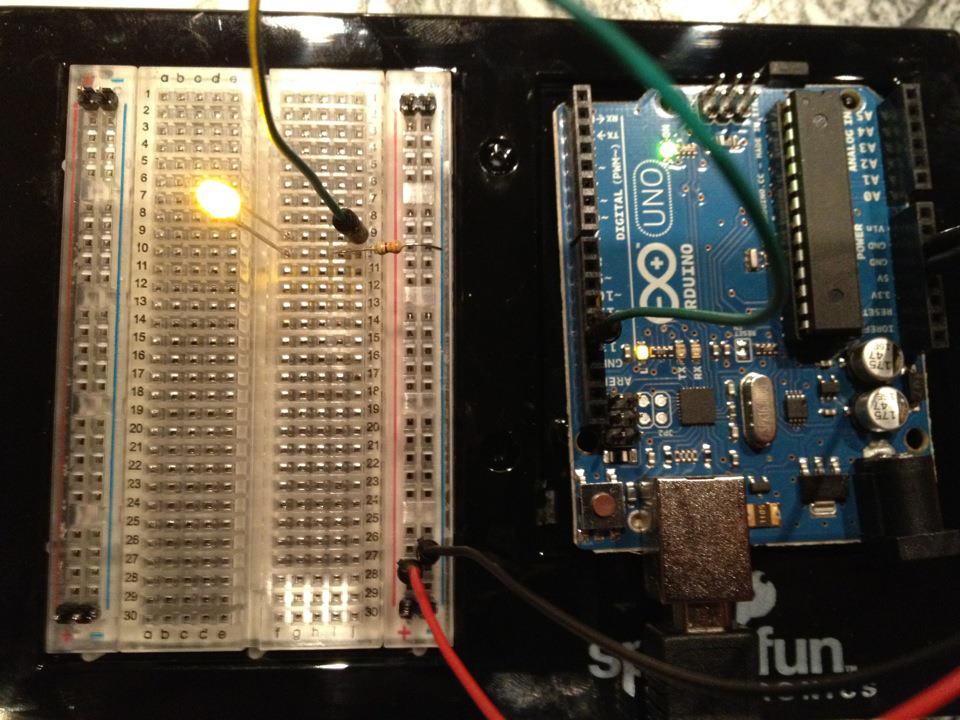
ब्लिंकिंग LED — आपका पहला Arduino प्रोजेक्ट
क्लासिक पहली इलेक्ट्रॉनिक्स प्रोजेक्ट! Arduino, एक ब्रेडबोर्ड, एक रेजिस्टर, और एक एकल LED का उपयोग करके एक ब्लिंकिंग LED सर्किट बनाएं। पूर्ण शुरुआती लोगों के लिए परफेक्ट — कोई सोल्डरिंग की आवश्यकता नहीं।
निर्देश
1
1
अपने घटक इकट्ठा करें
अपने घटक इकट्ठा करें
नीचे सूचीबद्ध सभी घटकों को एकत्र करें। कोई焊接की आवश्यकता नहीं — सब कुछ breadboard में जुड़ता है।
इस चरण के लिए सामग्री:
 SparkFun Inventor's Kit - V3.21 किट
आवश्यक उपकरण:
 Arduino IDE वाला कंप्यूटर
2
2
सर्किट आरेख
सर्किट आरेख
Signal flows from Arduino Pin 13 → 220Ω resistor (R1) → LED (D1) → GND। The resistor limits current to protect the LED।
इस चरण के लिए सामग्री:
 Arduino Uno R31 टुकड़ा
 5 मिमी एलईडी1 टुकड़ा
 1/4 वाट प्रतिरोधक किट1 टुकड़ा
3
3
इसे वायर करें
इसे वायर करें
- LED को breadboard में डालें — लंबी टांग (anode +) एक पंक्ति में, छोटी टांग (cathode −) अगली पंक्ति में।
- 220Ω resistor की एक टांग को LED cathode की समान पंक्ति में डालें। दूसरी टांग एक अलग पंक्ति में।
- Jumper wire को LED anode पंक्ति से → Arduino Pin 13 में लगाएं।
- Jumper wire को resistor की मुक्त पंक्ति से → Arduino GND में लगाएं।
इस चरण के लिए सामग्री:
5 मिमी एलईडी1 टुकड़ा1/4 वाट प्रतिरोधक किट1 टुकड़ा ब्रेडबोर्ड1 टुकड़ा
 जंपर तार (नर-नर)2 टुकड़े
4
4
ब्लिंक कोड अपलोड करें
ब्लिंक कोड अपलोड करें
USB के ज़रिए Arduino कनेक्ट करें। Arduino IDE खोलें, Tools → Board → Arduino Uno चुनें, कोड पेस्ट करें और Upload पर क्लिक करें।
blink.inoarduino
इस चरण के लिए सामग्री:
Arduino Uno R31 टुकड़ा USB-B केबल1 टुकड़ा
आवश्यक उपकरण:
Arduino IDE वाला कंप्यूटर5
5
PCB लेआउट (संदर्भ)
PCB लेआउट (संदर्भ)
यह सर्किट को PCB लेआउट के रूप में दिखाता है। इस प्रोजेक्ट के लिए आवश्यक नहीं है — ब्रेडबोर्ड बिल्कुल काम करता है — लेकिन यह दिखाता है कि समान सर्किट वास्तविक बोर्ड के रूप में निर्मित होने पर कैसा दिखता।
6
6
परीक्षण और प्रयोग
परीक्षण और प्रयोग
LED झपकाता है? बधाई हो! आपने अभी-अभी हार्डवेयर को प्रोग्राम किया है।
समस्या निवारण:
अगले प्रयोग:
समस्या निवारण:
- LED प्रकाश नहीं करता है? LED को पलटें — लंबी टांग Pin 13 की ओर।
- LED चालू रहता है? कोड सफलतापूर्वक अपलोड हुआ है या नहीं, जांचें।
- कुछ नहीं होता है? वायरिंग को Step 2 में दिए गए आरेख से मिलान करें।
अगले प्रयोग:
delay()मानों को बदलकर झपकाने की गति को नियंत्रित करें- Pin 12 पर एक दूसरा LED जोड़ें
- एक RGB LED से बदलें (देखें SIK Circuit 3)
सामग्री
7- SparkFun Inventor's Kit - V3.210% कमीशन1 किट₹10,108.25
- प्लेसहोल्डर
- प्लेसहोल्डर
- 1 टुकड़ाप्लेसहोल्डर
- प्लेसहोल्डर
- प्लेसहोल्डर
- प्लेसहोल्डर
आवश्यक उपकरण
2- प्लेसहोल्डर
- Optional, pre-made jumper wires do not need strippingप्लेसहोल्डर
अनुमानित कुल
मेकर ने जो खरीदा। बिना कीमत दिखाई गई सामग्री आप जहाँ से खरीदें वहीं से मिलेगी।
CC0 पब्लिक डोमेन
यह ब्लूप्रिंट CC0 के तहत जारी किया गया है। आप बिना अनुमति माँगे इस कार्य को किसी भी उद्देश्य के लिए कॉपी, संशोधित, वितरित और उपयोग करने के लिए स्वतंत्र हैं।
उनके ब्लूप्रिंट के माध्यम से उत्पाद खरीदकर मेकर का समर्थन करें जहाँ वे मेकर कमीशन कमाते हैं जो विक्रेताओं द्वारा निर्धारित होता है, या इस ब्लूप्रिंट का नया संस्करण बनाएँ और राजस्व साझा करने के लिए इसे अपने ब्लूप्रिंट में कनेक्शन के रूप में शामिल करें।