LIST
FEGURÐ OG VELLÍÐAN
HANDVERK
MENNING OG SAGA
SKEMMTUN
UMHVERFI
MATUR OG DRYKKUR
ÖFUGVERKFRÆÐI
VÍSINDI
ÍÞRÓTTIR
TÆKNI
KLÆÐANLEG TÆKNI
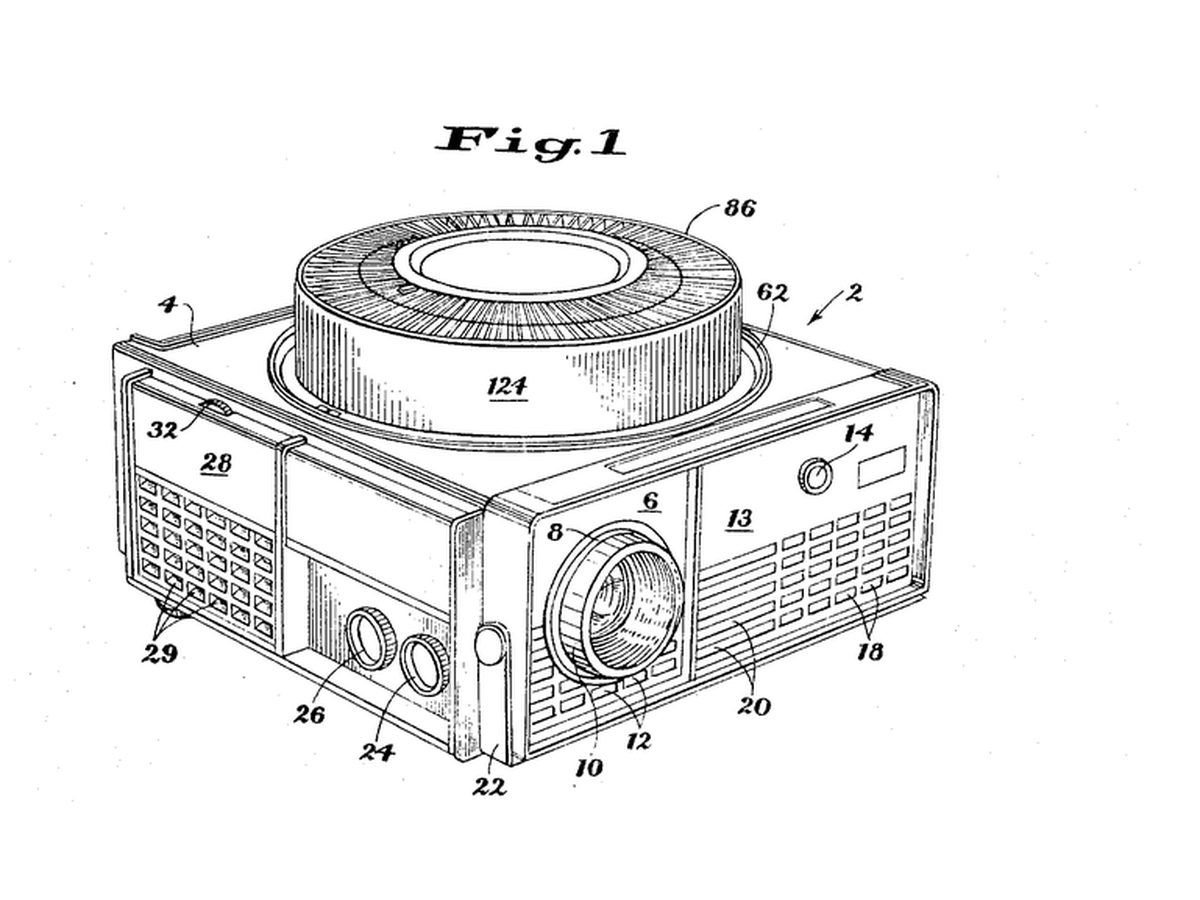


Rotary Gravity Slide Projector
Straight slide magazines pushed slides sideways and jammed. Kodak's round tray, designed by David E. Hansen, stood the slides on edge in a ring above the projector: each one fell into the gate by gravity when it reached the drop point and was lifted back when the tray moved on, so nothing had to push a slide sideways.
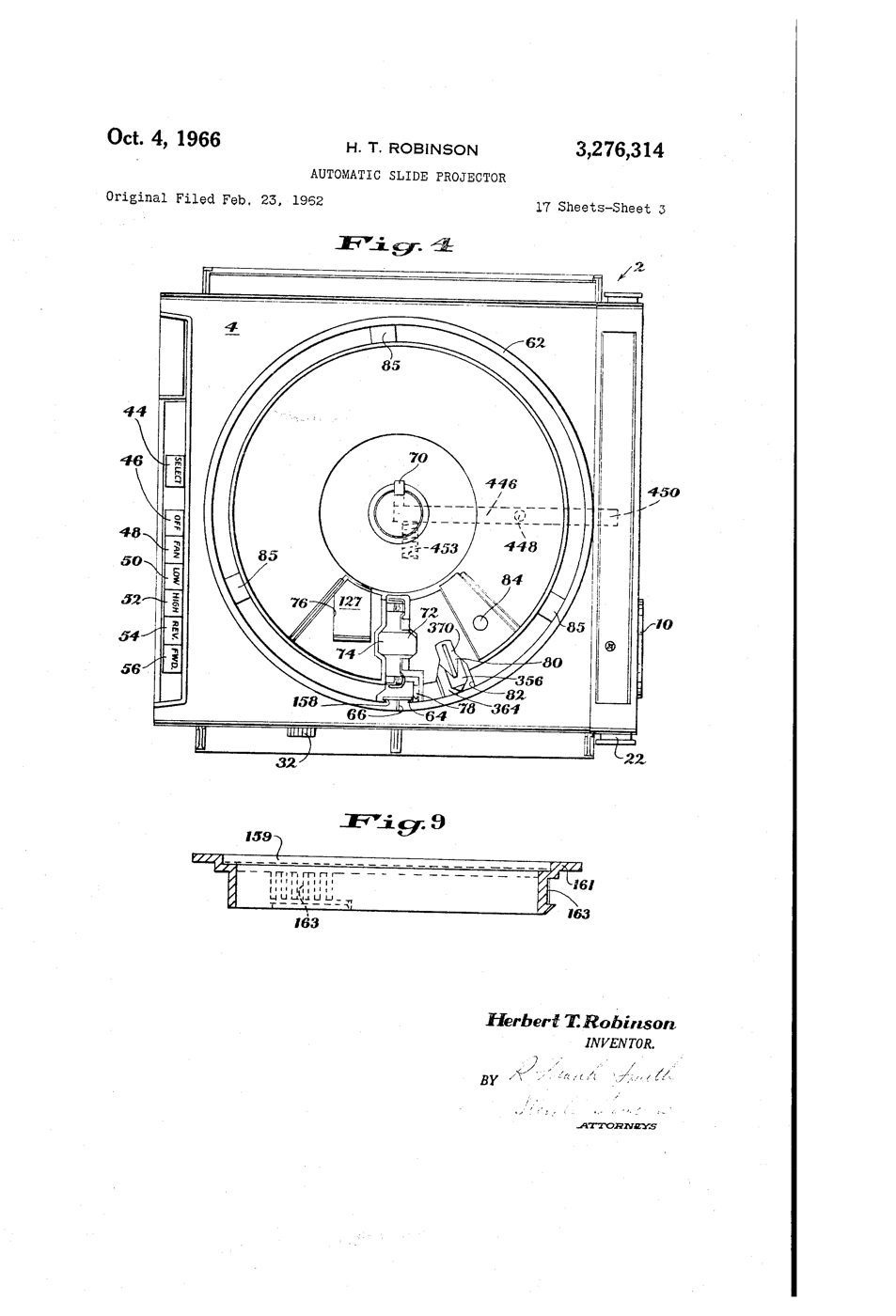
**US 3,276,314**, "Automatic slide projector", Herbert T. Robinson, assigned to Eastman Kodak, filed 1. June 1965 (continuing an application of 23. February 1962), granted 4. October 1966: a tray of two relatively movable portions with a passageway "through which the slides are adapted to pass substantially vertically, one at a time, in coordination with relative movement of the portions".
**You build the mechanism**: a 12-slot tray turned by a stepper, a servo that lifts each slide back, a torch and a lens to project it.
Lengra kominn
6 hours
Leiðbeiningar
1
1
Make twelve slides
Make twelve slides
Cut 50 x 50 mm frames from black card with a 36 x 24 mm window. Draw or print images on transparency film and tape one behind each window. Number them 0 to 11.
Efni fyrir þetta skref:
 Svartur karton2 plötur
 Glæra fyrir bleksprautuprentara2 plötur
Nauðsynleg verkfæri:
 Föndurhnífur
 Merkipenni
 Reglustika
2
2
Build the tray
Build the tray
Glue two 240 mm foam-board discs together. Cut 12 radial slots 4 mm wide and 55 mm long, 30 degrees apart, open underneath so a slide can fall through. Glue a hub on the motor shaft and the tray on the hub.
Efni fyrir þetta skref:
 Frauðplötur til líkanagerðar2 plötur
 Skrefmótor1 stykki
Nauðsynleg verkfæri:
Föndurhnífur Límbyssa
3
3
Base, gate and lift
Base, gate and lift
On a plywood base cut one drop slot under the tray. Below it, build a foam-board gate channel that holds a dropped slide upright between the torch and a 100 mm convex lens. Mount the servo so its arm, raised, pushes the slide back up into the tray.
Efni fyrir þetta skref:
 Krossviðarplata1 stykki
 SG90 örservómótor (5 stykki)1 pakki
 Safn safnlinsa1 sett
Nauðsynleg verkfæri:
 HandsögLímbyssa
 LED-skoðunarljós
4
4
Wire and flash
Wire and flash
EasyDriver STEP to D3, DIR to D4, motor coils to A and B, 12 V supply to its power input, GND shared with the Uno. Servo signal D9. Button between D2 and GND. Set the EasyDriver current adjuster low - the tray is light. Turn the tray by hand so slot 0 is over the gate before powering up.
rotary_slide_tray.inocpp
Efni fyrir þetta skref:
 Skrefmótordrifrás1 stykki
 Smárofi (stangarvirkur)1 stykki
 Dupont-tengivírasett (karl-kvenkyns)1 sett
Nauðsynleg verkfæri:
 Arduino Uno R3
 Jafnstraumsgjafi
 Tengibretti
 USB-B-snúra
5
5
Why the steps must not drift
Why the steps must not drift
Hleð Jupyter-vinnubók…
6
6
Show
Show
Load the slides upside down and reversed (a projector inverts the image). Darken the room, focus the lens on a wall, and press to advance. Count misfeeds over two full turns.
Nauðsynleg verkfæri:
 Málband
7
7
History & Context
History & Context
**What the patent specifies:** a projector for a tray of two relatively movable portions, slides passing substantially vertically through a passageway one at a time in step with the tray's movement. **Modern build (derived):** foam-board tray, stepper, servo lift and a torch.
Kodak made Carousel projectors from 1961 until 2004; a round tray held 80 slides. The limits: bent or thick mounts jam the gate, and the gravity drop needs the projector level.
Efni
10- 2 plöturStaðgengill
- 2 plöturStaðgengill
- 2 plöturStaðgengill
- frá$6.76
- 1 stykkiStaðgengill
- 1 pakkiStaðgengill
- 1 settStaðgengill
- frá$14.38
- 1 stykkiStaðgengill
- Staðgengill
Nauðsynleg verkfæri
11- Staðgengill
- Staðgengill
- Staðgengill
- Staðgengill
- Staðgengill
- Staðgengill
- Arduino Uno R310% þóknunMagento Legacy Storeships internationallyStaðgengill
- Staðgengill
- Tengibretti10% þóknunMagento Legacy Storeships internationallyStaðgengill
- USB-B-snúra10% þóknunMagento Legacy Storeships internationallyStaðgengill
Tengd Blueprint
Þessi blueprint deila þekkingu — tækni, efni eða meginreglur

CC0 opinbert ríki
Þessi teikning er gefin út undir CC0. Þér er frjálst að afrita, breyta, dreifa og nota þetta verk í hvaða tilgangi sem er, án þess að biðja um leyfi.
Studdu smiðinn með því að kaupa vörur í gegnum teikningu hans þar sem hann fær þóknun smiða sem seljendur ákvarða, eða búðu til nýja endurskoðun á þessari teikningu og tengdu hana sem tengingu í þinni eigin teikningu til að deila tekjum.