ARTE
BELLEZZA E BENESSERE
MESTIERE
CULTURA E STORIA
DIVERTIMENTO
AMBIENTE
CIBO E BEVANDE
INGEGNERIA INVERSA
SCIENZE
SPORT
TECNOLOGIA
INDOSSABILI
Tradotto
BLUEPRINT NFT


Lampeggiamento LED — Il Tuo Primo Progetto Arduino
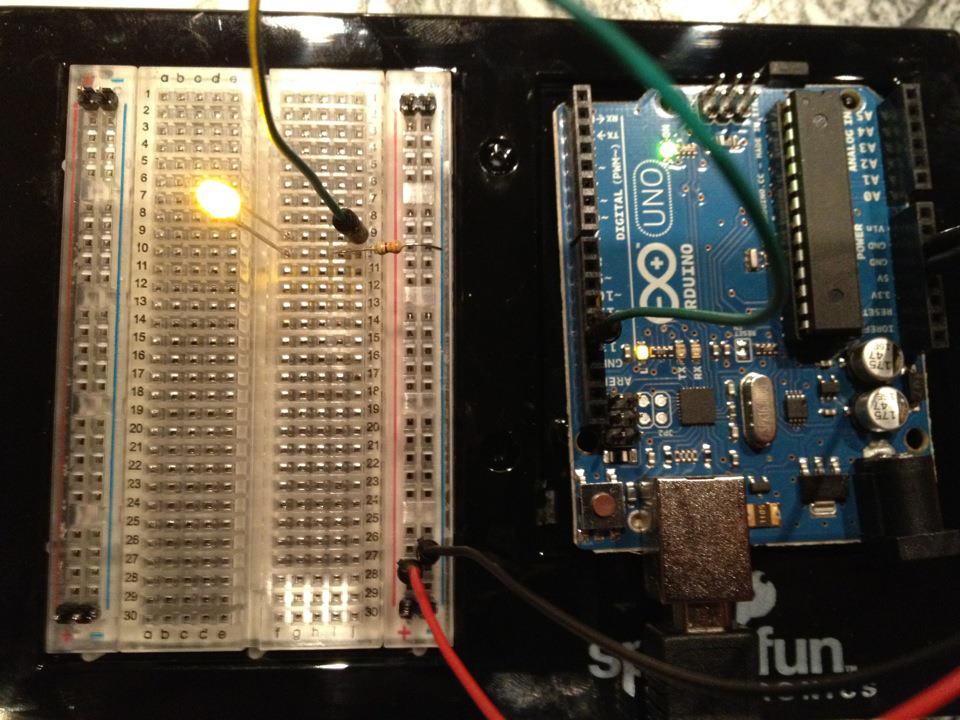
Il classico primo progetto di elettronica! Costruisci un circuito LED lampeggiante utilizzando un Arduino, una breadboard, un resistore e un singolo LED. Perfetto per principianti assoluti — nessuna saldatura richiesta.
Istruzioni
1
1
Raccogli i tuoi componenti
Raccogli i tuoi componenti
Raccogli tutti i componenti elencati di seguito. Non è necessario saldare — tutto si collega alla breadboard.
Materiali per questo passaggio:
 SparkFun Inventor's Kit - V3.21 kit
Strumenti necessari:
 Computer con l'IDE Arduino
2
2
Schema Circuitale
Schema Circuitale
Il segnale fluisce da Arduino Pin 13 → resistore 220Ω (R1) → LED (D1) → GND. Il resistore limita la corrente per proteggere LED.
Materiali per questo passaggio:
 Arduino Uno R31 pezzo
 LED da 5 mm1 pezzo
 Kit di resistenze da 1/4 W1 pezzo
3
3
Collegalo
Collegalo
- Inserisci il LED nella breadboard — gamba lunga (anodo +) in una riga, gamba corta (catodo −) nella riga successiva.
- Inserisci una gamba del resistore 220Ω nella stessa riga del catodo LED. L'altra gamba in una riga separata.
- Jumper wire dalla riga anodo LED → Arduino Pin 13.
- Jumper wire dalla riga libera del resistore → Arduino GND.
Materiali per questo passaggio:
LED da 5 mm1 pezzoKit di resistenze da 1/4 W1 pezzo Breadboard1 pezzo
 Cavetti ponticello2 pezzi
4
4
Caricare il Codice Blink
Caricare il Codice Blink
Collega Arduino tramite USB. Apri Arduino IDE, seleziona Tools → Board → Arduino Uno, incolla il codice e clicca su Upload.
blink.inoarduino
Materiali per questo passaggio:
Arduino Uno R31 pezzoStrumenti necessari:
Computer con l'IDE Arduino Cavo USB-B
5
5
PCB Layout (Riferimento)
PCB Layout (Riferimento)
Questo mostra il circuito come un layout PCB. Non necessario per questo progetto — la breadboard funziona perfettamente — ma mostra come lo stesso circuito apparirebbe se realizzato come una scheda reale.
6
6
Test e Esperimento
Test e Esperimento
LED lampeggia? Congratulazioni! Hai appena programmato hardware.
Risoluzione dei problemi:
Prossimi esperimenti:
Risoluzione dei problemi:
- LED non si accende? Capovolgi il LED — gamba lunga verso Pin 13.
- LED rimane acceso? Verifica che il codice sia stato caricato correttamente.
- Non succede nulla? Verifica che il cablaggio corrisponda allo schema nel Passaggio 2.
Prossimi esperimenti:
- Modifica i valori di
delay()per controllare la velocità di lampeggio - Aggiungi un secondo LED su Pin 12
- Sostituisci con un RGB LED (vedi SIK Circuito 3)
Materiali
6- SparkFun Inventor's Kit - V3.210% commissione1 kit€95.58
- Segnaposto
- Segnaposto
- 1 pezzoSegnaposto
- Segnaposto
- Segnaposto
Strumenti richiesti
3- Segnaposto
- 1 vendor sell this, none ship to you yetSegnaposto
- Optional, pre-made jumper wires do not need strippingSegnaposto
Totale stimato
Ciò che il maker ha acquistato. I materiali senza prezzo si trovano dove li compri tu.
CC0 Pubblico dominio
Questo progetto è rilasciato sotto CC0. Sei libero di copiare, modificare, distribuire e utilizzare quest'opera per qualsiasi scopo, senza chiedere permesso.
Supporta il Maker acquistando prodotti tramite il suo progetto dove guadagna una Commissione Maker stabilita dai venditori, oppure crea una nuova iterazione di questo progetto e includilo come collegamento nel tuo progetto per condividere i ricavi.