
ARTE
BELLEZZA E BENESSERE
MESTIERE
CULTURA E STORIA
DIVERTIMENTO
AMBIENTE
CIBO E BEVANDE
FUTURO VERDE
INGEGNERIA INVERSA
SCIENZE
SPORT
TECNOLOGIA
INDOSSABILI
Simon Says — SIK Circuit 16
Ed

Creato da

Ed

17. March 2026

Simon Says — SIK Circuit 16

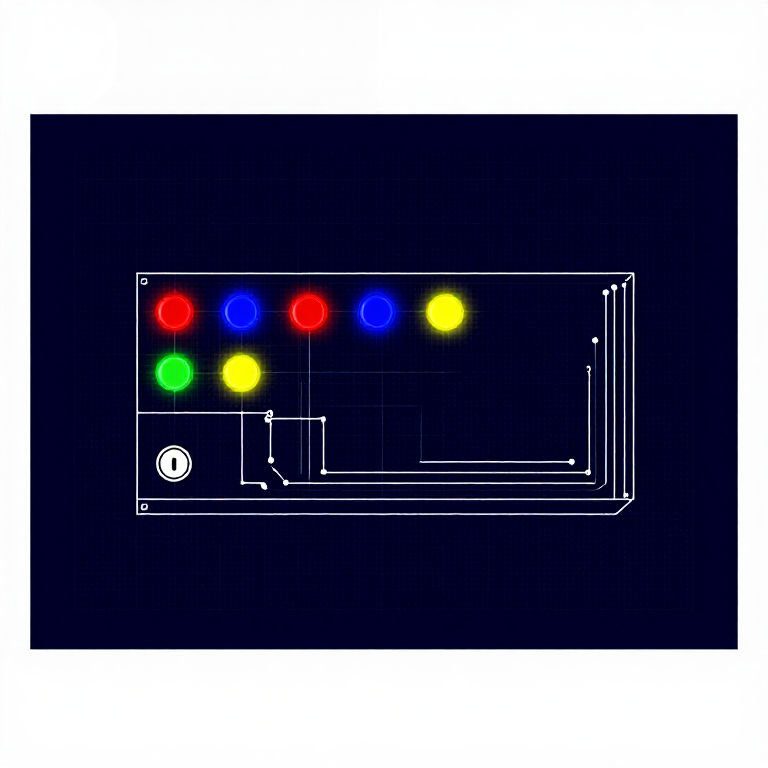
Build the classic Simon Says memory game! Four colored LEDs, four buttons, and a buzzer combine into a complete interactive game with memory mode, battle mode, and a secret easter egg.

Istruzioni

1

Parts & Introduction

The grand finale! Simon Says is a memory game where you repeat an ever-growing sequence of colored lights and sounds. This project combines LEDs, buttons, and a buzzer into a complete game with multiple modes. It's the most complex circuit in the SIK — a great capstone project.

Parts Needed

  • 1x Arduino Uno + USB cable
  • 1x Breadboard
  • 4x LEDs (red, green, blue, yellow if possible)
  • 4x Push Buttons
  • 1x Piezo Buzzer
  • 4x 330Ω Resistors
  • 17x Jumper Wires

Game Modes

  • Memory Mode (default) — Follow the growing pattern. Win after 13 rounds.
  • Battle Mode (hold green at startup) — Two-player mode, each player extends the sequence.
  • Easter Egg (hold yellow at startup) — Plays "Stayin' Alive" with flashing LEDs!
2

Hardware Hookup

Wiring Instructions

Pin Assignments
ComponentArduino Pin
Red LED10
Green LED3
Blue LED13
Yellow LED5
Red Button9
Green Button2
Blue Button12
Yellow Button6
Buzzer pin 14
Buzzer pin 27
  1. Each LED needs a 330Ω resistor between its negative leg and GND.
  2. Buttons use INPUT_PULLUP mode — connect one side to the pin, other side to GND. No external resistors needed.
  3. The buzzer uses two pins for push-pull drive (louder sound).
  4. Important: Make sure both GND rails on the breadboard are connected together!
3

Arduino Code

Open the Arduino IDE and upload the following sketch to your Arduino board.

simon_says.inoarduino
/*
SparkFun Inventor's Kit
Example sketch 16 — SIMON SAYS

Simon Says memory game. Press a button to start.
Repeat the LED sequence as it grows. Win after 13 rounds.

Hold GREEN at startup for Battle Mode (2 player).
Hold YELLOW at startup for a musical easter egg!

This code is completely free for any use.
*/

#define CHOICE_OFF    0
#define CHOICE_NONE   0
#define CHOICE_RED    (1 << 0)
#define CHOICE_GREEN  (1 << 1)
#define CHOICE_BLUE   (1 << 2)
#define CHOICE_YELLOW (1 << 3)

#define LED_RED     10
#define LED_GREEN   3
#define LED_BLUE    13
#define LED_YELLOW  5

#define BUTTON_RED    9
#define BUTTON_GREEN  2
#define BUTTON_BLUE   12
#define BUTTON_YELLOW 6

#define BUZZER1  4
#define BUZZER2  7

#define ROUNDS_TO_WIN      13
#define ENTRY_TIME_LIMIT   3000

#define MODE_MEMORY  0
#define MODE_BATTLE  1
#define MODE_BEEGEES 2

// Note frequencies
#define NOTE_G4 392
#define NOTE_A4 440
#define NOTE_C5 523

byte gameMode = MODE_MEMORY;
byte gameBoard[32];
byte gameRound = 0;

void setup()
{
  pinMode(BUTTON_RED, INPUT_PULLUP);
  pinMode(BUTTON_GREEN, INPUT_PULLUP);
  pinMode(BUTTON_BLUE, INPUT_PULLUP);
  pinMode(BUTTON_YELLOW, INPUT_PULLUP);

  pinMode(LED_RED, OUTPUT);
  pinMode(LED_GREEN, OUTPUT);
  pinMode(LED_BLUE, OUTPUT);
  pinMode(LED_YELLOW, OUTPUT);

  pinMode(BUZZER1, OUTPUT);
  pinMode(BUZZER2, OUTPUT);

  gameMode = MODE_MEMORY;

  if (checkButton() == CHOICE_YELLOW) play_beegees();
  if (checkButton() == CHOICE_GREEN)
  {
    gameMode = MODE_BATTLE;
    setLEDs(CHOICE_GREEN);
    toner(CHOICE_GREEN, 150);
    setLEDs(CHOICE_RED | CHOICE_BLUE | CHOICE_YELLOW);
    while(checkButton() != CHOICE_NONE) ;
  }

  play_winner();
}

void loop()
{
  attractMode();
  setLEDs(CHOICE_RED | CHOICE_GREEN | CHOICE_BLUE | CHOICE_YELLOW);
  delay(1000);
  setLEDs(CHOICE_OFF);
  delay(250);

  if (gameMode == MODE_MEMORY)
  {
    if (play_memory() == true)
      play_winner();
    else
      play_loser();
  }

  if (gameMode == MODE_BATTLE)
  {
    play_battle();
    play_loser();
  }
}

boolean play_memory(void)
{
  randomSeed(millis());
  gameRound = 0;

  while (gameRound < ROUNDS_TO_WIN)
  {
    add_to_moves();
    playMoves();

    for (byte currentMove = 0; currentMove < gameRound; currentMove++)
    {
      byte choice = wait_for_button();
      if (choice == 0) return false;
      if (choice != gameBoard[currentMove]) return false;
    }
    delay(1000);
  }
  return true;
}

boolean play_battle(void)
{
  gameRound = 0;
  while (1)
  {
    byte newButton = wait_for_button();
    gameBoard[gameRound++] = newButton;

    for (byte currentMove = 0; currentMove < gameRound; currentMove++)
    {
      byte choice = wait_for_button();
      if (choice == 0) return false;
      if (choice != gameBoard[currentMove]) return false;
    }
    delay(100);
  }
  return true;
}

void playMoves(void)
{
  for (byte currentMove = 0; currentMove < gameRound; currentMove++)
  {
    toner(gameBoard[currentMove], 150);
    delay(150);
  }
}

void add_to_moves(void)
{
  byte newButton = random(0, 4);
  if(newButton == 0) newButton = CHOICE_RED;
  else if(newButton == 1) newButton = CHOICE_GREEN;
  else if(newButton == 2) newButton = CHOICE_BLUE;
  else if(newButton == 3) newButton = CHOICE_YELLOW;
  gameBoard[gameRound++] = newButton;
}

void setLEDs(byte leds)
{
  digitalWrite(LED_RED, (leds & CHOICE_RED) ? HIGH : LOW);
  digitalWrite(LED_GREEN, (leds & CHOICE_GREEN) ? HIGH : LOW);
  digitalWrite(LED_BLUE, (leds & CHOICE_BLUE) ? HIGH : LOW);
  digitalWrite(LED_YELLOW, (leds & CHOICE_YELLOW) ? HIGH : LOW);
}

byte wait_for_button(void)
{
  long startTime = millis();
  while ((millis() - startTime) < ENTRY_TIME_LIMIT)
  {
    byte button = checkButton();
    if (button != CHOICE_NONE)
    {
      toner(button, 150);
      while(checkButton() != CHOICE_NONE) ;
      delay(10);
      return button;
    }
  }
  return CHOICE_NONE;
}

byte checkButton(void)
{
  if (digitalRead(BUTTON_RED) == 0) return CHOICE_RED;
  else if (digitalRead(BUTTON_GREEN) == 0) return CHOICE_GREEN;
  else if (digitalRead(BUTTON_BLUE) == 0) return CHOICE_BLUE;
  else if (digitalRead(BUTTON_YELLOW) == 0) return CHOICE_YELLOW;
  return CHOICE_NONE;
}

void toner(byte which, int buzz_length_ms)
{
  setLEDs(which);
  switch(which)
  {
    case CHOICE_RED:    buzz_sound(buzz_length_ms, 1136); break;
    case CHOICE_GREEN:  buzz_sound(buzz_length_ms, 568);  break;
    case CHOICE_BLUE:   buzz_sound(buzz_length_ms, 851);  break;
    case CHOICE_YELLOW: buzz_sound(buzz_length_ms, 638);  break;
  }
  setLEDs(CHOICE_OFF);
}

void buzz_sound(int buzz_length_ms, int buzz_delay_us)
{
  long buzz_length_us = buzz_length_ms * (long)1000;
  while (buzz_length_us > (buzz_delay_us * 2))
  {
    buzz_length_us -= buzz_delay_us * 2;
    digitalWrite(BUZZER1, LOW);
    digitalWrite(BUZZER2, HIGH);
    delayMicroseconds(buzz_delay_us);
    digitalWrite(BUZZER1, HIGH);
    digitalWrite(BUZZER2, LOW);
    delayMicroseconds(buzz_delay_us);
  }
}

void play_winner(void)
{
  setLEDs(CHOICE_GREEN | CHOICE_BLUE);
  winner_sound();
  setLEDs(CHOICE_RED | CHOICE_YELLOW);
  winner_sound();
  setLEDs(CHOICE_GREEN | CHOICE_BLUE);
  winner_sound();
  setLEDs(CHOICE_RED | CHOICE_YELLOW);
  winner_sound();
}

void winner_sound(void)
{
  for (byte x = 250; x > 70; x--)
  {
    for (byte y = 0; y < 3; y++)
    {
      digitalWrite(BUZZER2, HIGH);
      digitalWrite(BUZZER1, LOW);
      delayMicroseconds(x);
      digitalWrite(BUZZER2, LOW);
      digitalWrite(BUZZER1, HIGH);
      delayMicroseconds(x);
    }
  }
}

void play_loser(void)
{
  setLEDs(CHOICE_RED | CHOICE_GREEN);
  buzz_sound(255, 1500);
  setLEDs(CHOICE_BLUE | CHOICE_YELLOW);
  buzz_sound(255, 1500);
  setLEDs(CHOICE_RED | CHOICE_GREEN);
  buzz_sound(255, 1500);
  setLEDs(CHOICE_BLUE | CHOICE_YELLOW);
  buzz_sound(255, 1500);
}

void attractMode(void)
{
  while(1)
  {
    setLEDs(CHOICE_RED);
    delay(100);
    if (checkButton() != CHOICE_NONE) return;
    setLEDs(CHOICE_BLUE);
    delay(100);
    if (checkButton() != CHOICE_NONE) return;
    setLEDs(CHOICE_GREEN);
    delay(100);
    if (checkButton() != CHOICE_NONE) return;
    setLEDs(CHOICE_YELLOW);
    delay(100);
    if (checkButton() != CHOICE_NONE) return;
  }
}

int melody[] = {
  NOTE_G4, NOTE_A4, 0, NOTE_C5, 0, 0, NOTE_G4, 0, 0, 0,
  0, 0, NOTE_G4, 0, NOTE_G4, NOTE_G4, 0,
  NOTE_G4, 0, 0, NOTE_G4, 0, 0,
  NOTE_G4, 0, 0, 0, NOTE_G4, 0, NOTE_A4, 0, NOTE_C5, 0};

int noteDuration = 115;
int LEDnumber = 0;

void play_beegees()
{
  setLEDs(CHOICE_YELLOW);
  toner(CHOICE_YELLOW, 150);
  setLEDs(CHOICE_RED | CHOICE_GREEN | CHOICE_BLUE);
  while(checkButton() != CHOICE_NONE) ;
  setLEDs(CHOICE_NONE);
  delay(1000);
  digitalWrite(BUZZER1, LOW);

  while(checkButton() == CHOICE_NONE)
  {
    for (int thisNote = 0; thisNote < 32; thisNote++) {
      changeLED();
      tone(BUZZER2, melody[thisNote], noteDuration);
      int pauseBetweenNotes = noteDuration * 1.30;
      delay(pauseBetweenNotes);
      noTone(BUZZER2);
    }
  }
}

void changeLED(void)
{
  setLEDs(1 << LEDnumber);
  LEDnumber++;
  if(LEDnumber > 3) LEDnumber = 0;
}
4

Test & Experiment

What You Should See

The game starts with a victory sound, then LEDs cycle in an "attract mode" pattern. Press any button to start playing:

  1. A random LED lights up with a tone — press the matching button.
  2. The sequence grows by one each round.
  3. Win after 13 correct rounds! Lose if you press wrong or take too long (3 seconds).

Troubleshooting

  • Only half the circuit works: Make sure both GND rails on the breadboard are connected together!
  • No sound: Check that both buzzer pins are in the correct rows.
  • Buttons not responding: Pay close attention to which pin connects to each button. The INPUT_PULLUP mode means buttons read LOW when pressed.

Experiments to Try

  • Hold the green button during power-up for Battle Mode (2 players).
  • Hold the yellow button during power-up for the Bee Gees easter egg!
  • Modify ROUNDS_TO_WIN to make the game easier or harder.
  • Change ENTRY_TIME_LIMIT to give more or less time per button press.

Materiali

  • SparkFun Inventor's Kit - V3.2 - 1 kitNOK 999.20
    Visualizza
  • Arduino Uno R3 - 1 pieceSegnaposto
    Visualizza
  • Breadboard - 1 pieceSegnaposto
    Visualizza
  • 5mm LED - 4 piecessSegnaposto
    Visualizza
  • Push Button - 4 piecessNOK 11.20
    Visualizza
  • Piezo Buzzer - 1 piece
  • 330 Ohm Resistor - 4 piecessNOK 24.00
    Visualizza
  • Jumper Wires - 17 piecessNOK 39.20
    Visualizza

Strumenti richiesti

  • Computer with Arduino IDE

CC0 Pubblico dominio

Questo progetto è rilasciato sotto CC0. Sei libero di copiare, modificare, distribuire e utilizzare quest'opera per qualsiasi scopo, senza chiedere permesso.

Supporta il Maker acquistando prodotti tramite il suo progetto dove guadagna una Commissione Maker stabilita dai venditori, oppure crea una nuova iterazione di questo progetto e includilo come collegamento nel tuo progetto per condividere i ricavi.

Discussione

(0)

Accedi per partecipare alla discussione

Caricamento commenti...