예술
뷰티 및 웰니스
공예
문화 및 역사
엔터테인먼트
환경
음식 및 음료
역공학
과학
스포츠
기술
웨어러블
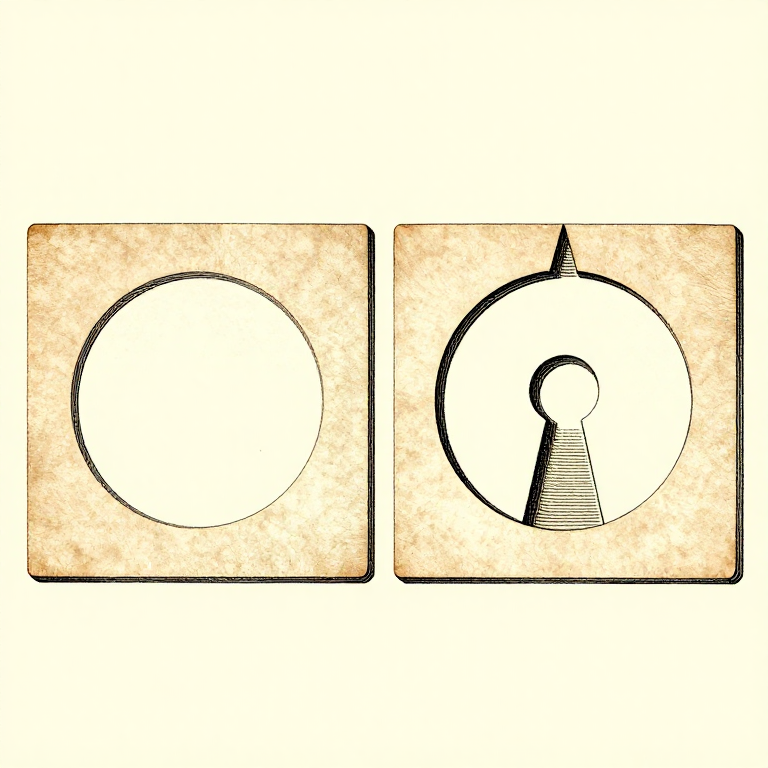


Designing For the Process: A Printable Part Is a Different Shape
A model drawn without thinking about printing can usually be printed. A model drawn WITH the process in mind prints faster, stronger, with no supports and a better surface — from the same amount of design effort.
Every rung before this one is a constraint: layers are weak in one direction, overhangs have a limit, holes come out small, corners warp, walls carry the load. Design is where those stop being problems to work around and become the rules the shape is drawn to.
That is the same move as designing a casting with draft angles, or a timber frame with wood movement allowed for. The process has a grain, and a good design runs with it.
고급
4 hours
안내
1
1
Chamfer the bottom, fillet the rest
Chamfer the bottom, fillet the rest
A 45-degree CHAMFER on the bottom edge of a part is self-supporting, removes the elephant-foot bulge, and makes the part easier to insert into anything. It is close to free and almost always an improvement.
Fillets elsewhere reduce stress concentration and warping, exactly as a radiused corner does on any other part. Internal corners especially: a sharp internal corner is where a printed part cracks.
But do NOT fillet the bottom edge — a bottom fillet is an overhang that starts at 90 degrees, which is the one angle nothing can print. Chamfer at the bottom, fillet above it, and that single rule removes a lot of support material.
이 단계의 재료:
 3D 프린팅 필라멘트(PLA)1 개
필요한 도구:
 데스크톱 컴퓨터
 3MF 파일 슬라이서 소프트웨어
 거스러미 제거 공구
2
2
Turn overhangs into bridges and teardrops
Turn overhangs into bridges and teardrops
A horizontal hole printed round has an unsupported arch at the top that sags. Printed as a TEARDROP — a circle with a 45-degree point on top — it is entirely self-supporting and needs no support at all.
A hexagonal hole does the same job and takes a nut. So does simply making the top of the hole a flat bridge rather than a curve, which prints well for the reasons the overhang rung gives.
The general form: wherever the model has a surface between 45 and 90 degrees, ask whether it can become a chamfer, a bridge, or a shape with a point on top. Nearly always it can, and nearly always the result is better than supporting it.
이 단계의 재료:
3D 프린팅 필라멘트(PLA)1 개필요한 도구:
데스크톱 컴퓨터3MF 파일 슬라이서 소프트웨어 디지털 캘리퍼스 6인치
3
3
Split the part where splitting helps
Split the part where splitting helps
A part that needs supports, or warps, or is too tall to be stable, can often be cut into two pieces that each print flat and are then glued or bolted.
Put the split where a joint is natural — at a change of section, behind a flange — and add a locating feature, a peg and socket or a dovetail, so the two halves cannot be assembled wrong. Design the clearance into one side only, as the tolerance rung sets out.
Splitting also lets each half be oriented for its own load path, which the orientation rung says is the highest-leverage decision available. A part split into two well-oriented halves can be stronger than the same part printed whole.
이 단계의 재료:
3D 프린팅 필라멘트(PLA)1 개필요한 도구:
데스크톱 컴퓨터3MF 파일 슬라이서 소프트웨어디지털 캘리퍼스 6인치거스러미 제거 공구4
4
Use real hardware where it belongs
Use real hardware where it belongs
Printed threads are weak, printed bearings wear, and printed springs creep. Heat-set brass inserts, steel pins, real bearings and real fasteners cost very little and remove the weakest parts of a printed assembly.
Design the pocket for them from the start: a straight bore for an insert, a captive hex pocket for a nut, a shoulder for a bearing to seat against. A pocket designed in prints perfectly; one drilled afterwards splits the part along a layer.
Which is the whole argument of this batch. The printer is one process among several, it has specific strengths and specific limits, and the best results come from using it for what it is good at and something else for the rest.
이 단계의 재료:
3D 프린팅 필라멘트(PLA)1 개 카본 PETG 필라멘트1 개
필요한 도구:
데스크톱 컴퓨터디지털 캘리퍼스 6인치 3D 프린터 공구 세트
관련 블루프린트
이 블루프린트들은 지식을 공유합니다 — 기술, 재료 또는 원리
CC0 퍼블릭 도메인
이 블루프린트는 CC0로 공개되었습니다. 어떤 목적으로든 자유롭게 복사, 수정, 배포 및 사용할 수 있습니다.
제품 구매를 통해 메이커를 지원하세요. 판매자가 설정한 메이커 커미션 을 받거나, 이 블루프린트의 새로운 반복을 만들어 연결로 포함시킬 수 있습니다.