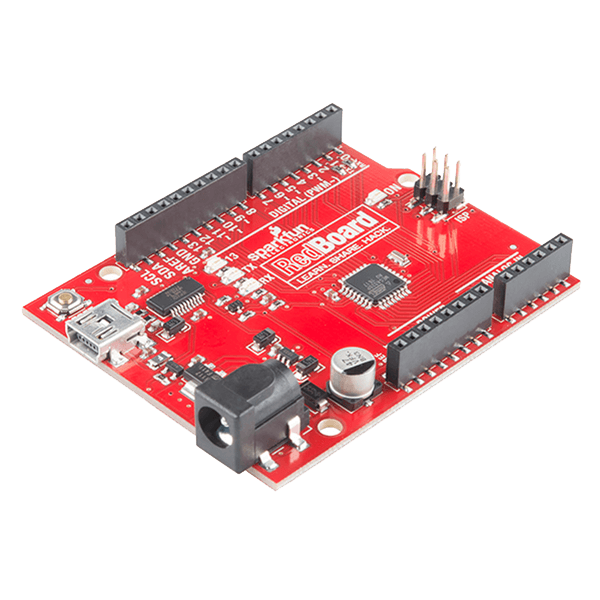
SparkFun RedBoard - Programmed with Arduino
The SparkFun RedBoard combines the simplicity of the UNO’s Optiboot bootloader (which is used in the Pro series), the stability of the FTDI (which we all missed after the Duemilanove was discontinued) and the R3 shield compatibility of the latest Arduino UNO R3.
The RedBoard can be programmed over a USB Mini-B cable using the Arduino IDE: Just plug in the board, select ”Arduino UNO“ from the board menu and you’re ready to upload code.
RedBoard has all of the hardware peripherals you know and love: 14 Digital I/O pins with 6 PWM pins, 6 Analog Inputs, UART, SPI and external interrupts.
We’ve also broken out the SDA, SCL and IOREF pins that showed up on the UNO R3, so the RedBoard will be compatible with future shields. This version adds an SMD ISP header for use with shields.
You can power the RedBoard over USB or through the barrel jack. The on-board power regulator can handle anything from 7 to 15VDC
Features:
- ATmega328 microcontroller with Optiboot (UNO) Bootloader
- USB Programming Facilitated by the Ubiquitous FTDI FT231X
- Input voltage - 7-15V
- 0-5V outputs with 3.3V compatible inputs
- 14 Digital I/O Pins (6 PWM outputs)
- 6 Analog Inputs
- ISP Header
- 32k Flash Memory
- 16MHz Clock Speed
- All SMD Construction
- R3 Shield Compatible
- Red PCB!
Documents:
- Schematic
- Eagle Files
- FTDI Drivers
- How to Install FTDI Drivers
- Arduino IDE Download
- Product Video
- Hookup Guide
- Graphical Datasheet
- GitHub (Design Files)
블루프린트 창작자는 고객이 블루프린트를 통해 구매할 때 이 비율을 받습니다