فنون
الجمال والعناية
حِرَف
الثقافة والتاريخ
ترفيه
البيئة
الطعام والمشروبات
المستقبل الأخضر
الهندسة العكسية
العلوم
رياضة
التقنية
الأجهزة القابلة للارتداء
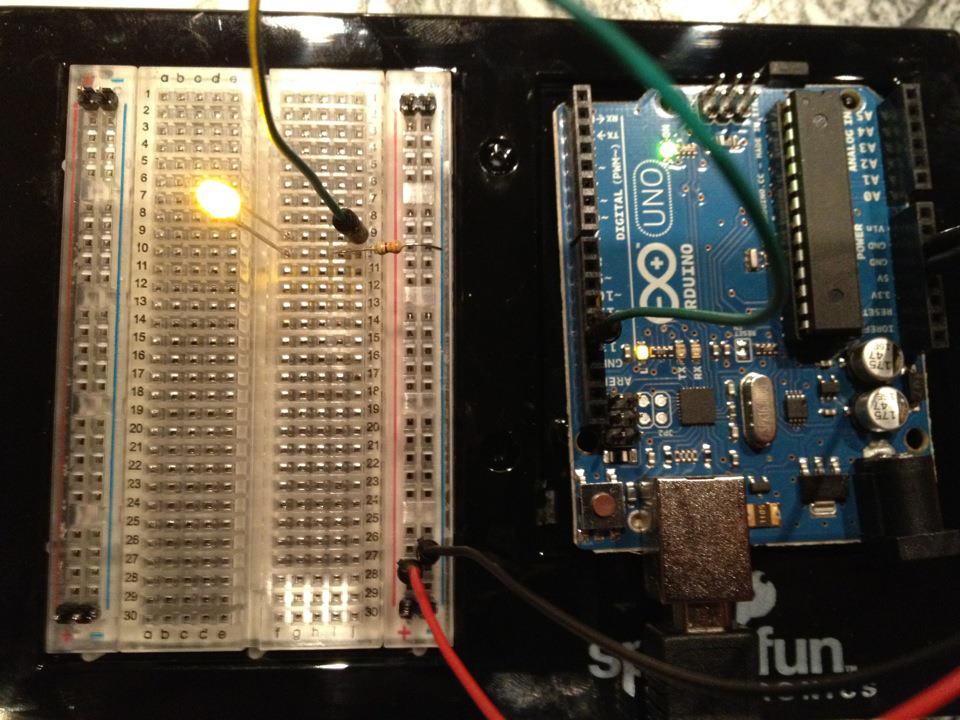


Blinking LED — Your First Arduino Project
The classic first electronics project! Build a blinking LED circuit using an Arduino, a breadboard, a resistor, and a single LED. Perfect for absolute beginners — no soldering required.
التعليمات
1
1
Gather Your Components
Gather Your Components
Collect all components listed below. No soldering needed — everything plugs into the breadboard.
المواد لهذه الخطوة:
 SparkFun Inventor's Kit - V3.21 طقم
 Arduino Uno R31 قطعة
 5mm LED (any color)1 قطعة
 220 ohm Resistor (1/4W)1 قطعة
 Breadboard1 قطعة
 Jumper Wires (Male-to-Male)2 قطع
 USB-B Cable1 قطعة
الأدوات المطلوبة:
Computer with Arduino IDE
2
2
Circuit Schematic
Circuit Schematic
Signal flows from Arduino Pin 13 → 220Ω resistor (R1) → LED (D1) → GND. The resistor limits current to protect the LED.
المواد لهذه الخطوة:
Arduino Uno R31 قطعة5mm LED (any color)1 قطعة220 ohm Resistor (1/4W)1 قطعة3
3
Wire It Up
Wire It Up
- Insert the LED into the breadboard — long leg (anode +) in one row, short leg (cathode −) in the next.
- Insert one leg of the 220Ω resistor into the same row as the LED cathode. Other leg in a separate row.
- Jumper wire from LED anode row → Arduino Pin 13.
- Jumper wire from resistor free row → Arduino GND.
المواد لهذه الخطوة:
5mm LED (any color)1 قطعة220 ohm Resistor (1/4W)1 قطعةBreadboard1 قطعةJumper Wires (Male-to-Male)2 قطع4
4
Upload the Blink Code
Upload the Blink Code
Connect Arduino via USB. Open Arduino IDE, select Tools → Board → Arduino Uno, paste the code, and click Upload.
blink.inoarduino
// Blinking LED — Your First Arduino Project
// Turns an LED on for one second, then off for one second, repeatedly.

const int LED_PIN = 13;  // Pin connected to the LED

void setup() {
  pinMode(LED_PIN, OUTPUT);  // Set pin 13 as an output
}

void loop() {
  digitalWrite(LED_PIN, HIGH);  // Turn LED ON
  delay(1000);                  // Wait 1 second

  digitalWrite(LED_PIN, LOW);   // Turn LED OFF
  delay(1000);                  // Wait 1 second
}

// EXPERIMENT IDEAS:
// - Change delay(1000) to delay(100) for fast blinking
// - Change delay(1000) to delay(2000) for slow blinking
// - Try delay(50) for a strobe effect
// - Use different values for ON and OFF times:
//   delay(200) ON, delay(800) OFF = short flash
//   delay(800) ON, delay(200) OFF = long flash
المواد لهذه الخطوة:
Arduino Uno R31 قطعةUSB-B Cable1 قطعةالأدوات المطلوبة:
Computer with Arduino IDE
5
5
PCB Layout (Reference)
PCB Layout (Reference)
This shows the circuit as a PCB layout. Not needed for this project — the breadboard works perfectly — but shows how the same circuit would look if manufactured as a real board.
6
6
Test and Experiment
Test and Experiment
LED blinks? Congratulations! You just programmed hardware.
Troubleshooting:
Next experiments:
Troubleshooting:
- LED does not light up? Flip the LED — long leg toward Pin 13.
- LED stays on? Check code uploaded successfully.
- Nothing happens? Verify wiring matches the schematic in Step 2.
Next experiments:
- Change
delay()values to control blink speed - Add a second LED on Pin 12
- Replace with an RGB LED (see SIK Circuit 3)
المواد
7- $105.00
- 1 قطعةعنصر نائب
- عنصر نائب
- عنصر نائب
- 1 قطعةعنصر نائب
- عنصر نائب
الأدوات المطلوبة
2- Computer with Arduino IDE
- عنصر نائب
التكلفة الإجمالية المقدرة
$105.00CC0 ملكية عامة
هذا المخطط مُصدر بموجب CC0. يحق لك نسخه وتعديله وتوزيعه واستخدامه لأي غرض، دون طلب إذن.
ادعم الصانع بشراء منتجات عبر مخططه حيث يكسب عمولة الصانع يحددها البائعون، أو أنشئ نسخة جديدة من هذا المخطط وضمّنه كرابط في مخططك لمشاركة الإيرادات.