කලාව
රූපලාවණ්ය සහ සුවතාව
ශිල්පය
සංස්කෘතිය සහ ඉතිහාසය
විනෝදාස්වාදය
පරිසරය
ආහාර සහ පාන
ප්රතිලෝම ඉංජිනේරු
විද්යාවන්
ක්රීඩා
තාක්ෂණය
පැළඳිය හැකි
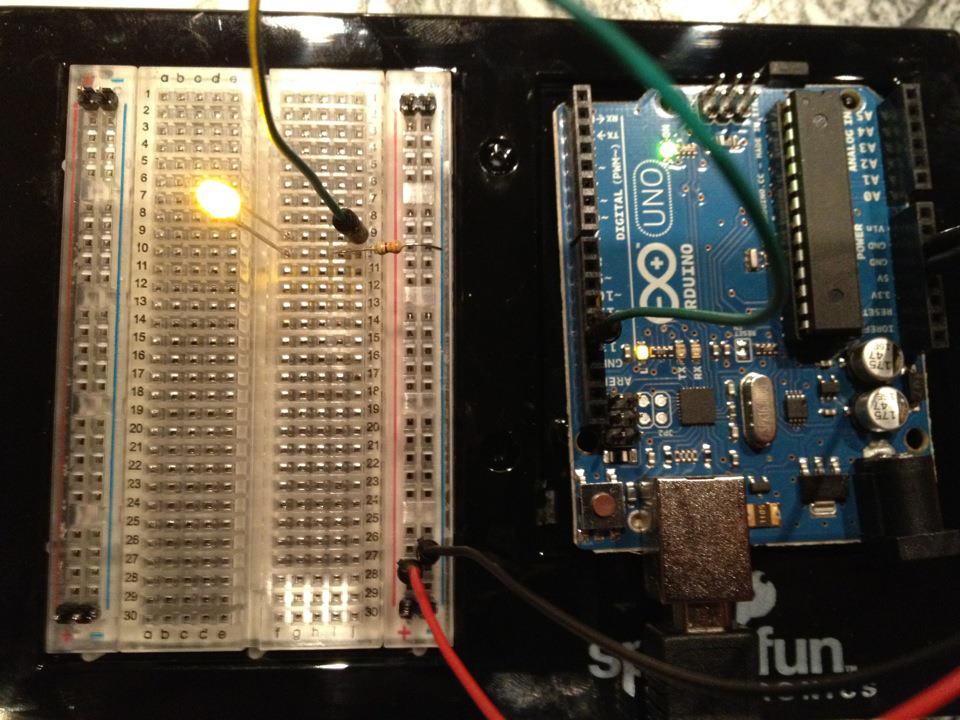
පරිවර්තනය කර ඇත
BLUEPRINT NFT


Blinking LED — ඔබේ පළමු Arduino Project
සම්භාව්ය පළමු ඉලෙක්ට්රොනික් ව්යාපෘතිය! Arduino, breadboard, resistor එකක් සහ LED එකක් භාවිතා කර ඔප්පු LED පරිපථයක් සාදන්න. සම්පූර්ණ ආරම්භකයින්ට පරිපූර්ණයි — සෝල්ඩරින් අවශ්ය නැත.
උපදෙස්
1
1
ඔබේ සංරචක එකතු කරන්න
ඔබේ සංරචක එකතු කරන්න
පහත ලේඛනගත සියලුම සංරචක එකතු කරන්න. කිසිදු焊接 අවශ්ය නොවේ — සෑම දෙයක්ම බ්රෙඩ්බෝඩ්එ එකතු වේ.
මෙම පියවර සඳහා ද්රව්ය:
 SparkFun Inventor's Kit - V3.21 කට්ටලය
අවශ්ය මෙවලම්:
 Arduino IDE සහිත පරිගණකය
2
2
පරිපථ योजनाबद्ध
පරිපථ योजनाबद्ध
සිංහල මගින් අර්ඩුයිනෝ පින් 13 → 220Ω 저항 (R1) → LED (D1) → GND. 저항은 LEDను रक्षा करने के लिए करंट को सीमित करता है।
මෙම පියවර සඳහා ද්රව්ය:
 Arduino Uno R31 කැබැල්ල
 මිලිමීටර් 5 LED1 කැබැල්ල
 1/4W ප්රතිරෝධක කට්ටලය1 කැබැල්ල
3
3
එය නැවත සම්බන්ධ කරන්න
එය නැවත සම්බන්ධ කරන්න
- LED බ්රෙඩ්බෝර්ඩ් එකට ඇතුල් කරන්න — දිගු පාද (anode +) එක පෙළකින්, කෙටි පාද (cathode −) ඊට පස්සේ පෙළකින්.
- 220Ω 저항 එর එක පාදය LED cathode ට සමාන පෙළට ඇතුල් කරන්න. අනෙක් පාදය වෙනස් පෙළකට.
- Jumper wire LED anode පෙළից → Arduino Pin 13 වෙත.
- Jumper wire 저항 නිදහස් පෙළ → Arduino GND වෙත.
මෙම පියවර සඳහා ද්රව්ය:
මිලිමීටර් 5 LED1 කැබැල්ල1/4W ප්රතිරෝධක කට්ටලය1 කැබැල්ල බ්රෙඩ්බෝඩ්1 කැබැල්ල
 සම්බන්ධක කම්බි2 කැබලි
4
4
Blink කේතය උඩුගත කරන්න
Blink කේතය උඩුගත කරන්න
USB හරහා Arduino සම්බන්ධ කරන්න. Arduino IDE විවෘත කර, Tools → Board → Arduino Uno තෝරා, කේතය ඇලවීම කර Upload ක්ලික් කරන්න.
blink.inoarduino
මෙම පියවර සඳහා ද්රව්ය:
Arduino Uno R31 කැබැල්ලඅවශ්ය මෙවලම්:
Arduino IDE සහිත පරිගණකය USB-B කේබලය
5
5
PCB සැරසිලි (යොමුව)
PCB සැරසිලි (යොමුව)
මෙය PCB සැරසිලි ලෙස පරිපථ පෙන්වයි. මෙම ව්යාපෘතිය සඳහා අවශ්ය නොවේ — ඉතිරිවලුන් පරිපථ පරිපූර්ණයි — නමුත් සැබෑ තලක ලෙස නිෂ්පාදනය කළ නම් එම පරිපථ කෙබඳු ලෙස දිස්වනු ඇතිදැයි පෙන්වයි.
6
6
පරීක්ෂණ සහ පර්යේෂණ
පරීක්ෂණ සහ පර්යේෂණ
LED දැල්වෙනවාද? පිළිවෙතින්! ඔබ දැන් දෘඩ උපකරණ ක්රමලේඛනය කර ඇත.
ගැටළු විසඳීම:
ඉදිරි පර්යේෂණ:
ගැටළු විසඳීම:
- LED ආලෝකිත නොවනවාද? LED පෙරලන්න — දිගු දෙපැත්ත Pin 13 දෙසට.
- LED සක්රිය ව ඉන්නවාද? කේතය සফලව උඩුගත වී ඇතිදැයි පරීක්ෂා කරන්න.
- කිසිවක් සිදු නොවේද? තාරයම් 2 පියවරේ ස්කිමාටිකයට ගැලපෙන්නේදැයි තහවුරු කරන්න.
ඉදිරි පර්යේෂණ:
delay()අගයන් වෙනස් කර දැල්වීමේ වේගය පාලනය කරන්න- Pin 12 හි දෙවන LED එක් කරන්න
- RGB LED සමඟ ප්රතිස්ථාපනය කරන්න (SIK Circuit 3 බලන්න)
ද්රව්ය
6- SparkFun Inventor's Kit - V3.210% කොමිස්1 කට්ටලය$106.94
- ස්ථානගත
- ස්ථානගත
- 1 කැබැල්ලස්ථානගත
- ස්ථානගත
- ස්ථානගත
අවශ්ය මෙවලම්
3- ස්ථානගත
- 1 vendor sell this, none ship to you yetස්ථානගත
- Optional, pre-made jumper wires do not need strippingස්ථානගත
ඇස්තමේන්තුගත එකතුව
නිර්මාණකරු මිලදී ගත් දේ. මිලක් නොමැතිව පෙන්වන ද්රව්ය ඔබ මිලදී ගන්නා තැනින් ලැබේ.
CC0 පොදු වසම
මෙම බ්ලූප්රින්ට් CC0 යටතේ නිකුත් කර ඇත. ඔබට අවසර නොමැතිව පිටපත් කිරීම, වෙනස් කිරීම, බෙදා හැරීම සහ භාවිතා කිරීම කළ හැක.
බ්ලූප්රින්ට් හරහා නිෂ්පාදන මිලදී ගැනීමෙන් නිර්මාතෘට සහාය වන්න නිර්මාතෘ කොමිසම විකුණුම්කරුවන් විසින් නියම කළ, හෝ මෙම බ්ලූප්රින්ට්හි නව අනුවාදයක් සාදා ආදායම බෙදා ගැනීමට ඔබේ බ්ලූප්රින්ට්හි සම්බන්ධතාවයක් ලෙස ඇතුළත් කරන්න.