ပူးပေါင်းဆောင်ရွက်ခြင်း
အနုပညာ
အလှအပနှင့် ကျန်းမာရေး
လက်မှုအနုပညာ
ယဉ်ကျေးမှုနှင့် သမိုင်း
ဖျော်ဖြေရေး
ပတ်ဝန်းကျင်
အစားအစာနှင့် အချိုရည်
ပြောင်းပြန်အင်ဂျင်နီယာပညာ
သိပ္ပံပညာများ
အားကစား
နည်းပညာ
ဝတ်ဆင်နိုင်သောပစ္စည်းများ
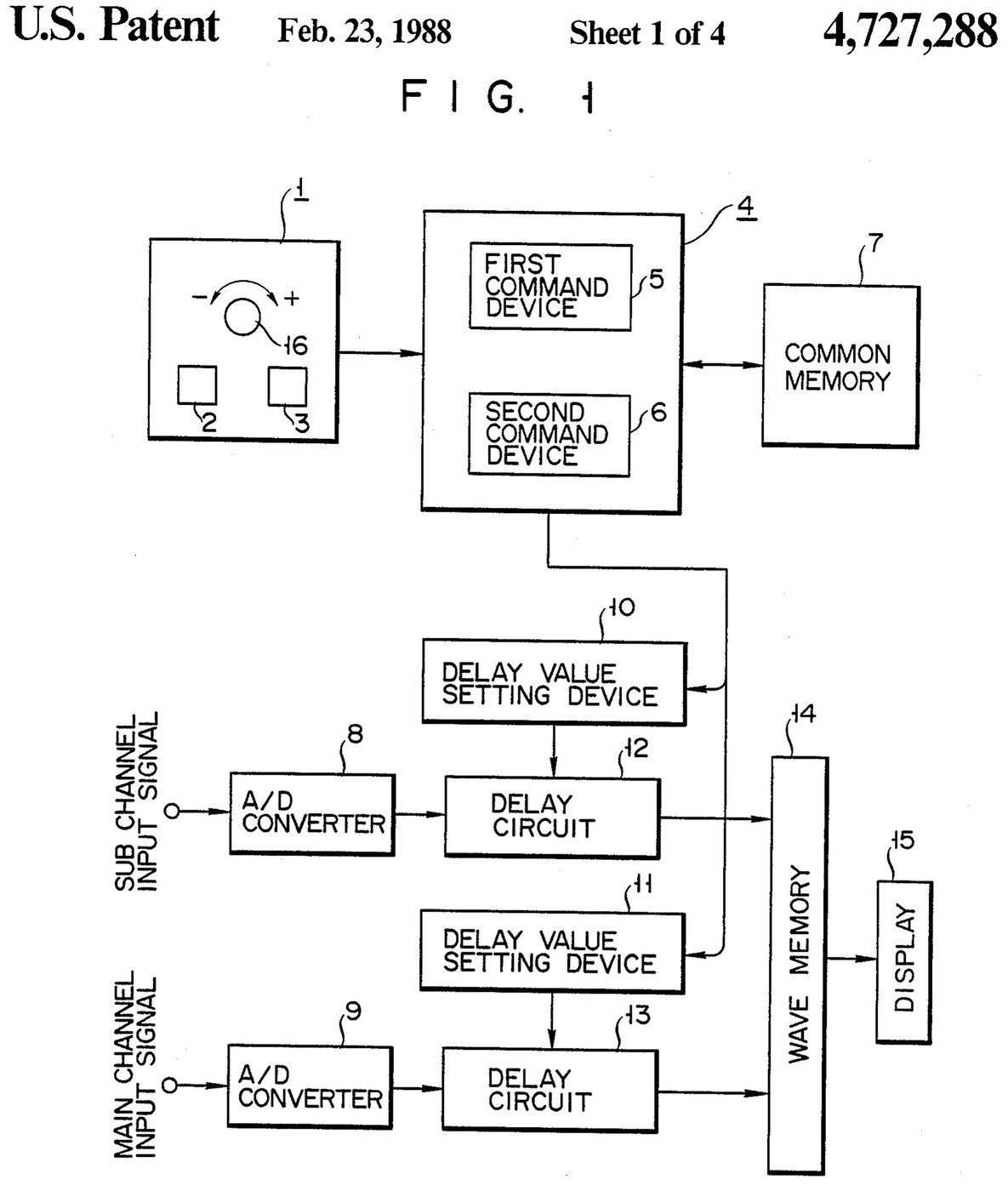

Oscilloscope: Two-Channel Digital, with a Delay per Channel and a Common Delay (Anritsu, US 4,727,288, 1988)
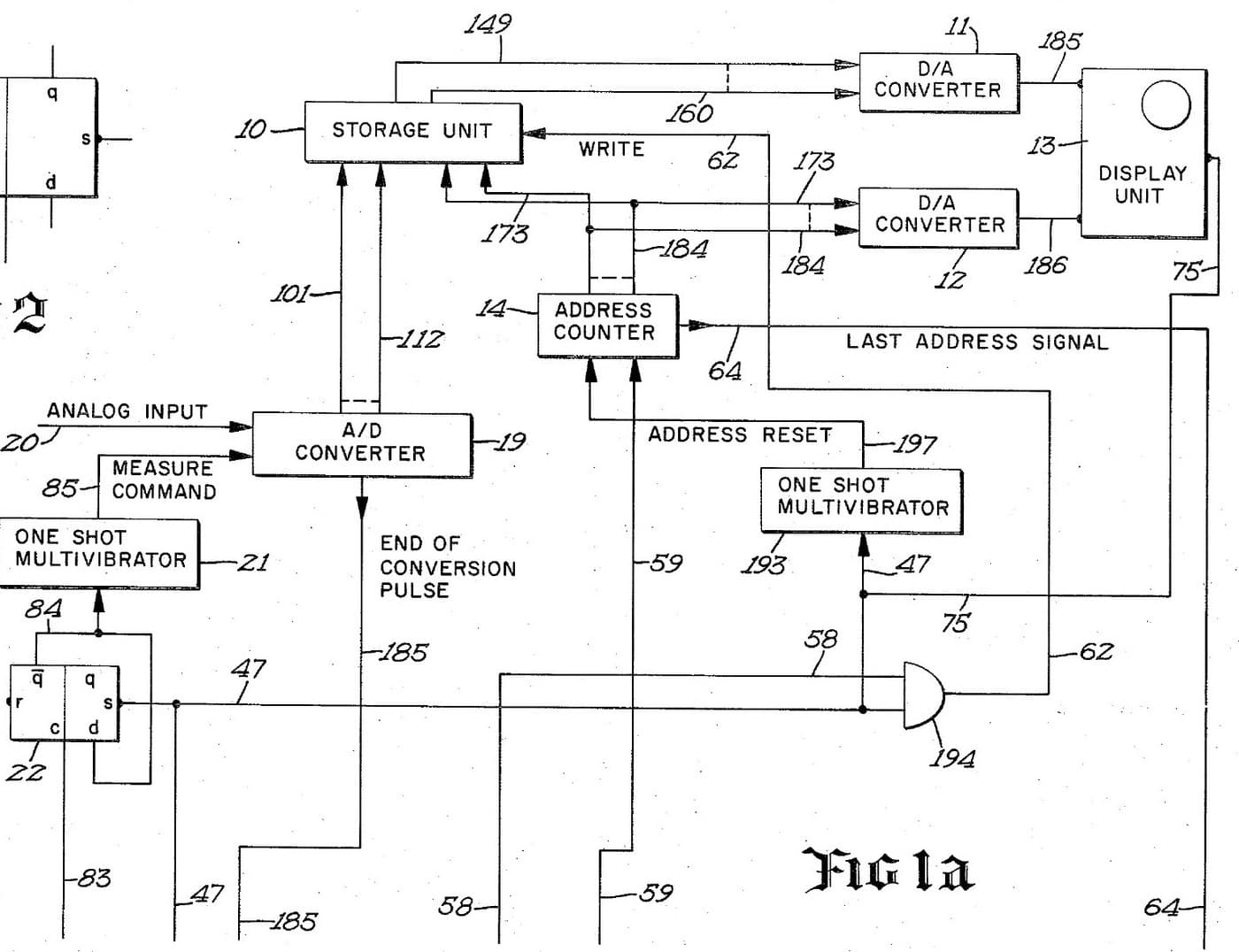
A two-channel digital oscilloscope. Each channel has its own converter and delay circuit. One knob, with a main and a sub button, sets the delays. The sub button shifts only the sub channel's wave, so you can line it up against the main one. The main button shifts both waves together and keeps the gap between them.
Result: a 2-channel digital oscilloscope that can move both traces along the time base without losing their phase difference.
Source: K. Nakatsugawa et al. (Anritsu), US 4,727,288 (1988). Unknown: sample rate, bandwidth, memory size and the display. Picture: the patent drawing.
ကျွမ်းကျင်သူ
Unknown
ညွှန်ကြားချက်များ
1
1
Convert the two channels
Convert the two channels
Bring the main channel and the sub channel each to its own analog-to-digital converter. Ours: BNC sockets. Not given: the sample rate, the bandwidth.
ဤအဆင့်အတွက် ကုန်ကြမ်းများ:
 အန်နာလော့-ဒစ်ဂျစ်တယ် ပြောင်းလဲကိရိယာ2 main and sub converters
 ဝင်ရိုးတူ ဆက်စွပ်အစုံ (BNC / SO-239)1 input sockets
လိုအပ်သော ကိရိယာများ:
 ဂဟေဆော်တံ
 ကြိုးအခွံခွာကိရိယာ
2
2
Delay, store and display
Delay, store and display
Pass each channel's digital signal through its own delay circuit, whose delay is set by its own delay value setting device. Store both delayed signals in a wave memory and show them on the display. Ours: logic ICs for the delay circuits and setting devices, IC memory, and a CRT driven through D/A converters. Not given: how the delay circuits are built, the memory size, the display.
ဤအဆင့်အတွက် ကုန်ကြမ်းများ:
 လော်ဂျစ် IC စုံလင်အစုံ1 delay circuits and setting devices
 ပေါင်းစပ်ဆားကစ် မှတ်ဉာဏ်1 wave memory
 ဒစ်ဂျစ်တယ်မှ အန်နာလော့ ပြောင်းစက်2 display drive
 ကက်သုတ်ရောင်ခြည် ပြွန်1 display
လိုအပ်သော ကိရိယာများ:
ဂဟေဆော်တံကြိုးအခွံခွာကိရိယာ3
3
Build the delay panel and processor
Build the delay panel and processor
Make a delay operation panel with a main switch, a sub switch and one dial, with an encoder on the dial so each turn is read as a change in its output. Connect the panel to a microprocessor with a common memory that holds the sub channel's delay S in one area and the main channel's delay M in another. Mount it all in a case with its supply. Ours: push buttons, an aluminium case, a DC supply.
ဤအဆင့်အတွက် ကုန်ကြမ်းများ:
 နှိပ်ခလုတ်2 main and sub switches
 လှည့်အာရုံခံကိရိယာ1 delay dial
 မိုက်ခရိုပရိုဆက်ဆာ1 command devicesပေါင်းစပ်ဆားကစ် မှတ်ဉာဏ်1 common memory
 အလူမီနီယမ်အိတ်ခ်လိုဇာဘူး1 case
လိုအပ်သော ကိရိယာများ:
 တိုက်ရိုက်လှိုင်း လျှပ်စစ်ရင်းမြစ်
 ရပ်တည်တူးစက်ဂဟေဆော်တံ
4
4
Program the two commands
Program the two commands
When the dial turns, read the encoder change e and which switch is held. Sub switch: add e to S, set the sum in the sub channel's setting device and store it back as the new S. Main switch: add e to both M and S, set M + e in the main channel's device and S + e in the sub channel's, and store both back. The main command so moves both channels by the same amount and keeps their relative delay.
လိုအပ်သော ကိရိယာများ:
ဂဟေဆော်တံ5
5
Compare two waves
Compare two waves
Feed two signals in. Hold the sub switch and turn the dial to slide the sub channel's wave against the main one. Then hold the main switch and turn the dial: both waves move along the time base together, with the phase difference between them unchanged. Test it with a known signal.
လိုအပ်သော ကိရိယာများ:
 လှိုင်းထုတ်စက်
ပစ္စည်းများ
10- 2 main and sub convertersနေရာယူပစ္စည်း
- 1 input socketsနေရာယူပစ္စည်း
- 1 delay circuits and setting devicesနေရာယူပစ္စည်း
- 1 common memoryနေရာယူပစ္စည်း
- 2 display driveနေရာယူပစ္စည်း
- 1 displayနေရာယူပစ္စည်း
- နေရာယူပစ္စည်း
- နေရာယူပစ္စည်း
- 1 command devicesနေရာယူပစ္စည်း
- 1 caseနေရာယူပစ္စည်း
ဤဘလူးပရင့်က ပြုလုပ်သည်

ဆက်စပ် အစီအစဉ်များ
ဤအစီအစဉ်များသည် အသိပညာမျှဝေသည် — နည်းပညာ၊ ပစ္စည်း သို့မဟုတ် မူများ
CC0 အများပိုင်
ဤအစီအစဉ်ကို CC0 အောက်တွင် ထုတ်ဝေထားသည်။ ခွင့်ပြုချက်မလိုဘဲ ကူးယူ၊ ပြင်ဆင်၊ ဖြန့်ဝေ နှင့် အသုံးပြုနိုင်သည်။
အစီအစဉ်မှတစ်ဆင့် ကုန်ပစ္စည်းများဝယ်ယူ၍ လက်မှုပညာရှင်ကို ပံ့ပိုးပါ လက်မှုပညာရှင် ကော်မရှင် ရောင်းချသူက သတ်မှတ်သည်၊ သို့မဟုတ် ဤအစီအစဉ်၏ ဗားရှင်းအသစ်ဖန်တီး၍ ဝင်ငွေခွဲဝေရန် သင့်အစီအစဉ်တွင် ချိတ်ဆက်မှုအဖြစ် ထည့်သွင်းပါ။