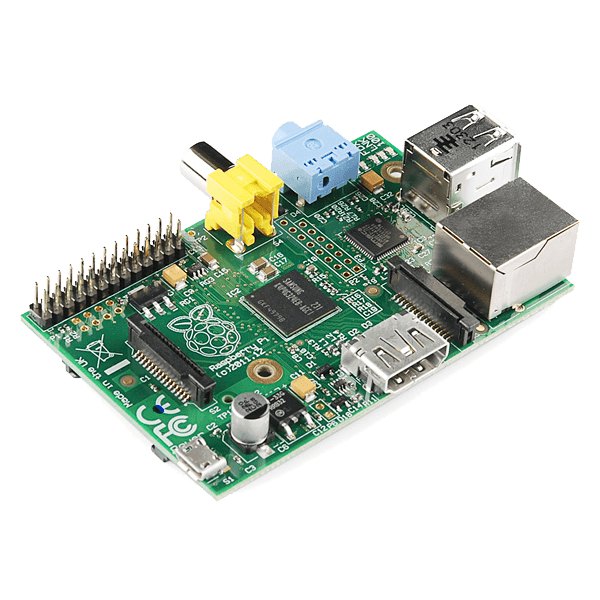
Raspberry Pi - Model B
Who wants pi? The Raspberry Pi has made quite a splash since it was first announced.
The credit-card sized computer is capable of many of the things that your desktop PC does, like spreadsheets, word-processing and games. It also plays high-definition video.
It can run several flavors of Linux and is being used to teach kids all over the world how to program...
The secret sauce that makes this computer so small and powerful is the Broadcom BCM2835, a System-on-Chip that contains an ARM1176JZFS with floating point, running at 700Mhz, and a Videocore 4 GPU.
The GPU provides Open GL ES 2.0, hardware-accelerated OpenVG, and 1080p30 H.264 high-profile decode and is capable of 1Gpixel/s, 1.5Gtexel/s or 24 GFLOPs of general purpose compute.
What's that all mean? It means that if you plug the Raspberry Pi into your HDTV, you could watch BluRay quality video, using H.264 at 40MBits/s.
But wait, there's more. The Model B also has a 10/100 Ethernet port so you can surf the web (or serve web pages) from right there on the Pi. The system volume lives on an SD card, so it's easy to prepare, run and debug several different operating systems on the same hardware. Most Linux distributions for the Pi will happily live on a 2GB SD card but larger cards are supported.
The Model B's two built-in USB ports provide enough connectivity for a mouse and keyboard, but if you want to add more you can use a USB hub. It is recommended that you use a powered hub so as not to overtax the on-board voltage regulator. Powering the Raspberry Pi is easy, just plug any USB power supply into the micro-USB port. There's no power button so the Pi will begin to boot as soon as power is applied, to turn it off simply remove power.
On top of all that, the low-level peripherals on the Pi make it great for hardware hacking. The 0.1" spaced GPIO header on the Pi gives you access to 8 GPIO, UART, I2C, SPI as well as 3.3 and 5V sources. Mating ribbon cables can be found in the related products below.
Dimensions: 85.60mm x 56mm x 21mm
Features:
- Broadcom BCM2835 SoC
- 700 MHz ARM1176JZF-S core CPU
- Broadcom VideoCore IV GPU
- 512 MB RAM
- 2 x USB2.0 Ports
- Video Out via Composite (PAL and NTSC), HDMI or Raw LCD (DSI)
- Audio Out via 3.5mm Jack or Audio over HDMI
- Storage: SD/MMC/SDIO
- 10/100 Ethernet (RJ45)
- Low-Level Peripherals:
- 8 x GPIO
- UART
- I2C bus
- SPI bus with two chip selects
- +3.3V
- +5V
- Ground
- Power Requirements: 5V @ 700 mA via MicroUSB or GPIO Header
- Supports Debian GNU/Linux, Fedora, Arch Linux, RISC OS and More!
Documents:
- Quickstart Guide
- Creating a Boot Card
- GPIO Header Pinout
- Raspberry Pi Foundation
- Pi DOOM Tutorial
- Product Video
Blueprint creators earn this percentage when customers purchase through their Blueprints