ARTE
BELLEZA Y BIENESTAR
ARTESANÍA
CULTURA E HISTORIA
ENTRETENIMIENTO
MEDIO AMBIENTE
COMIDA Y BEBIDAS
INGENIERÍA INVERSA
CIENCIAS
DEPORTES
TECNOLOGÍA
TECNOLOGÍA VESTIBLE
Traducido
BLUEPRINT NFT


Parpadeante LED — Tu Primer Proyecto Arduino
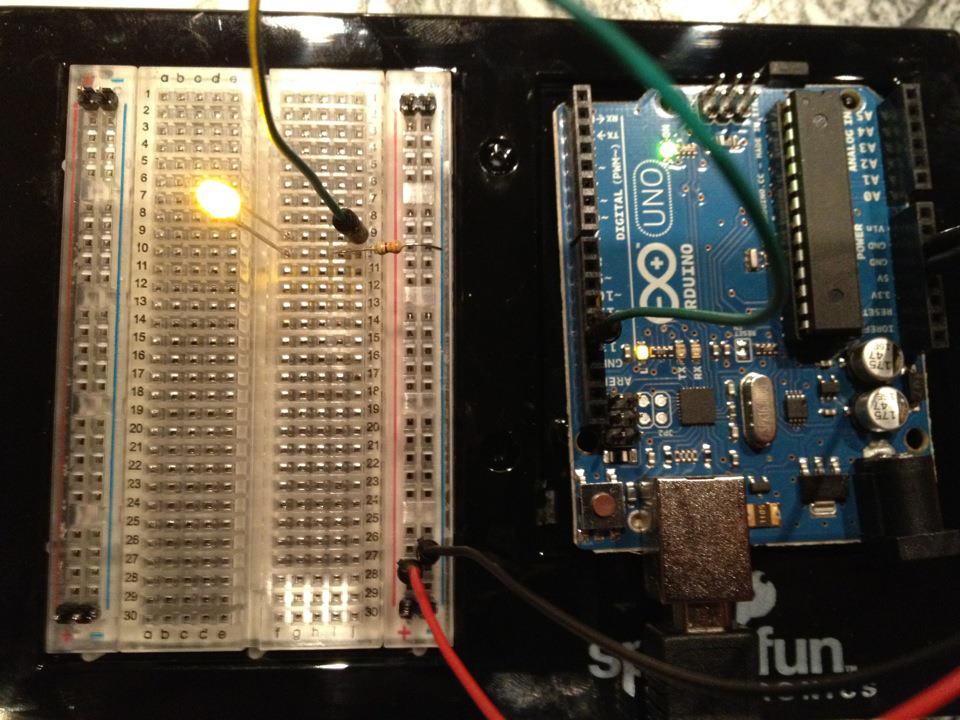
¡El clásico primer proyecto de electrónica! Construye un circuito LED parpadeante usando un Arduino, una placa de pruebas, una resistencia y un único LED. Perfecto para principiantes absolutos — no se requiere soldadura.
Instrucciones
1
1
Reúne Tus Componentes
Reúne Tus Componentes
Recopila todos los componentes listados a continuación. No se requiere soldadura — todo se conecta a la placa de pruebas.
Materiales para este paso:
 SparkFun Inventor's Kit - V3.21 kit
Herramientas necesarias:
 Ordenador con el IDE de Arduino
2
2
Esquema del Circuito
Esquema del Circuito
La señal fluye desde Arduino Pin 13 → resistor 220Ω (R1) → LED (D1) → GND. La resistencia limita la corriente para proteger el LED.
Materiales para este paso:
 Arduino Uno R31 pieza
 LED de 5 mm1 pieza
 Kit de resistencias de 1/4 W1 pieza
3
3
Conéctalo
Conéctalo
- Inserta el LED en la breadboard — pata larga (ánodo +) en una fila, pata corta (cátodo −) en la siguiente.
- Inserta una pata del resistor 220Ω en la misma fila que el cátodo del LED. Otra pata en una fila separada.
- Cable jumper desde la fila del ánodo LED → Arduino Pin 13.
- Cable jumper desde la fila libre del resistor → Arduino GND.
Materiales para este paso:
LED de 5 mm1 piezaKit de resistencias de 1/4 W1 pieza Placa de pruebas1 pieza
 Cables de puente2 piezas
4
4
Subir el Código Blink
Subir el Código Blink
Conecta Arduino vía USB. Abre Arduino IDE, selecciona Tools → Board → Arduino Uno, pega el código y haz clic en Upload.
blink.inoarduino
Materiales para este paso:
Arduino Uno R31 piezaHerramientas necesarias:
Ordenador con el IDE de Arduino Cable USB-B
5
5
PCB Diseño (Referencia)
PCB Diseño (Referencia)
Esto muestra el circuito como un diseño PCB. No es necesario para este proyecto — la placa de pruebas funciona perfectamente — pero muestra cómo se vería el mismo circuito si se fabricara como una placa real.
6
6
Prueba y Experimento
Prueba y Experimento
LED parpadea? ¡Felicitaciones! Acabas de programar hardware.
Solución de problemas:
Próximos experimentos:
Solución de problemas:
- ¿LED no se enciende? Voltea LED — pata larga hacia Pin 13.
- ¿LED permanece encendido? Verifica que el código se haya cargado exitosamente.
- ¿No pasa nada? Verifica que el cableado coincida con el esquema en el Paso 2.
Próximos experimentos:
- Cambia los valores de
delay()para controlar la velocidad de parpadeo - Añade un segundo LED en Pin 12
- Reemplaza con un RGB LED (ver SIK Circuito 3)
Materiales
6- SparkFun Inventor's Kit - V3.210% de comisión1 kitMX$1,945.49
- Marcador de posición
- Marcador de posición
- 1 piezaMarcador de posición
- Marcador de posición
- Marcador de posición
Herramientas requeridas
3- Marcador de posición
- 1 vendor sell this, none ship to you yetMarcador de posición
- Optional, pre-made jumper wires do not need strippingMarcador de posición
Total estimado
Lo que compró quien lo hizo. Los materiales sin precio se consiguen donde tú los compres.
CC0 Dominio público
Este Blueprint se publica bajo CC0. Eres libre de copiar, modificar, distribuir y usar este trabajo para cualquier propósito, sin pedir permiso.
Apoya al Maker comprando productos a través de su Blueprint, donde gana una Comisión del Maker establecida por los vendedores, o crea una nueva iteración de este Blueprint e inclúyela como conexión en tu propio Blueprint para compartir ingresos.