Kerjasama
SENI
KECANTIKAN & KESEJAHTERAAN
KRAFTANGAN
BUDAYA & SEJARAH
HIBURAN
ALAM SEKITAR
MAKANAN & MINUMAN
KEJURUTERAAN TERBALIK
SAINS
SUKAN
TEKNOLOGI
BOLEH PAKAI
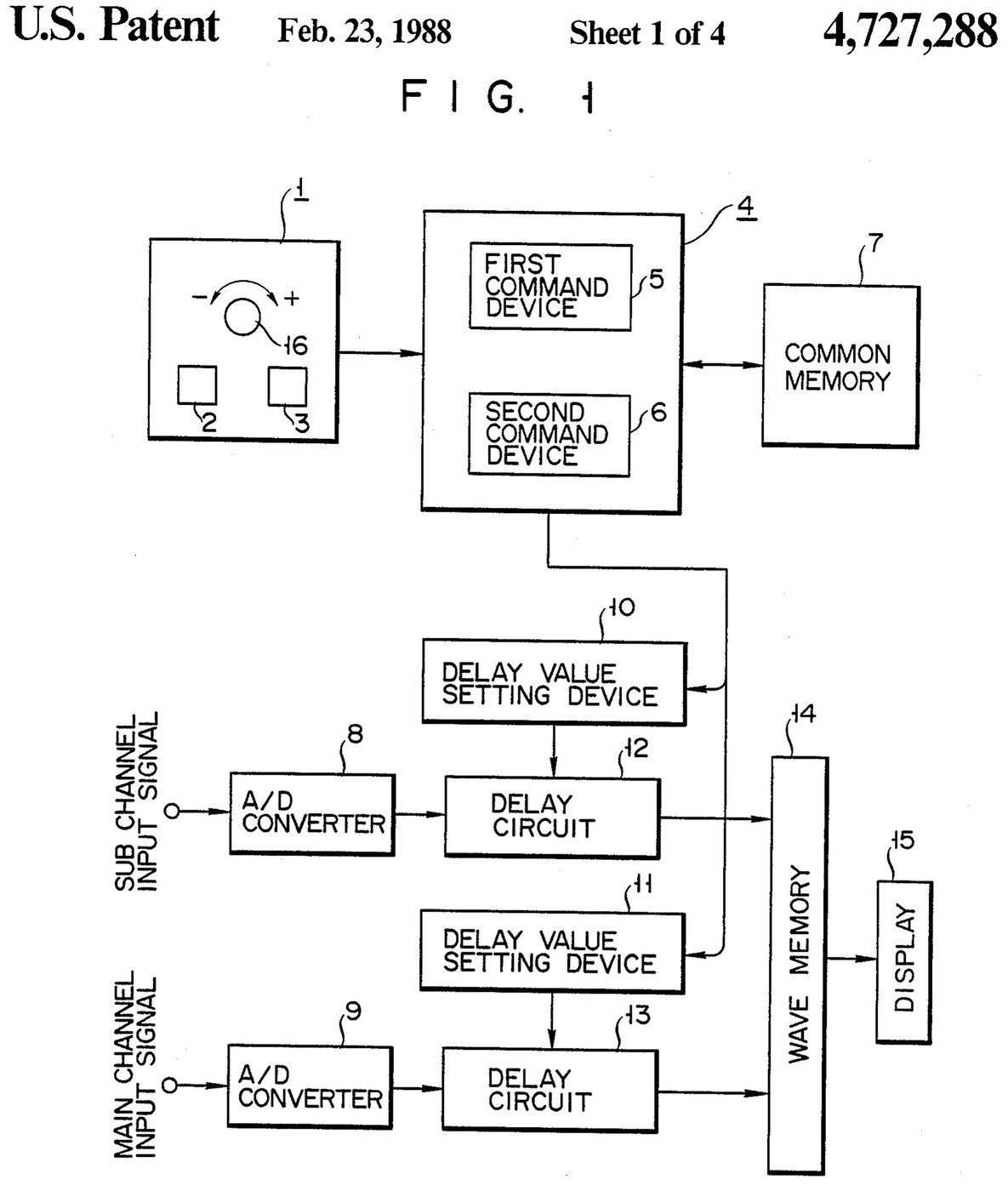

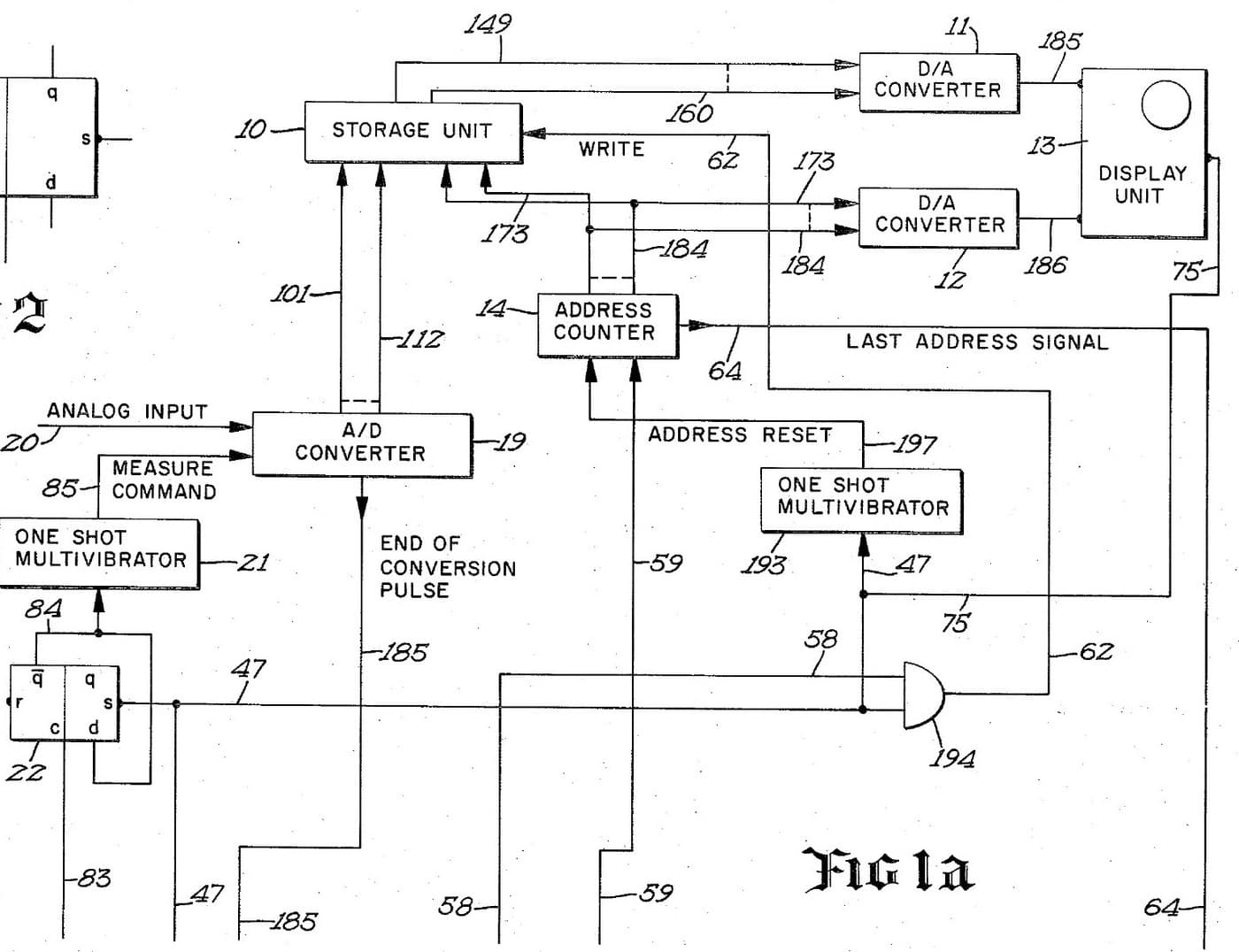
Oscilloscope: Two-Channel Digital, with a Delay per Channel and a Common Delay (Anritsu, US 4,727,288, 1988)
A two-channel digital oscilloscope. Each channel has its own converter and delay circuit. One knob, with a main and a sub button, sets the delays. The sub button shifts only the sub channel's wave, so you can line it up against the main one. The main button shifts both waves together and keeps the gap between them.
Result: a 2-channel digital oscilloscope that can move both traces along the time base without losing their phase difference.
Source: K. Nakatsugawa et al. (Anritsu), US 4,727,288 (1988). Unknown: sample rate, bandwidth, memory size and the display. Picture: the patent drawing.
Pakar
Unknown
Arahan
1
1
Convert the two channels
Convert the two channels
Bring the main channel and the sub channel each to its own analog-to-digital converter. Ours: BNC sockets. Not given: the sample rate, the bandwidth.
Bahan untuk langkah ini:
 Penukar Analog-ke-Digital2 main and sub converters
 Set penyambung sepaksi (BNC / SO-239)1 input sockets
Alatan diperlukan:
 Alat pematerian
 Playar pelucut wayar
2
2
Delay, store and display
Delay, store and display
Pass each channel's digital signal through its own delay circuit, whose delay is set by its own delay value setting device. Store both delayed signals in a wave memory and show them on the display. Ours: logic ICs for the delay circuits and setting devices, IC memory, and a CRT driven through D/A converters. Not given: how the delay circuits are built, the memory size, the display.
Bahan untuk langkah ini:
 Pelbagai IC logik1 delay circuits and setting devices
 Memori litar bersepadu1 wave memory
 Penukar digital ke analog2 display drive
 Tiub sinar katod1 display
Alatan diperlukan:
Alat pematerianPlayar pelucut wayar3
3
Build the delay panel and processor
Build the delay panel and processor
Make a delay operation panel with a main switch, a sub switch and one dial, with an encoder on the dial so each turn is read as a change in its output. Connect the panel to a microprocessor with a common memory that holds the sub channel's delay S in one area and the main channel's delay M in another. Mount it all in a case with its supply. Ours: push buttons, an aluminium case, a DC supply.
Bahan untuk langkah ini:
 Butang tekan2 main and sub switches
 Pengekod putar1 delay dial
 Mikropemproses1 command devicesMemori litar bersepadu1 common memory
 Kotak kalis aluminium1 case
Alatan diperlukan:
 Unit kuasa arus terus
 Gerudi TiangAlat pematerian
4
4
Program the two commands
Program the two commands
When the dial turns, read the encoder change e and which switch is held. Sub switch: add e to S, set the sum in the sub channel's setting device and store it back as the new S. Main switch: add e to both M and S, set M + e in the main channel's device and S + e in the sub channel's, and store both back. The main command so moves both channels by the same amount and keeps their relative delay.
Alatan diperlukan:
Alat pematerian5
5
Compare two waves
Compare two waves
Feed two signals in. Hold the sub switch and turn the dial to slide the sub channel's wave against the main one. Then hold the main switch and turn the dial: both waves move along the time base together, with the phase difference between them unchanged. Test it with a known signal.
Alatan diperlukan:
 Penjana Fungsi
Bahan
10- 2 main and sub convertersPemegang Tempat
- 1 input socketsPemegang Tempat
- 1 delay circuits and setting devicesPemegang Tempat
- 1 common memoryPemegang Tempat
- 2 display drivePemegang Tempat
- 1 displayPemegang Tempat
- Pemegang Tempat
- Pemegang Tempat
- 1 command devicesPemegang Tempat
- 1 casePemegang Tempat
Alatan Diperlukan
5- 2 vendors sell this, none ship to you yetPemegang Tempat
- Pemegang Tempat
- Pemegang Tempat
- Pemegang Tempat
- Pemegang Tempat
Blueprint ini membuat

Blueprint berkaitan
Blueprint ini berkongsi pengetahuan — teknik, bahan atau prinsip
CC0 Domain Awam
Blueprint ini dikeluarkan di bawah CC0. Anda bebas menyalin, mengubah, mengedar, dan menggunakan karya ini untuk sebarang tujuan, tanpa meminta kebenaran.
Sokong Pembuat dengan membeli produk melalui Blueprint mereka di mana mereka memperoleh Komisen Pembuat ditetapkan oleh Penjual, atau cipta iterasi baru Blueprint ini dan sertakan ia sebagai sambungan dalam Blueprint anda sendiri untuk berkongsi hasil.