IṢẸ́ ỌNÀ
ẸWÀ ÀTI ÌLERA
IṢẸ́ ỌWỌ́
ÀṢÀ ÀTI ÌTÀN
ÌṢERÉ
ÀYÍKÁ
OÚNJẸ ÀTI OHUN MÍMU
REVERSE ENGINEERING
SÁYẸ́ǸSÌ
ERÉ ÌDÁRAYÁ
ÌMỌ̀-Ẹ̀RỌ
ÀWỌN OHUN WÍWỌ̀
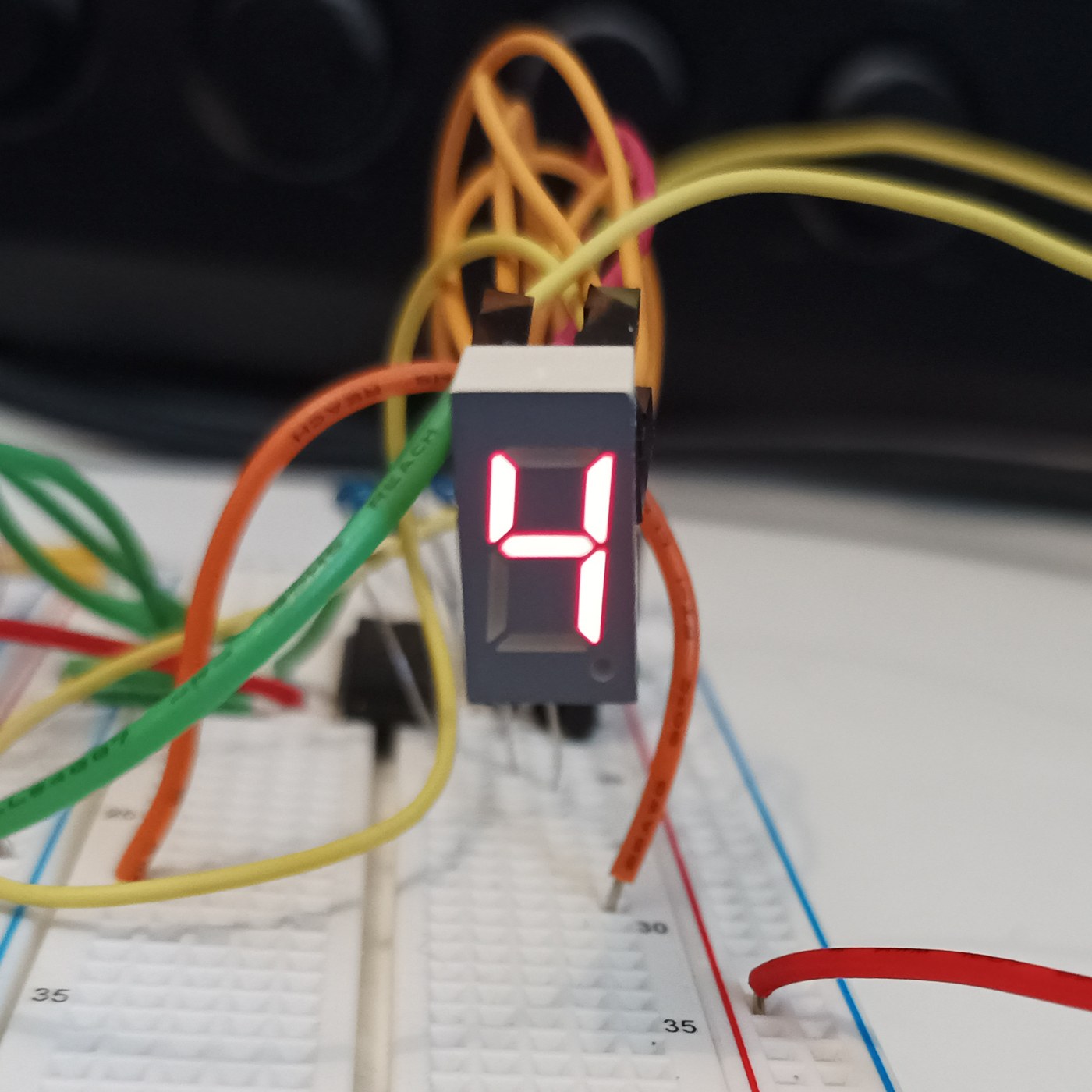


The Seven-Segment LED Display
The opposite of the Nixie: instead of a shaped numeral at 170 V, the fewest straight lines that still make every digit — seven bars in a figure eight, at 2 V and pennies. It looks like sticks and nobody cares, because it is seven LEDs and never wears out. You will build a four-digit display and confront its one clever idea, multiplexing, then measure the refresh rate at which the flicker vanishes for your own eyes.
Olùbẹ̀rẹ̀
4 hours
Ìlànà
1
1
Seven sticks, ten digits, and the sibling that used 170 volts
Seven sticks, ten digits, and the sibling that used 170 volts
Nixie versus seven-segment: the same job, opposite answers. The Nixie shows the real numeral shape at 170 V and poisons its cathodes; the seven-segment builds each digit from seven bars (a-g) at 2 V and never wears out. Before wiring, draw a figure eight, label the bars a-g, and write which bars light for each digit 0-9. That table is the whole interface and becomes the lookup table in the code step.
Àwọn ohun èlò fún ìgbésẹ̀ yìí:
 Ìfihàn onígun 7 oníhàhà 4 (TM1637)1 ẹyọ
2
2
Wire it: seven segment resistors, one transistor per digit
Wire it: seven segment resistors, one transistor per digit
The multiplex wiring. All four digits' matching segments share one pin through ONE resistor — seven segment lines, seven resistors, whatever the digit count. Each digit's common cathode switches to ground through one NPN. Resistors go on the SEGMENTS, not the digits, or an 8 shares one resistor seven ways and dims. Four digits: eleven pins instead of twenty-eight. That saving is why you multiplex.
Ń gbé olùwò KiCanvas wọlé...
Olùwò Àpẹrẹ PCB Akọ́ṣẹ́mọṣẹ́
Àwọn ohun èlò fún ìgbésẹ̀ yìí:
Ìfihàn onígun 7 oníhàhà 4 (TM1637)1 ẹyọ Àkójọ Rẹsístà1 ohun èlò
 Onírúurú transistor1 ìtò
Àwọn irinṣẹ́ tí a nílò:
 Pátákó Àdánwò
 Ibùdó Ìtanná
3
3
Drive it, and find the flicker frequency for your own eyes
Drive it, and find the flicker frequency for your own eyes
The sketch multiplexes the four digits, then sweeps the refresh rate down so YOU find the frequency at which the steady number breaks into flicker — your flicker-fusion threshold, higher in peripheral vision. Each digit is lit a quarter of the time, so to stay bright it must be driven harder while on: refresh too slow and it flickers, drive too hard and you exceed the LED peak current. You have measured one wall of that box.
sevenseg_mux.inocpp
Àwọn ohun èlò fún ìgbésẹ̀ yìí:
Ìfihàn onígun 7 oníhàhà 4 (TM1637)1 ẹyọÀwọn irinṣẹ́ tí a nílò:
 Pátákó Ìdàgbàsókè ESP32
 Okùn Ìsopọ̀
4
4
Multiplex duty cycle versus perceived brightness
Multiplex duty cycle versus perceived brightness
Ń ṣí ìwé Jupyter…
Àwọn irinṣẹ́ tí a nílò:
 Kọ̀ǹpútà Tábìlì
Àwọn ohun-èlò
3- Àyè
- 1 ìtòÀyè
Àwọn irinṣẹ́ tó nílò
5- 1 vendor sell this, none ship to you yetÀyè
- Àyè
- 3 vendors sell this, none ship to you yetÀyè
Blueprint tó jọra
Àwọn blueprint wọ̀nyí pín ìmọ̀ — ọ̀nà, ohun-èlò tàbí ìlànà

CC0 Àgbègbè Gbogbogbò
Blueprint yìí ti jáde lábẹ́ CC0. O lè ṣe àdàkọ, yí padà, pín, àti lò láìsí ìyọ̀ǹda.
Ṣàtìlẹ́yìn Olùṣẹ́dá nípa rírà àwọn ọjà nipasẹ̀ Blueprint wọn Ẹ̀san Olùṣẹ́dá tí àwọn Olùtajà gbé kalẹ̀, tàbí ṣẹ̀dá àtúnṣe tuntun ti Blueprint yìí kí o sì fi sínú Blueprint rẹ gẹ́gẹ́ bí ìsopọ̀ láti pín owó-wíwọlé.