Arduino Uno R3 SMD
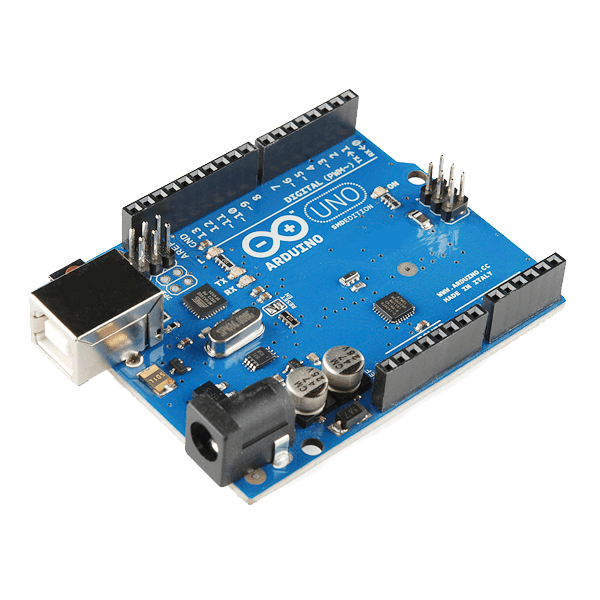
This is the new Arduino Uno R3. In addition to all the features of the previous board, the Uno now uses an ATmega16U2 instead of the 8U2 found on the Uno (or the FTDI found on previous generations). This allows for faster transfer rates and more memory. No drivers needed for Linux or Mac (inf file for Windows is needed and included in the Arduino IDE), and the ability to have the Uno show up as a keyboard, mouse, joystick, etc.
The Uno R3 also adds SDA and SCL pins next to the AREF. In addition, there are two new pins placed near the RESET pin. One is the IOREF that allow the shields to adapt to the voltage provided from the board. The other is a not connected and is reserved for future purposes. The Uno R3 works with all existing shields but can adapt to new shields which use these additional pins.
Arduino is an open-source physical computing platform based on a simple i/o board and a development environment that implements the Processing/Wiring language. Arduino can be used to develop stand-alone interactive objects or can be connected to software on your computer (e.g. Flash, Processing, MaxMSP). The open-source IDE can be downloaded for free (currently for Mac OS X, Windows, and Linux).
Special SMD Version: Because Atmel is moving more and more of their production capacity to surface mount ICs, the DIP packaged ATmega is becoming more and more difficult to get. To keep up with demand, we now offer the Arduino Uno R3 with an SMD ATmega. The board is identical to the PTH version of the Uno, but you won't be able to remove the ATmega without some hot-air. This change shouldn't affect most users. Besides - when was the last time you managed to destroy an ATmega and needed to repair an Arduino board? Those things are nearly indestructible.
Note: The Arduino Uno R3 requires the Arduino 1.0 drivers folder in order to install properly on some computers. We have tested and confirmed that the R3 can be programmed in older versions of the IDE. However, the first time using the R3 on a new computer, you will need to have Arduino 1.0 installed on that machine. If you are interested in reading more about the changes to the IDE, check out the official Arduino 1.0 Release notes!
Features:
- ATmega328 microcontroller
- Input voltage - 7-12V
- 14 Digital I/O Pins (6 PWM outputs)
- 6 Analog Inputs
- 32k Flash Memory
- 16Mhz Clock Speed
Documents:
- Product Page
- Arduino IDE Download
Àwọn ẹlẹ́dà Ìtọ́nisọ́nà ń jèrè ìdá yìí nígbà tí àwọn oníbàárà bá rà nípasẹ̀ Ìtọ́nisọ́nà wọn