SINING
BEAUTY AT WELLNESS
CRAFTS
KULTURA AT KASAYSAYAN
LIBANGAN
KAPALIGIRAN
PAGKAIN AT INUMIN
REVERSE ENGINEERING
AGHAM
ISPORTS
TEKNOLOHIYA
MGA WEARABLE
Isinalang
BLUEPRINT NFT


Kumikislap na LED — Ang Iyong Unang Arduino Project
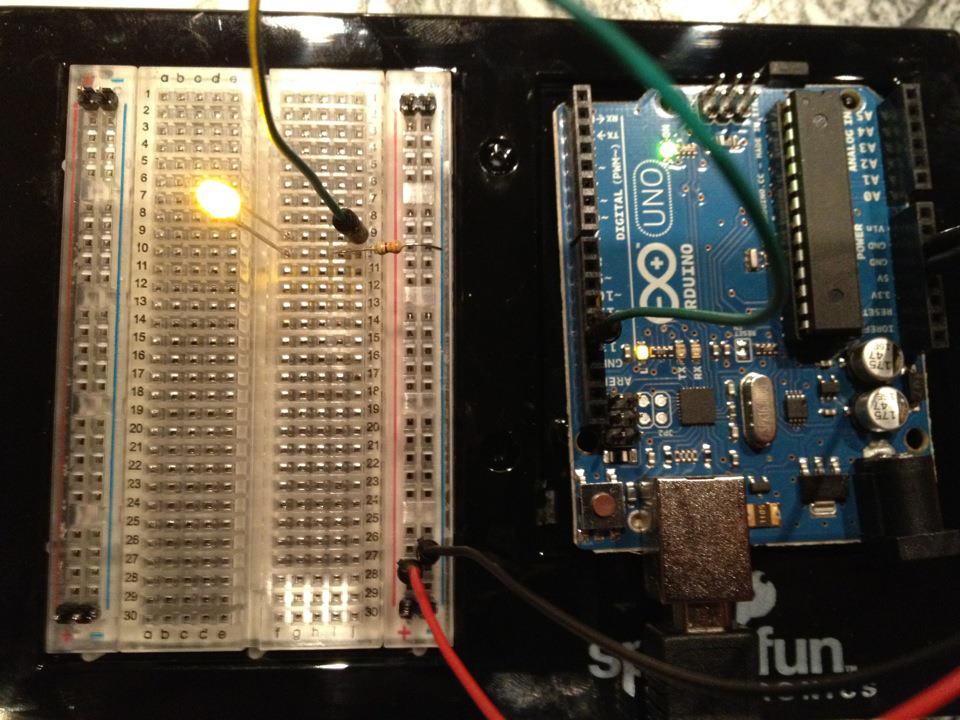
Ang klasikong unang electronics project! Bumuo ng kumikislap na LED circuit gamit ang Arduino, breadboard, resistor, at isang LED. Perpekto para sa mga ganap na baguhan — walang soldering na kailangan.
Mga Tagubilin
1
1
Tipunin ang Iyong mga Bahagi
Tipunin ang Iyong mga Bahagi
Kolektahin ang lahat ng bahagi na nakalista sa ibaba. Walang kailangang pagsusolder — lahat ay umaangkop sa breadboard.
Mga materyales para sa hakbang na ito:
 SparkFun Inventor's Kit - V3.21 kit
Mga kailangang kasangkapan:
 Kompyuter na May Arduino IDE
2
2
Eskema ng Circuit
Eskema ng Circuit
Ang signal ay umaagos mula sa Arduino Pin 13 → 220Ω resistor (R1) → LED (D1) → GND. Ang resistor ay naglilimita ng current upang protektahan ang LED.
Mga materyales para sa hakbang na ito:
 Arduino Uno R31 piraso
 LED na 5 mm1 piraso
 Kit ng Risistor na 1/4 W1 piraso
3
3
I-wire Ito
I-wire Ito
- Isingit ang LED sa breadboard — mahabang binti (anode +) sa isang hilera, maikling binti (cathode −) sa susunod.
- Isingit ang isang binti ng 220Ω resistor sa parehong hilera ng LED cathode. Ang ibang binti sa hiwalay na hilera.
- Jumper wire mula sa LED anode row → Arduino Pin 13.
- Jumper wire mula sa resistor free row → Arduino GND.
Mga materyales para sa hakbang na ito:
LED na 5 mm1 pirasoKit ng Risistor na 1/4 W1 piraso Lapad na Pansubok1 piraso
 Mga Jumper Wire2 piraso
4
4
I-upload ang Blink Code
I-upload ang Blink Code
Ikonekta ang Arduino sa pamamagitan ng USB. Buksan ang Arduino IDE, piliin ang Tools → Board → Arduino Uno, i-paste ang code, at i-click ang Upload.
blink.inoarduino
Mga materyales para sa hakbang na ito:
Arduino Uno R31 pirasoMga kailangang kasangkapan:
Kompyuter na May Arduino IDE Kableng USB-B
5
5
PCB Layout (Sanggunian)
PCB Layout (Sanggunian)
Ipinapakita nito ang circuit bilang isang PCB layout. Hindi kinakailangan para sa proyektong ito — ang breadboard ay gumagana nang perpekto — ngunit ipinakikita kung paano ang parehong circuit ay magmukhang kung ito ay ginawa bilang isang tunay na board.
6
6
Subukan at Eksperimento
Subukan at Eksperimento
LED kumikislap? Binabati! Nag-program ka lang ng hardware.
Paglutas ng Problema:
Susunod na eksperimento:
Paglutas ng Problema:
- LED ay hindi umilaw? Baligtarin ang LED — mahabang binti tungo sa Pin 13.
- LED ay nananatiling siyalang? Suriin kung ang code ay matagumpay na na-upload.
- Walang nangyayari? Patunayan na ang wiring ay tumutugma sa schematic sa Step 2.
Susunod na eksperimento:
- Baguhin ang
delay()na mga halaga upang kontrolin ang bilis ng kislap - Magdagdag ng pangalawang LED sa Pin 12
- Palitan ng isang RGB LED (tingnan ang SIK Circuit 3)
Mga Materyales
6- SparkFun Inventor's Kit - V3.210% komisyon1 kit$106.94
- Placeholder
- Placeholder
- 1 pirasoPlaceholder
- Placeholder
- Placeholder
Mga Kinakailangang Kasangkapan
3- Placeholder
- 1 vendor sell this, none ship to you yetPlaceholder
- Optional, pre-made jumper wires do not need strippingPlaceholder
Tinatayang Kabuuan
Ang binili ng gumawa. Ang mga materyales na walang presyo ay kukunin mo kung saan ka bibili.
CC0 Pampublikong Domain
Ang blueprint na ito ay inilabas sa ilalim ng CC0. Malaya kang kumopya, magbago, mamahagi, at gumamit nang walang pahintulot.
Suportahan ang Maker sa pamamagitan ng pagbili ng mga produkto sa kanilang Blueprint Komisyon ng Maker itinakda ng mga Vendor, o lumikha ng bagong bersyon ng Blueprint na ito at isama bilang koneksyon sa iyong Blueprint upang ibahagi ang kita.