فن
خوبصورتی اور تندرستی
دستکاری
ثقافت اور تاریخ
تفریح
ماحول
خوراک اور مشروبات
ریورس انجینئرنگ
سائنسز
کھیل
ٹیکنالوجی
پہننے والے آلات
ترجمہ شدہ
BLUEPRINT NFT


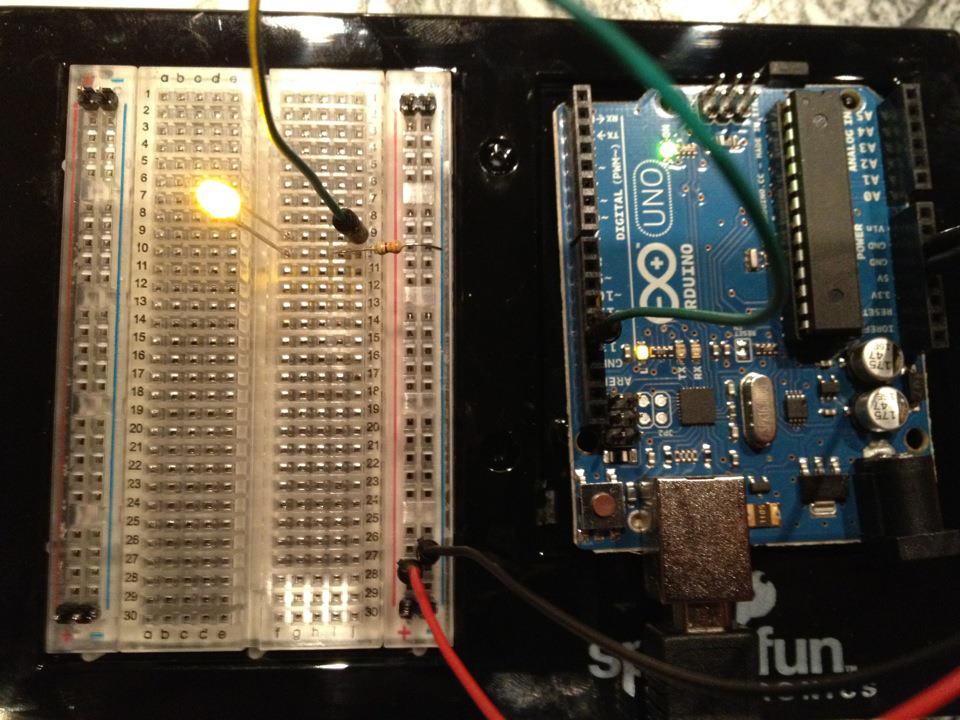
LED کو جھلملاتے ہوئے — آپ کا پہلا Arduino پروجیکٹ
کلاسیکی پہلا الیکٹرانکس پروجیکٹ! Arduino، بریڈ بورڈ، ایک resistor اور ایک واحد LED استعمال کرتے ہوئے ایک جھلملاتا ہوا LED سرکٹ بنائیں۔ بالکل ابتدائی افراد کے لیے بہترین — کوئی سولڈرنگ درکار نہیں۔
ہدایات
1
1
اپنے اجزاء جمع کریں
اپنے اجزاء جمع کریں
نیچے درج تمام اجزاء جمع کریں۔ کوئی سولڈرنگ کی ضرورت نہیں — سب کچھ بریڈ بورڈ میں لگایا جاتا ہے۔
اس مرحلے کے لیے مواد:
 SparkFun Inventor's Kit - V3.21 کٹ
درکار اوزار:
 Arduino IDE والا کمپیوٹر
2
2
سرکٹ اسکیمیٹک
سرکٹ اسکیمیٹک
سگنل Arduino Pin 13 → 220Ω resistor (R1) → LED (D1) → GND سے بہتی ہے۔ resistor موجودہ کو محدود کرتا ہے LED کو محفوظ رکھنے کے لیے۔
اس مرحلے کے لیے مواد:
 Arduino Uno R31 ٹکڑا
 ۵ ملی میٹر ایل ای ڈی1 ٹکڑا
 چوتھائی واٹ مزاحمت کِٹ1 ٹکڑا
3
3
اسے تار سے جوڑیں
اسے تار سے جوڑیں
- LED کو بریڈ بورڈ میں ڈالیں — لمبی ٹانگ (anode +) ایک صف میں، چھوٹی ٹانگ (cathode −) اگلی صف میں۔
- 220Ω resistor کی ایک ٹانگ LED cathode کی اسی صف میں ڈالیں۔ دوسری ٹانگ الگ صف میں۔
- Jumper wire LED anode صف سے → Arduino Pin 13۔
- Jumper wire resistor خالی صف سے → Arduino GND۔
اس مرحلے کے لیے مواد:
۵ ملی میٹر ایل ای ڈی1 ٹکڑاچوتھائی واٹ مزاحمت کِٹ1 ٹکڑا بریڈ بورڈ1 ٹکڑا
 جمپر تاریں2 ٹکڑے
4
4
بلنک کوڈ اپلوڈ کریں
بلنک کوڈ اپلوڈ کریں
USB کے ذریعے Arduino کو جوڑیں۔ Arduino IDE کھولیں، Tools → Board → Arduino Uno منتخب کریں، کوڈ پیسٹ کریں اور Upload پر کلک کریں۔
blink.inoarduino
اس مرحلے کے لیے مواد:
Arduino Uno R31 ٹکڑادرکار اوزار:
Arduino IDE والا کمپیوٹر USB-B کیبل
5
5
PCB لے آؤٹ (حوالہ)
PCB لے آؤٹ (حوالہ)
یہ سرکٹ کو PCB لے آؤٹ کے طور پر دکھاتا ہے۔ اس منصوبے کے لیے ضروری نہیں ہے — بریڈ بورڈ بالکل ٹھیک کام کرتا ہے — لیکن اگر اسے ایک حقیقی بورڈ کے طور پر تیار کیا جائے تو وہی سرکٹ کیسے نظر آئے گا اس کو ظاہر کرتا ہے۔
6
6
ٹیسٹ اور تجربہ
ٹیسٹ اور تجربہ
LED جھمکتا ہے؟ مبارک ہو! آپ نے ابھی ہارڈویئر کو پروگرام کیا۔
مسائل کا حل:
اگلے تجربے:
مسائل کا حل:
- LED روشن نہیں ہوتا ہے؟ LED کو الٹا پلٹائیں — لمبی ٹانگ Pin 13 کی طرف۔
- LED آن رہتا ہے؟ چیک کریں کہ کوڈ کامیابی سے اپ لوڈ ہوا ہے۔
- کچھ نہیں ہوتا ہے؟ تار کنیکشن کی تصدیق کریں جو Step 2 میں سکیمیٹک سے ملتا ہے۔
اگلے تجربے:
delay()کی قدریں بدلیں تاکہ جھمکنے کی رفتار کو کنٹرول کریں- Pin 12 پر دوسرا LED شامل کریں
- RGB LED کے ساتھ بدلیں (دیکھیں SIK Circuit 3)
مواد
6- SparkFun Inventor's Kit - V3.210% کمیشن1 کٹ$106.94
- پلیس ہولڈر
- پلیس ہولڈر
- 1 ٹکڑاپلیس ہولڈر
- پلیس ہولڈر
- پلیس ہولڈر
درکار اوزار
3- پلیس ہولڈر
- 1 vendor sell this, none ship to you yetپلیس ہولڈر
- Optional, pre-made jumper wires do not need strippingپلیس ہولڈر
تخمینی کل
بنانے والے نے جو خریدا۔ بغیر قیمت دکھائے گئے مواد آپ جہاں سے خریدیں وہیں سے ملیں گے۔
CC0 پبلک ڈومین
یہ بلیو پرنٹ CC0 کے تحت جاری کیا گیا ہے۔ آپ اجازت لیے بغیر اس کام کو نقل، ترمیم، تقسیم اور کسی بھی مقصد کے لیے استعمال کرنے کے لیے آزاد ہیں۔
میکر کی حمایت کریں ان کے بلیو پرنٹ کے ذریعے پروڈکٹس خرید کر جہاں وہ میکر کمیشن وینڈرز کی طرف سے مقرر، کماتے ہیں، یا اس بلیو پرنٹ کی نئی تکرار بنائیں اور آمدنی شیئر کرنے کے لیے اسے اپنے بلیو پرنٹ میں کنکشن کے طور پر شامل کریں۔