تعاون
فن
خوبصورتی اور تندرستی
دستکاری
ثقافت اور تاریخ
تفریح
ماحول
خوراک اور مشروبات
ریورس انجینئرنگ
سائنسز
کھیل
ٹیکنالوجی
پہننے والے آلات
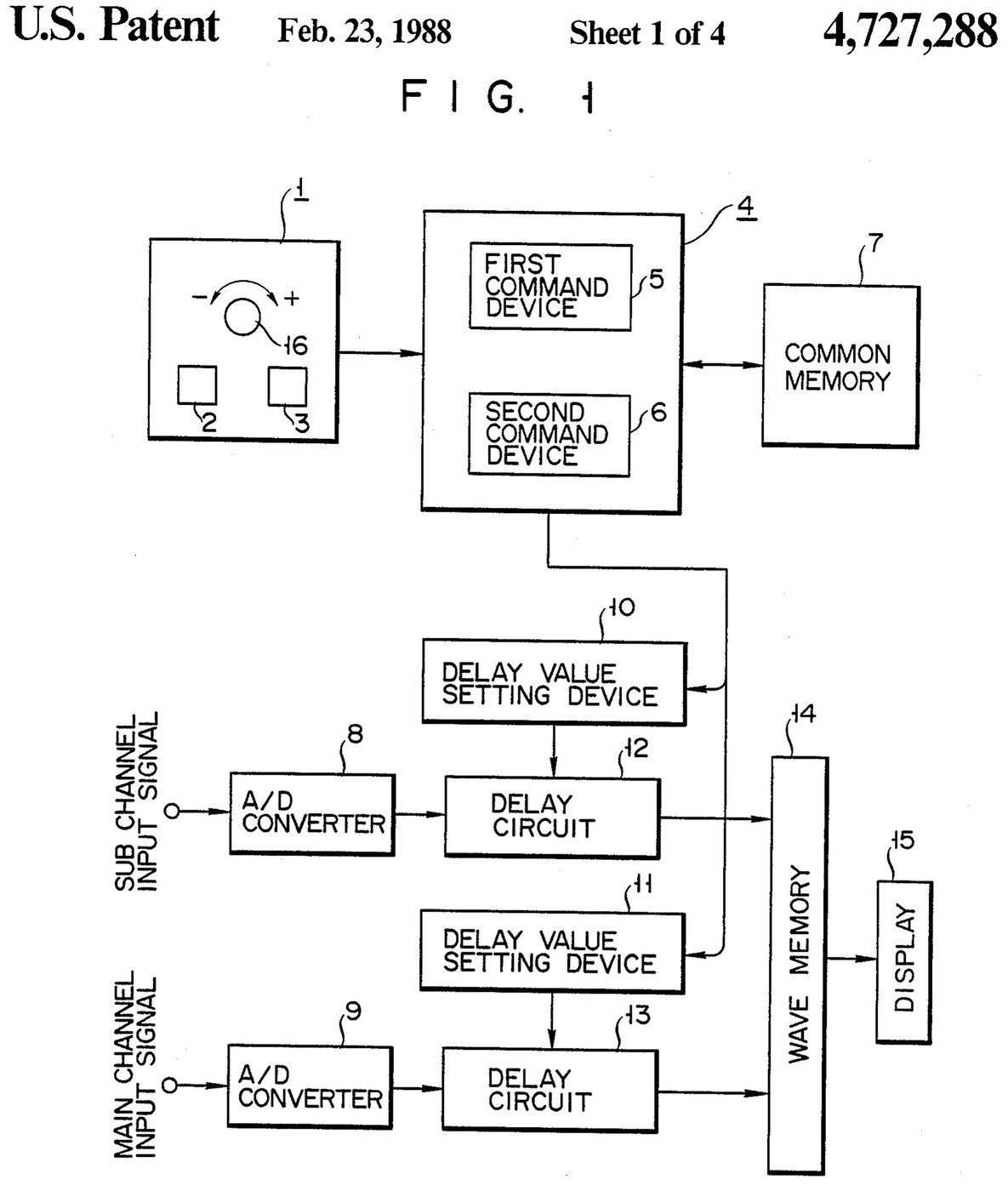

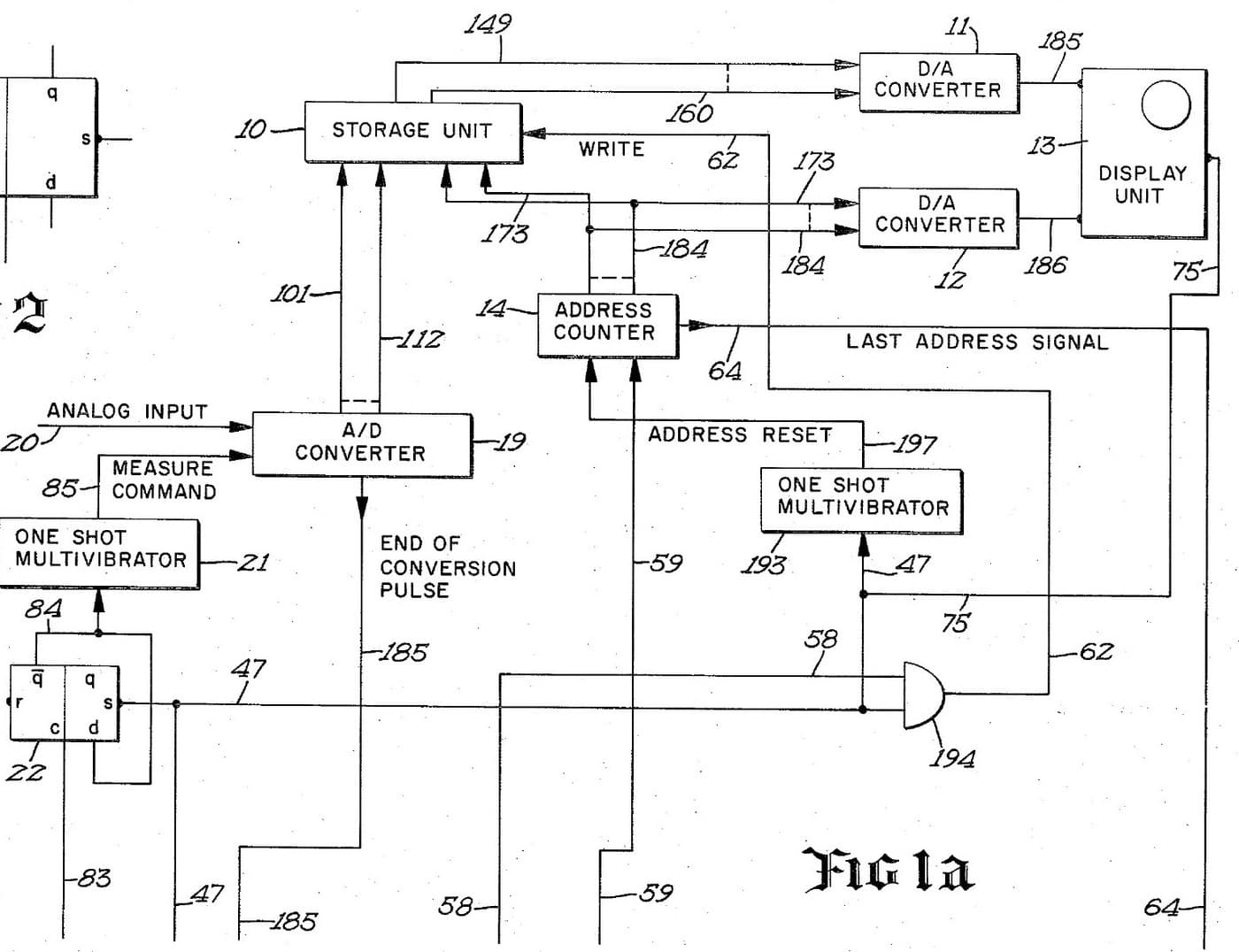
Oscilloscope: Two-Channel Digital, with a Delay per Channel and a Common Delay (Anritsu, US 4,727,288, 1988)
A two-channel digital oscilloscope. Each channel has its own converter and delay circuit. One knob, with a main and a sub button, sets the delays. The sub button shifts only the sub channel's wave, so you can line it up against the main one. The main button shifts both waves together and keeps the gap between them.
Result: a 2-channel digital oscilloscope that can move both traces along the time base without losing their phase difference.
Source: K. Nakatsugawa et al. (Anritsu), US 4,727,288 (1988). Unknown: sample rate, bandwidth, memory size and the display. Picture: the patent drawing.
ماہر
Unknown
ہدایات
1
1
Convert the two channels
Convert the two channels
Bring the main channel and the sub channel each to its own analog-to-digital converter. Ours: BNC sockets. Not given: the sample rate, the bandwidth.
اس مرحلے کے لیے مواد:
 اینالاگ سے ڈیجیٹل کنورٹر2 main and sub converters
 ہم محور جوڑوں کا سیٹ (BNC / SO-239)1 input sockets
درکار اوزار:
 ٹانکا لگانے کی سلاخ
 تار کا غلاف اتارنے کا اوزار
2
2
Delay, store and display
Delay, store and display
Pass each channel's digital signal through its own delay circuit, whose delay is set by its own delay value setting device. Store both delayed signals in a wave memory and show them on the display. Ours: logic ICs for the delay circuits and setting devices, IC memory, and a CRT driven through D/A converters. Not given: how the delay circuits are built, the memory size, the display.
اس مرحلے کے لیے مواد:
 منطقی آئی سی کا مجموعہ1 delay circuits and setting devices
 انٹیگریٹڈ سرکٹ میموری1 wave memory
 ڈیجیٹل سے اینالاگ کنورٹر2 display drive
 کیتھوڈ رے ٹیوب1 display
درکار اوزار:
ٹانکا لگانے کی سلاختار کا غلاف اتارنے کا اوزار3
3
Build the delay panel and processor
Build the delay panel and processor
Make a delay operation panel with a main switch, a sub switch and one dial, with an encoder on the dial so each turn is read as a change in its output. Connect the panel to a microprocessor with a common memory that holds the sub channel's delay S in one area and the main channel's delay M in another. Mount it all in a case with its supply. Ours: push buttons, an aluminium case, a DC supply.
اس مرحلے کے لیے مواد:
 دبانے کا بٹن2 main and sub switches
 گردشی اینکوڈر1 delay dial
 مائیکروپروسیسر1 command devicesانٹیگریٹڈ سرکٹ میموری1 common memory
 ایلومینیم کا ڈبہ1 case
درکار اوزار:
 راست رو بجلی کا منبع
 ستون والی مشق مشینٹانکا لگانے کی سلاخ
4
4
Program the two commands
Program the two commands
When the dial turns, read the encoder change e and which switch is held. Sub switch: add e to S, set the sum in the sub channel's setting device and store it back as the new S. Main switch: add e to both M and S, set M + e in the main channel's device and S + e in the sub channel's, and store both back. The main command so moves both channels by the same amount and keeps their relative delay.
درکار اوزار:
ٹانکا لگانے کی سلاخ5
5
Compare two waves
Compare two waves
Feed two signals in. Hold the sub switch and turn the dial to slide the sub channel's wave against the main one. Then hold the main switch and turn the dial: both waves move along the time base together, with the phase difference between them unchanged. Test it with a known signal.
درکار اوزار:
 لہر ساز
مواد
10- 2 main and sub convertersپلیس ہولڈر
- 1 input socketsپلیس ہولڈر
- 1 delay circuits and setting devicesپلیس ہولڈر
- 1 common memoryپلیس ہولڈر
- 2 display driveپلیس ہولڈر
- 1 displayپلیس ہولڈر
- پلیس ہولڈر
- پلیس ہولڈر
- 1 command devicesپلیس ہولڈر
- 1 caseپلیس ہولڈر
یہ بلوپرنٹ بناتا ہے

متعلقہ بلیو پرنٹ
یہ بلیو پرنٹ علم بانٹتے ہیں — تکنیک، مواد یا اصول
CC0 پبلک ڈومین
یہ بلیو پرنٹ CC0 کے تحت جاری کیا گیا ہے۔ آپ اجازت لیے بغیر اس کام کو نقل، ترمیم، تقسیم اور کسی بھی مقصد کے لیے استعمال کرنے کے لیے آزاد ہیں۔
میکر کی حمایت کریں ان کے بلیو پرنٹ کے ذریعے پروڈکٹس خرید کر جہاں وہ میکر کمیشن وینڈرز کی طرف سے مقرر، کماتے ہیں، یا اس بلیو پرنٹ کی نئی تکرار بنائیں اور آمدنی شیئر کرنے کے لیے اسے اپنے بلیو پرنٹ میں کنکشن کے طور پر شامل کریں۔