microSD Shield
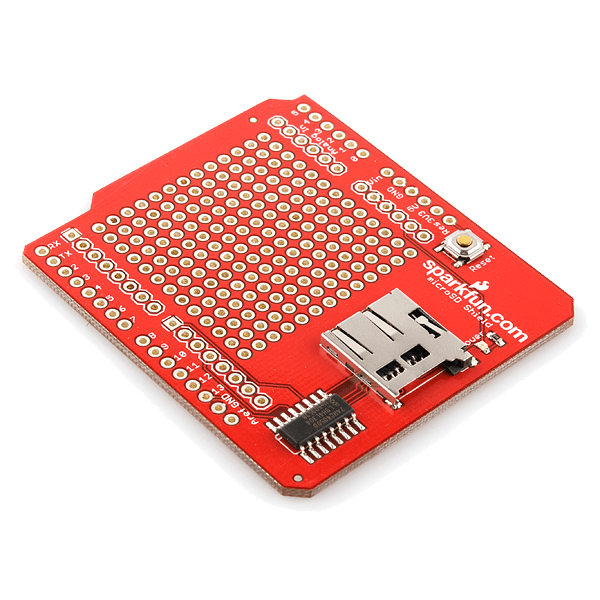
Running out of memory space in your Arduino project? The microSD Shield equips your Arduino with mass-storage capability, so you can use it for data-logging or other related projects.
After taking a figurative lashing from the comments section we're begging for mercy by updating the microSD Shield board.
All new microSD shields have a voltage converter chip on-board that converts the Arduino 5V signals to 3.3V signals in accordance with SD specifications.
No more 'blown up' SD cards!
Communication with microSD cards is achieved over an SPI interface.
The SCK, DI, and DO pins of the microSD socket are broken out to the ATmega168/328's standard SPI pins (digital 11-13), while the CS pin is broken out to Arduino's D8 pin. If you decide to use one of the many open source FAT libraries (like FAT16 or SDFat) make sure to change the code to reflect the location of the CS pin.
Most libraries assume the CS pin is connected to D10; this will have to be changed to D8. Also for the libraries to work pin D10 will have to be set as an output in the 'setup()' section of your sketch.
The shield also includes a large prototyping area with a 13x12 grid of 0.1" pitch PTHs.
This shield comes populated with a microSD socket, red power indicator LED, and a reset button; but it does not come with headers installed. We recommend the 6 and 8-pin stackable headers.
Documents:
- Example sketch
- Schematic
- Eagle Files
- FAT16 Library (Unzip this folder in the Arduino Libraries Folder. Once unzipped you can find an example by going to File->Examples->FAT->FAT_Example in Arduino. You must re-open Arduino after unzipping the folder.
Abakora ibishushanyo binjiza iri janisha iyo abakiriya baguze banyuze mu Bishushanyo byabo