فنون
الجمال والعناية
حِرَف
الثقافة والتاريخ
ترفيه
البيئة
الطعام والمشروبات
الهندسة العكسية
العلوم
رياضة
التقنية
الأجهزة القابلة للارتداء
مترجم
BLUEPRINT NFT


وميض LED — مشروعك الأول مع Arduino
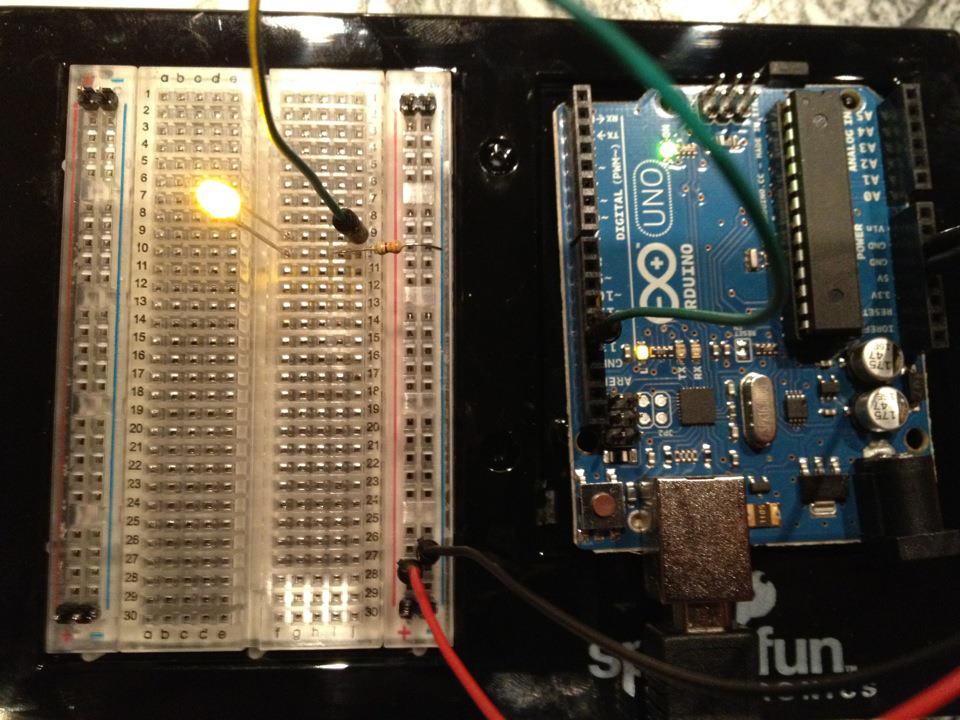
المشروع الإلكتروني الأول الكلاسيكي! بناء دارة وميض LED باستخدام Arduino ولوحة التجارب ومقاوم وLED واحد. مثالي للمبتدئين تماماً — لا يتطلب لحام.
التعليمات
1
1
جمع مكوناتك
جمع مكوناتك
قم بجمع جميع المكونات المدرجة أدناه. لا حاجة للحام — كل شيء يتصل بلوحة التجارب.
المواد لهذه الخطوة:
 مجموعة SparkFun للمخترعين - V3.21 طقم
الأدوات المطلوبة:
 حاسوب عليه بيئة Arduino IDE
2
2
مخطط الدائرة الكهربائية
مخطط الدائرة الكهربائية
يتدفق الإشارة من Arduino Pin 13 → مقاومة 220Ω (R1) → LED (D1) → GND. تحد المقاومة من التيار لحماية LED.
المواد لهذه الخطوة:
 Arduino Uno R31 قطعة
 مصباح LED قياس 5 مم1 قطعة
 طقم مقاومات ربع واط1 قطعة
3
3
وصلها
وصلها
- أدرج LED في لوحة التجارب — الرجل الطويل (الأنود +) في صف واحد، الرجل القصير (الكاثود −) في الصف التالي.
- أدرج أحد طرفي مقاومة 220Ω في نفس الصف مع كاثود LED. الطرف الآخر في صف منفصل.
- سلك الوصل من صف الأنود LED → دبوس Arduino 13.
- سلك الوصل من صف المقاومة الحر → Arduino GND.
المواد لهذه الخطوة:
مصباح LED قياس 5 مم1 قطعةطقم مقاومات ربع واط1 قطعة لوحة تجارب1 قطعة
 أسلاك توصيل2 قطع
4
4
تحميل كود الوميض
تحميل كود الوميض
قم بتوصيل Arduino عبر USB. افتح Arduino IDE، واختر Tools → Board → Arduino Uno، والصق الكود، وانقر على Upload.
blink.inoarduino
المواد لهذه الخطوة:
Arduino Uno R31 قطعةالأدوات المطلوبة:
حاسوب عليه بيئة Arduino IDE كبل USB-B
5
5
PCB التخطيط (مرجع)
PCB التخطيط (مرجع)
يوضح هذا الدائرة كتخطيط PCB. غير مطلوب لهذا المشروع — لوح التجارب يعمل بشكل مثالي — لكنه يوضح كيف ستبدو نفس الدائرة إذا تم تصنيعها كلوح حقيقي.
6
6
الاختبار والتجربة
الاختبار والتجربة
LED يومض؟ تهانينا! لقد برمجت للتو الأجهزة.
استكشاف الأخطاء:
التجارب التالية:
استكشاف الأخطاء:
- LED لا يضيء؟ اقلب LED — الرجل الطويلة باتجاه Pin 13.
- LED يبقى مضاءً؟ تحقق من تحميل الكود بنجاح.
- لا يحدث شيء؟ تحقق من أن الأسلاك تطابق الرسم التخطيطي في الخطوة 2.
التجارب التالية:
- غير قيم
delay()للتحكم في سرعة الوميض - أضف LED ثانية على Pin 12
- استبدل بـ RGB LED (انظر SIK Circuit 3)
المواد
6- مجموعة SparkFun للمخترعين - V3.2عمولة 10%1 طقم$106.94
- عنصر نائب
- عنصر نائب
- 1 قطعةعنصر نائب
- عنصر نائب
- عنصر نائب
الأدوات المطلوبة
3- عنصر نائب
- 1 vendor sell this, none ship to you yetعنصر نائب
- Optional, pre-made jumper wires do not need strippingعنصر نائب
التكلفة الإجمالية المقدرة
ما اشتراه صانع المشروع. المواد التي تظهر بلا سعر تُشترى من حيث تجدها.
CC0 ملكية عامة
هذا المخطط مُصدر بموجب CC0. يحق لك نسخه وتعديله وتوزيعه واستخدامه لأي غرض، دون طلب إذن.
ادعم الصانع بشراء منتجات عبر مخططه حيث يكسب عمولة الصانع يحددها البائعون، أو أنشئ نسخة جديدة من هذا المخطط وضمّنه كرابط في مخططك لمشاركة الإيرادات.