ศิลปะ
ความงามและสุขภาพ
งานฝีมือ
วัฒนธรรมและประวัติศาสตร์
ความบันเทิง
สิ่งแวดล้อม
อาหารและเครื่องดื่ม
วิศวกรรมย้อนรอย
วิทยาศาสตร์
กีฬา
เทคโนโลยี
อุปกรณ์สวมใส่
แปลแล้ว
BLUEPRINT NFT


กระพริบ LED — โครงการ Arduino แรกของคุณ
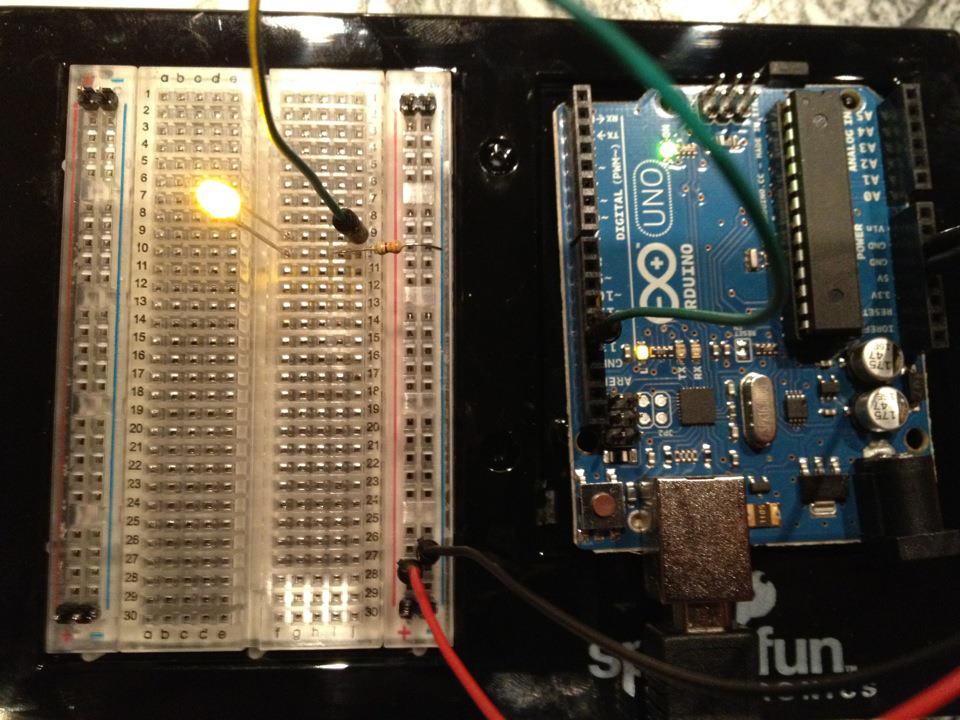
โครงการอิเล็กทรอนิกส์คลาสสิกแรก! สร้างวงจร LED ที่กระพริบโดยใช้ Arduino บอร์ดทดลอง ตัวต้านทาน และ LED เพียงตัวเดียว เหมาะสำหรับผู้เริ่มต้นแบบสัมบูรณ์ — ไม่จำเป็นต้องบัดกรี
คำแนะนำ
1
1
รวบรวมส่วนประกอบของคุณ
รวบรวมส่วนประกอบของคุณ
รวบรวมส่วนประกอบทั้งหมดที่แสดงรายการด้านล่าง ไม่จำเป็นต้องบัดกรี — ทุกอย่างเสียบเข้าไปในเบรดบอร์ด
วัสดุสำหรับขั้นตอนนี้:
 SparkFun Inventor's Kit - V3.21 ชุด
เครื่องมือที่ต้องใช้:
 คอมพิวเตอร์ที่ติดตั้ง Arduino IDE
2
2
แผนผังวงจร
แผนผังวงจร
สัญญาณไหลจาก Arduino Pin 13 → ตัวต้านทาน 220Ω (R1) → LED (D1) → GND। ตัวต้านทานจำกัดกระแสเพื่อปกป้อง LED।
วัสดุสำหรับขั้นตอนนี้:
 Arduino Uno R31 ชิ้น
 หลอด LED 5 มม.1 ชิ้น
 ชุดตัวต้านทาน 1/4 วัตต์1 ชิ้น
3
3
เชื่อมต่อสายไฟ
เชื่อมต่อสายไฟ
- แทรก LED เข้าไปในเบรดบอร์ด — ขายาว (anode +) ในแถวหนึ่ง ขาสั้น (cathode −) ในแถวถัดไป
- แทรกขาหนึ่งของ 220Ω resistor เข้าไปในแถวเดียวกับ cathode ของ LED ขาอีกข้างหนึ่งในแถวแยกต่างหาก
- Jumper wire จาก anode row ของ LED → Arduino Pin 13
- Jumper wire จาก resistor free row → Arduino GND
วัสดุสำหรับขั้นตอนนี้:
หลอด LED 5 มม.1 ชิ้นชุดตัวต้านทาน 1/4 วัตต์1 ชิ้น เบรดบอร์ด1 ชิ้น
 สายจัมเปอร์2 ชิ้น
4
4
อัปโหลดโค้ด Blink
อัปโหลดโค้ด Blink
เชื่อมต่อ Arduino ผ่าน USB เปิด Arduino IDE เลือก Tools → Board → Arduino Uno วางโค้ดแล้วคลิก Upload
blink.inoarduino
วัสดุสำหรับขั้นตอนนี้:
Arduino Uno R31 ชิ้นเครื่องมือที่ต้องใช้:
คอมพิวเตอร์ที่ติดตั้ง Arduino IDE สาย USB-B
5
5
PCB เค้าโครง (อ้างอิง)
PCB เค้าโครง (อ้างอิง)
นี่แสดงวงจรเป็น PCB เค้าโครง ไม่จำเป็นสำหรับโครงการนี้ — บอร์ดทดลองทำงานได้อย่างสมบูรณ์ — แต่แสดงว่าวงจรเดียวกันจะมีลักษณะอย่างไรหากผลิตเป็นบอร์ดจริง
6
6
ทดสอบและการทดลอง
ทดสอบและการทดลอง
LED กระพริบหรือไม่? ยินดีด้วย! คุณเพิ่งเขียนโปรแกรมฮาร์ดแวร์เสร็จแล้ว
การแก้ไขปัญหา:
การทดลองต่อไป:
การแก้ไขปัญหา:
- LED ไม่สว่างหรือไม่? พลิก LED — ขายาวชี้ไปที่ Pin 13
- LED อยู่ในสถานะเปิดอยู่เสมอ? ตรวจสอบว่าโค้ดอัปโหลดเสร็จสิ้นแล้ว
- ไม่มีอะไรเกิดขึ้น? ยืนยันว่าการเดินสายตรงกับแผนผังในขั้นตอนที่ 2
การทดลองต่อไป:
- เปลี่ยนค่า
delay()เพื่อควบคุมความเร็วของการกระพริบ - เพิ่ม LED ตัวที่สองบน Pin 12
- แทนที่ด้วย RGB LED (ดู SIK Circuit 3)
วัสดุ
6- SparkFun Inventor's Kit - V3.2ค่าคอมมิชชัน 10%1 ชุด$106.94
- ตัวยึดตำแหน่ง
- ตัวยึดตำแหน่ง
- 1 ชิ้นตัวยึดตำแหน่ง
- ตัวยึดตำแหน่ง
- ตัวยึดตำแหน่ง
เครื่องมือที่จำเป็น
3- ตัวยึดตำแหน่ง
- 1 vendor sell this, none ship to you yetตัวยึดตำแหน่ง
- Optional, pre-made jumper wires do not need strippingตัวยึดตำแหน่ง
ยอดรวมประมาณ
สิ่งที่ผู้ทำซื้อมา วัสดุที่ไม่แสดงราคาให้หาซื้อจากที่ที่คุณซื้อได้
CC0 สาธารณสมบัติ
พิมพ์เขียวนี้เผยแพร่ภายใต้ CC0 คุณสามารถคัดลอก แก้ไข แจกจ่าย และใช้งานผลงานนี้เพื่อวัตถุประสงค์ใดก็ได้ โดยไม่ต้องขออนุญาต
สนับสนุนเมกเกอร์โดยซื้อสินค้าผ่านพิมพ์เขียวของพวกเขา ซึ่งพวกเขาจะได้รับ ค่าคอมมิชชันเมกเกอร์ ที่ผู้ขายกำหนด หรือสร้างเวอร์ชันใหม่ของพิมพ์เขียวนี้และรวมเป็นการเชื่อมต่อในพิมพ์เขียวของคุณเพื่อแบ่งรายได้