SANAT
GÜZELLİK & SAĞLIK
ZANAAT
KÜLTÜR & TARİH
EĞLENCE
ÇEVRE
YİYECEK & İÇECEK
TERS MÜHENDİSLİK
BİLİMLER
SPOR
TEKNOLOJİ
GİYİLEBİLİR ÜRÜNLER
Çevrildi
BLUEPRINT NFT
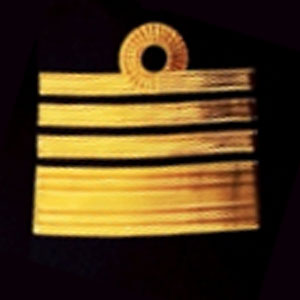

Yanıp Sönen LED — İlk Arduino Projeniz
Klasik ilk elektronik projesi! Arduino, breadboard, bir direnç ve tek bir LED kullanarak yanıp sönen LED devresi oluşturun. Mutlak yeni başlayanlar için mükemmel — lehimleme gerekli değildir.
Talimatlar
1
1
Bileşenlerinizi Toplayın
Bileşenlerinizi Toplayın
Aşağıda listelenen tüm bileşenleri toplayın. Lehimlemeye gerek yok — her şey breadboard'a takılır.
Bu adım için malzemeler:
 SparkFun Mucitler Kiti - V3.21 takım
Gerekli aletler:
 Arduino IDE Kurulu Bilgisayar
2
2
Devre Şeması
Devre Şeması
Sinyal, Arduino Pin 13 → 220Ω direnç (R1) → LED (D1) → GND yolundan akar. Direnç, LED koruması için akımı sınırlar.
Bu adım için malzemeler:
 Arduino Uno R31 adet
 5 mm LED1 adet
 1/4 W Direnç Seti1 adet
3
3
Kabloları Bağla
Kabloları Bağla
- LED öğesini breadboard'a takın — uzun bacak (anode +) bir sıraya, kısa bacak (katod −) sonraki sıraya.
- 220Ω dirençin bir bacağını LED katodunun bulunduğu sıraya takın. Diğer bacak ayrı bir sıraya.
- Jumper kablosunu LED anode sırası → Arduino Pin 13 üzerine takın.
- Jumper kablosunu direnç boş sırası → Arduino GND üzerine takın.
Bu adım için malzemeler:
5 mm LED1 adet1/4 W Direnç Seti1 adet Devre Tahtası1 adet
 Jumper kablo (erkek-erkek)2 adet
4
4
Blink Kodunu Yükle
Blink Kodunu Yükle
Arduino'yu USB ile bağlayın. Arduino IDE'yi açın, Tools → Board → Arduino Uno seçin, kodu yapıştırın ve Upload'a tıklayın.
blink.inoarduino
Bu adım için malzemeler:
Arduino Uno R31 adet USB-B kablosu1 adet
Gerekli aletler:
Arduino IDE Kurulu Bilgisayar5
5
PCB Düzeni (Referans)
PCB Düzeni (Referans)
Bu, devreyi PCB düzeni olarak gösterir. Bu proje için gerekli değildir — breadboard mükemmel şekilde çalışır — ancak aynı devrenin gerçek bir kart olarak üretilirse nasıl görüneceğini gösterir.
6
6
Test ve Deneme
Test ve Deneme
LED yanıp sönüyor? Tebrikler! Az önce donanım programladınız.
Sorun Giderme:
Sonraki deneyler:
Sorun Giderme:
- LED yanmıyor mu? LED öğesini çevirin — uzun bacak Pin 13'e doğru.
- LED sürekli açık mı? Kodun başarıyla yüklendiğini kontrol edin.
- Hiçbir şey olmuyor mu? Kablolama işleminin Adım 2'deki şemaya uygun olduğunu doğrulayın.
Sonraki deneyler:
- Yanıp sönme hızını kontrol etmek için
delay()değerlerini değiştirin - Pin 12'ye ikinci bir LED ekleyin
- Bir RGB LED ile değiştirin (SIK Devre 3'e bakın)
Malzemeler
7- SparkFun Mucitler Kiti - V3.2%10 komisyon1 takım$104.26
- Yer Tutucu
- Yer Tutucu
- 1 adetYer Tutucu
- Yer Tutucu
- Yer Tutucu
- Yer Tutucu
Gerekli Aletler
2- Yer Tutucu
- Optional, pre-made jumper wires do not need strippingYer Tutucu
Tahmini toplam
Yapan kişinin satın aldıkları. Fiyatsız görünen malzemeleri nereden alıyorsanız oradan temin edersiniz.
CC0 Kamu Malı
Bu plan CC0 lisansıyla yayınlanmıştır. İzin almadan kopyalayabilir, değiştirebilir, dağıtabilir ve herhangi bir amaçla kullanabilirsiniz.
Planı üzerinden ürün satın alarak Maker'ı destekleyin, böylece Maker Komisyonu Satıcılar tarafından belirlenen komisyonu kazanırlar veya bu Planın yeni bir versiyonunu oluşturun ve gelir paylaşımı için kendi Planınıza bağlantı olarak ekleyin.