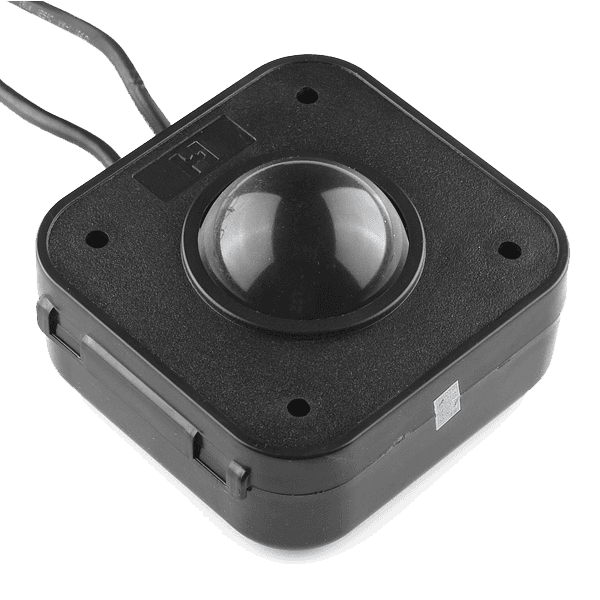
Trackball - PS/2
If you're looking for a fun input device for your project this thing is a ball... really!
This trackball communicates via PS/2 just like your computer mouse (okay, like your old computer mouse) and provides X and Y axis control as well as three separate button-clicks (activated by pulling the included spade connectors to ground).
The ball itself is 5 cm in diameter, made from clear acrylic and lit from below by four LEDs: two green LEDs show that the trackball is powered, two red LEDs indicate a button-click.
This thing is just begging to be hacked.
The 10x10x4 cm case simply snaps together and can be pulled apart with very little effort.
It also has a 31 mm mounting hole at each of it's four corners that drops all of the way through the case.
Note: The pinout for the button-click spade connectors is as follows: black is GND; white is right-click; yellow is left-click; and red is middle-click ('scroll-wheel' click).
The ground line has 3 spade connectors, one for each button.
They can be connected directly to our Concave Retro Gaming Buttons!
Dimensions: 10 x 10 cm, 4 cm tall without ball / 6 cm including ball.
Features:
- PS/2 interface
- 5 foot cable
- Left/Middle/Right-Click Button Leads
- Red and Green Status LEDs
- 2" Clear Acrylic Ball
Documents:
- Arduino Example
- PS/2 Pinout Diagram
- Roll-a-tone Example Code
Blueprint creators earn this percentage when customers purchase through their Blueprints