
NGHỆ THUẬT
LÀM ĐẸP VÀ SỨC KHỎE
THỦ CÔNG
VĂN HÓA VÀ LỊCH SỬ
GIẢI TRÍ
MÔI TRƯỜNG
THỰC PHẨM VÀ ĐỒ UỐNG
TƯƠNG LAI XANH
KỸ THUẬT NGƯỢC
KHOA HỌC
THỂ THAO
CÔNG NGHỆ
THIẾT BỊ ĐEO
Driving an RGB LED — SIK Circuit 3
Ed

Tạo bởi

Ed

17. tháng Ba 2026FI
47
0
0
0
0

Driving an RGB LED — SIK Circuit 3

Make an RGB LED display a rainbow of colors! Learn about PWM (analogWrite), color mixing, and how red, green, and blue light combine to create any color.

Hướng dẫn

1

Parts & Introduction

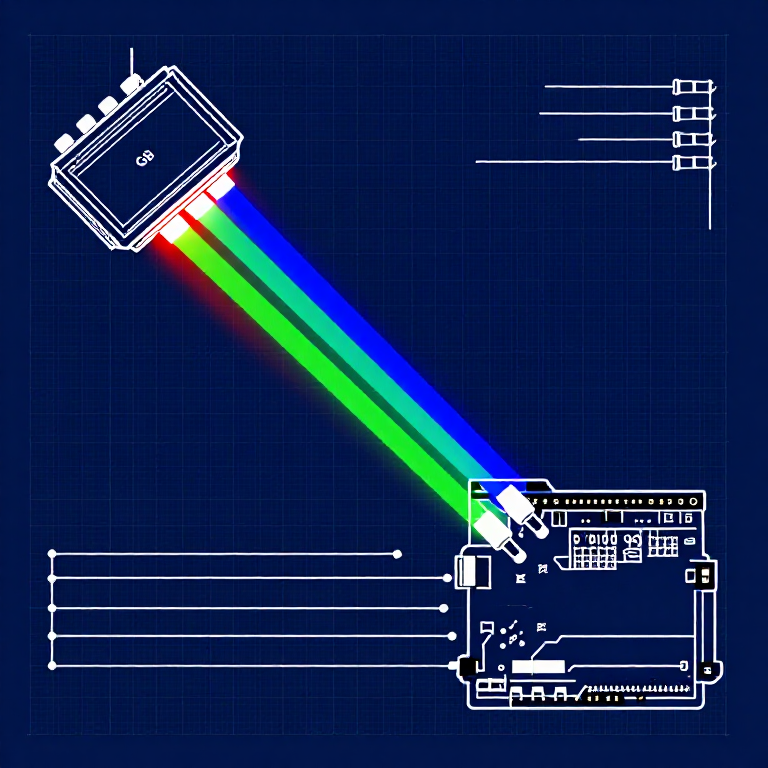
An RGB LED contains three tiny LEDs (red, green, blue) in one package. By mixing different brightness levels of each color, you can create any color in the rainbow. This experiment introduces analogWrite() for PWM output.

Parts Needed

  • 1x Arduino Uno + USB cable
  • 1x Breadboard
  • 1x RGB LED (Common Cathode)
  • 3x 330Ω Resistors
  • 5x Jumper Wires

RGB LED Pin Order (flat edge facing you): Red, Ground (longest pin), Green, Blue.

Vật liệu cho bước này:

SparkFun Inventors Kit - V3.2SparkFun Inventors Kit - V3.21 bộ
Arduino Uno R3Arduino Uno R31 cái
BreadboardBreadboard1 cái
RGB LED (Common Cathode)RGB LED (Common Cathode)1 cái
330 Ohm Resistor330 Ohm Resistor3 cái
Jumper WiresJumper Wires5 cái

Công cụ cần thiết:

Computer with Arduino IDE
2

Hardware Hookup

Wiring Instructions

  1. Place the RGB LED in the breadboard. Identify pins from the flattened edge: Red, GND (longest), Green, Blue.
  2. Connect the GND pin (longest, second from left) to the GND rail.
  3. Connect the Red pin through a 330Ω resistor to Arduino Pin 9.
  4. Connect the Green pin through a 330Ω resistor to Arduino Pin 10.
  5. Connect the Blue pin through a 330Ω resistor to Arduino Pin 11.

Pins 9, 10, and 11 are all PWM-capable (marked with ~ on the board).

Vật liệu cho bước này:
RGB LED (Common Cathode)RGB LED (Common Cathode)1 cái
330 Ohm Resistor330 Ohm Resistor3 cái
BreadboardBreadboard1 cái
Jumper WiresJumper Wires5 cái
3

Arduino Code

Open the Arduino IDE and upload the following sketch to your Arduino board.

rgb_led.inoarduino
/*
SparkFun Inventor's Kit
Example sketch 03 — RGB LED

Make an RGB LED display a rainbow of colors!

Hardware connections:
  RGB LED pins (from flattened edge): RED, COMMON, GREEN, BLUE
  RED -> 330 ohm resistor -> Pin 9
  COMMON -> GND
  GREEN -> 330 ohm resistor -> Pin 10
  BLUE -> 330 ohm resistor -> Pin 11

This code is completely free for any use.
*/

const int RED_PIN = 9;
const int GREEN_PIN = 10;
const int BLUE_PIN = 11;

int DISPLAY_TIME = 10;  // milliseconds

void setup()
{
  pinMode(RED_PIN, OUTPUT);
  pinMode(GREEN_PIN, OUTPUT);
  pinMode(BLUE_PIN, OUTPUT);
}

void loop()
{
  mainColors();
  showSpectrum();
}

void mainColors()
{
  // Off
  digitalWrite(RED_PIN, LOW);
  digitalWrite(GREEN_PIN, LOW);
  digitalWrite(BLUE_PIN, LOW);
  delay(1000);

  // Red
  digitalWrite(RED_PIN, HIGH);
  digitalWrite(GREEN_PIN, LOW);
  digitalWrite(BLUE_PIN, LOW);
  delay(1000);

  // Green
  digitalWrite(RED_PIN, LOW);
  digitalWrite(GREEN_PIN, HIGH);
  digitalWrite(BLUE_PIN, LOW);
  delay(1000);

  // Blue
  digitalWrite(RED_PIN, LOW);
  digitalWrite(GREEN_PIN, LOW);
  digitalWrite(BLUE_PIN, HIGH);
  delay(1000);

  // Yellow (red + green)
  digitalWrite(RED_PIN, HIGH);
  digitalWrite(GREEN_PIN, HIGH);
  digitalWrite(BLUE_PIN, LOW);
  delay(1000);

  // Cyan (green + blue)
  digitalWrite(RED_PIN, LOW);
  digitalWrite(GREEN_PIN, HIGH);
  digitalWrite(BLUE_PIN, HIGH);
  delay(1000);

  // Purple (red + blue)
  digitalWrite(RED_PIN, HIGH);
  digitalWrite(GREEN_PIN, LOW);
  digitalWrite(BLUE_PIN, HIGH);
  delay(1000);

  // White (all on)
  digitalWrite(RED_PIN, HIGH);
  digitalWrite(GREEN_PIN, HIGH);
  digitalWrite(BLUE_PIN, HIGH);
  delay(1000);
}

void showSpectrum()
{
  int x;
  for (x = 0; x < 768; x++)
  {
    showRGB(x);
    delay(DISPLAY_TIME);
  }
}

void showRGB(int color)
{
  int redIntensity;
  int greenIntensity;
  int blueIntensity;

  if (color <= 255)
  {
    redIntensity = 255 - color;
    greenIntensity = color;
    blueIntensity = 0;
  }
  else if (color <= 511)
  {
    redIntensity = 0;
    greenIntensity = 255 - (color - 256);
    blueIntensity = (color - 256);
  }
  else
  {
    redIntensity = (color - 512);
    greenIntensity = 0;
    blueIntensity = 255 - (color - 512);
  }

  analogWrite(RED_PIN, redIntensity);
  analogWrite(GREEN_PIN, greenIntensity);
  analogWrite(BLUE_PIN, blueIntensity);
}

Vật liệu cho bước này:

Arduino Uno R3Arduino Uno R31 cái

Công cụ cần thiết:

Computer with Arduino IDE
4

Test & Experiment

What You Should See

The LED cycles through 8 solid colors (off, red, green, blue, yellow, cyan, purple, white) for 1 second each, then smoothly fades through the entire color spectrum.

Troubleshooting

  • Incorrect colors: With four pins close together, it's easy to misplace one. Double-check each connection.
  • Red too bright: The red diode is often brighter. Try a higher-value resistor on the red pin, or reduce in code: analogWrite(RED_PIN, redIntensity/3).

Experiments to Try

  • Add a potentiometer to control which color is displayed.
  • Create your own color sequences — try a "sunrise" effect (dark red → orange → yellow → white).

Vật liệu

6

Công cụ yêu cầu

1
  • Computer with Arduino IDE
Tổng ước tính
$139.00

CC0 Phạm vi công cộng

Bản thiết kế này được phát hành theo CC0. Bạn tự do sao chép, sửa đổi, phân phối và sử dụng cho bất kỳ mục đích nào mà không cần xin phép.

Hỗ trợ nhà sáng tạo bằng cách mua sản phẩm qua bản thiết kế, nơi họ nhận Hoa hồng nhà sáng tạo do nhà bán hàng đặt, hoặc tạo phiên bản mới và kết nối trong bản thiết kế riêng để chia sẻ doanh thu.

Thảo luận

(0)

Đăng nhập để tham gia thảo luận

Đang tải bình luận...



