NGHỆ THUẬT
LÀM ĐẸP VÀ SỨC KHỎE
THỦ CÔNG
VĂN HÓA VÀ LỊCH SỬ
GIẢI TRÍ
MÔI TRƯỜNG
THỰC PHẨM VÀ ĐỒ UỐNG
KỸ THUẬT NGƯỢC
KHOA HỌC
THỂ THAO
CÔNG NGHỆ
THIẾT BỊ ĐEO
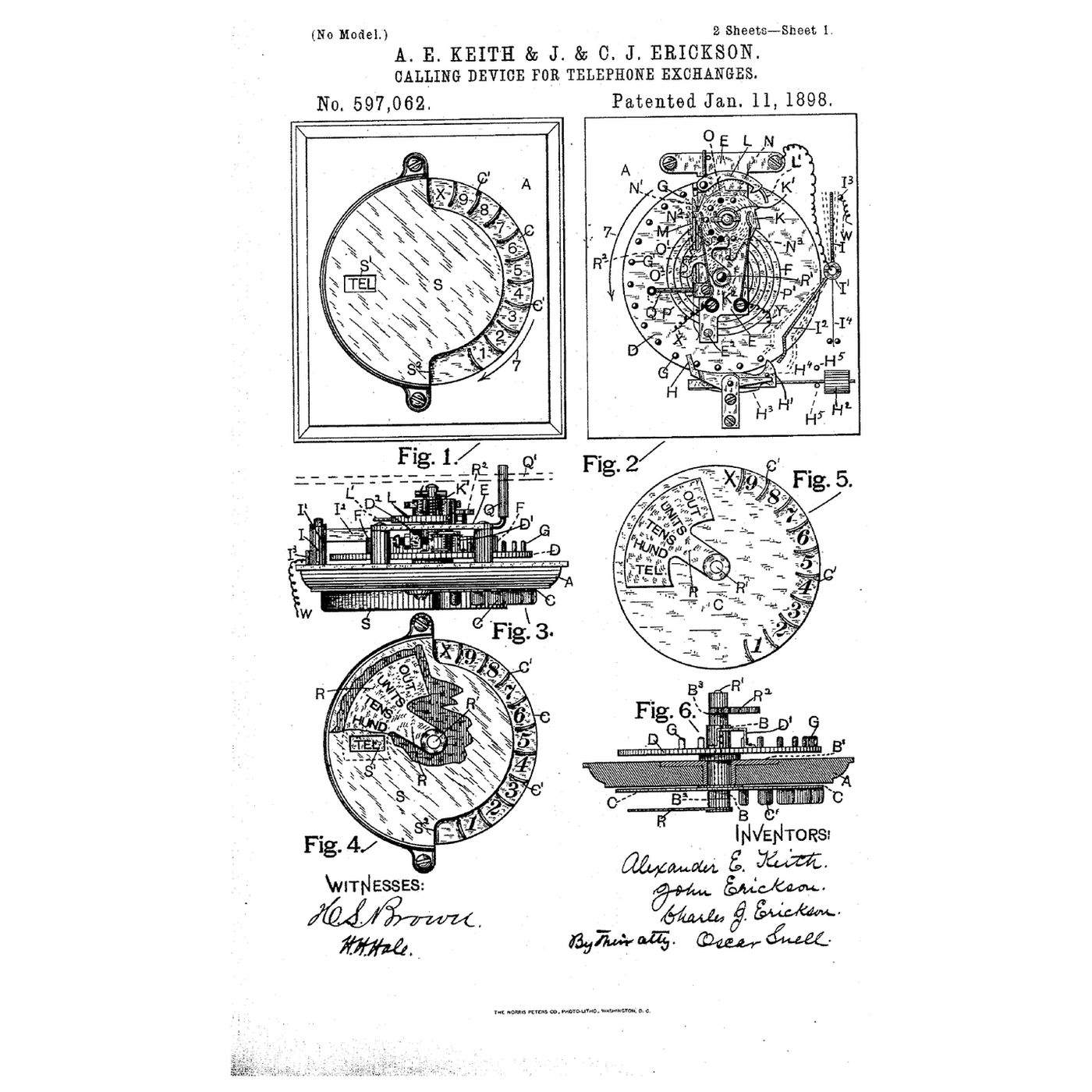


The Rotary Dial: A Number Sent as a Count of Breaks
Strowger's automatic exchange stepped a selector once for each pulse it received — but early subscribers had to send those pulses by pressing buttons, a count at a time. The dial made it natural: pull a finger-hole round to a stop and let go, and the spring-driven return breaks the line once for each hole it passes.
Alexander E. Keith, John Erickson and Charles J. Erickson of Chicago, assignors to the Strowger Automatic Telephone Exchange, filed US 597,062, *Calling Device for Telephone-Exchanges*, on 20 August 1896; it was granted 11 January 1898. Its finger-holds are set in a circle, a spring returns the dial, an escapement limits the return, and a switch in the return movement sends the impulses.
This rung draws the pulse train, shows why the return must run at a steady speed, and decodes dialled pulses into digits with an Arduino.
Cơ bản
About 3 hours
Hướng dẫn
1
1
The pulse train and the steady return
The pulse train and the steady return
Đang tải sổ tay Jupyter…
2
2
What the pulses drive
What the pulses drive
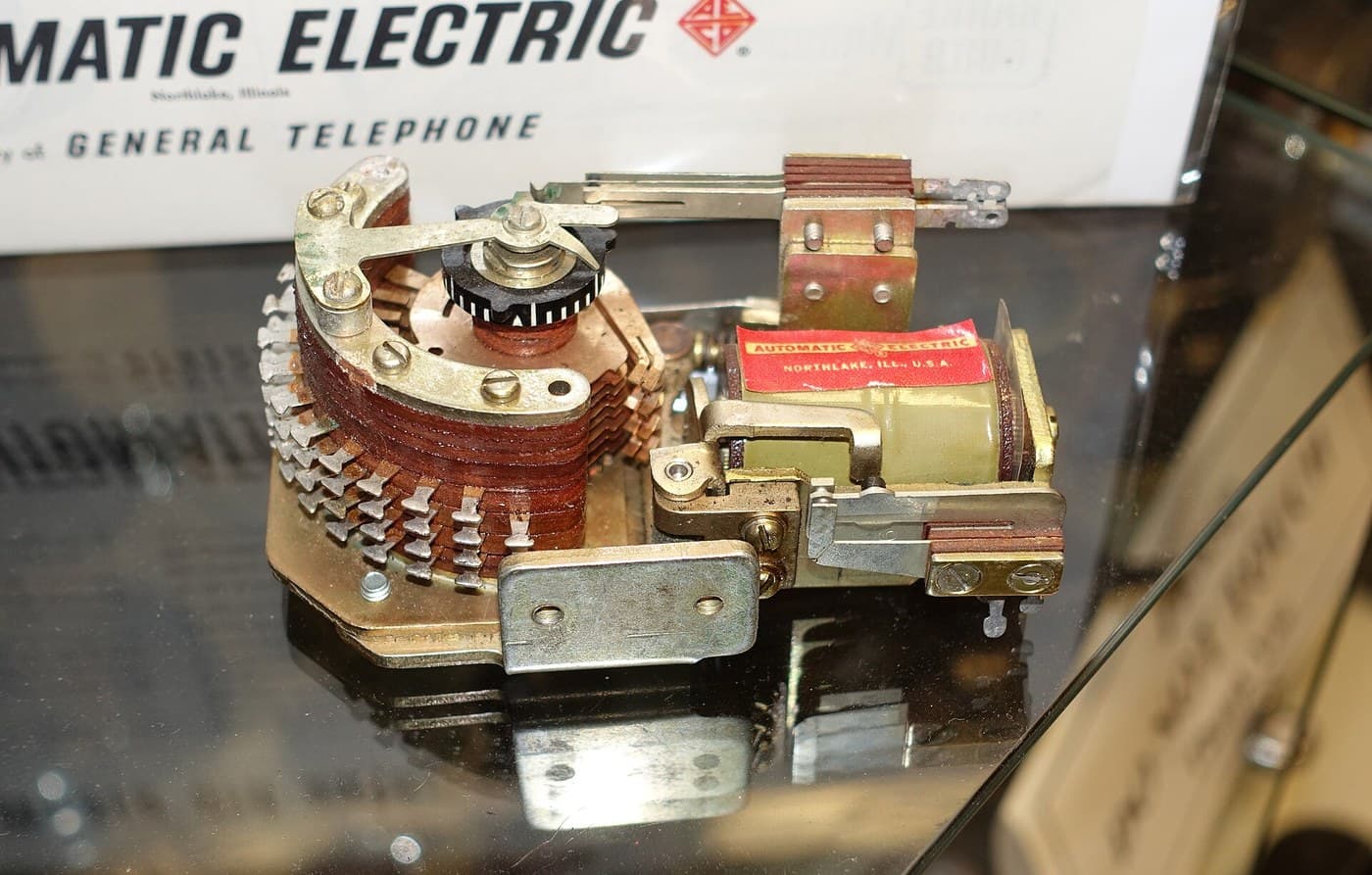
Each break steps a Strowger selector one position. The embedded blueprint shows the exchange the dial was designed to feed.
3
3
Read the 1896 calling device
Read the 1896 calling device
US 597,062 describes the device as "a series of movable finger-holds of which some one is moved up to a stop and then released", the holds "disposed … in circular order". A helical spring K′ on the ratchet wheel returns the mechanism; the return is "limited by an escapement mechanism" whose pallets engage the pins of an escapement wheel, and a circuit-breaker makes the impulses as it returns. An indicator shows which of several magnets at the distant station is being worked.
The later rotary dial kept the principle — wind by hand, send on the spring-driven return at a governed speed — and moved the finger-holds into the familiar perforated finger wheel.
4
4
The sketch that decodes the pulses
The sketch that decodes the pulses
Counts breaks on pin 2, ends a digit after a 300 ms gap and a number after 3 s, and prints the digits. Ten breaks is 0.
dial_decoder.inoarduino
Vật liệu cho bước này:
 Arduino Uno R31 cái
 Nút nhấn1 cái
 Dây nối1 cái
 Bảng cắm mạch1 cái
 Đĩa quay số1 cái
Công cụ cần thiết:
 Máy tính cài Arduino IDE
 Đồng hồ vạn năng
5
5
Dial into it
Dial into it
Upload the sketch and open the serial monitor at 9600 baud. With a push button between pin 2 and GND, press it quickly three times, pause, then press it once: the monitor prints 31. Hold the button closed between presses — a dial's pulse contacts are closed at rest and open for each break.
If you have a real rotary dial, find its pulse contacts with the multimeter on continuity: they read closed at rest and flicker open as the dial returns. Wire them in place of the button. Dial each digit and check the monitor. A dial whose digits come out one too many or too few has a pulse contact out of adjustment; one that prints ? is bouncing — raise DEBOUNCE_MS.
Công cụ cần thiết:
 Đồng hồ bấm giờ
6
6
A dial that sends wrong numbers
A dial that sends wrong numbers
Rotary dial faults, from the easiest to check.
Flow
Loading...
7
7
History and honest limits
History and honest limits
**Alexander E. Keith**, **John Erickson** and **Charles J. Erickson** filed **US 597,062** on 20 August 1896, assigned to the Strowger Automatic Telephone Exchange; it was granted 11 January 1898. Rotary dials spread with automatic exchanges through the early twentieth century and were replaced by push-button tone dialling from the 1960s.
**Honest limits.** The 10 breaks a second and 60/40 ratio are the later standard figures, not the 1896 patent's; exchanges accepted a range around them. The push button in the bench test cannot make breaks as regular as a governed dial.
Vật liệu
5- từ$26.65
- từ$9.36
- 1 cáiTạm thời
Công cụ yêu cầu
3- Tạm thời
- Tạm thời
- Tạm thời
Blueprint liên quan
Các blueprint này chia sẻ kiến thức — kỹ thuật, vật liệu hoặc nguyên tắc

CC0 Phạm vi công cộng
Bản thiết kế này được phát hành theo CC0. Bạn tự do sao chép, sửa đổi, phân phối và sử dụng cho bất kỳ mục đích nào mà không cần xin phép.
Hỗ trợ nhà sáng tạo bằng cách mua sản phẩm qua bản thiết kế, nơi họ nhận Hoa hồng nhà sáng tạo do nhà bán hàng đặt, hoặc tạo phiên bản mới và kết nối trong bản thiết kế riêng để chia sẻ doanh thu.