Zusammenarbeit
KUNST
SCHÖNHEIT & WELLNESS
HANDWERK
KULTUR & GESCHICHTE
UNTERHALTUNG
UMFELD
ESSEN & GETRÄNKE
REVERSE ENGINEERING
WISSENSCHAFTEN
SPORT
TECHNOLOGIE
WEARABLES
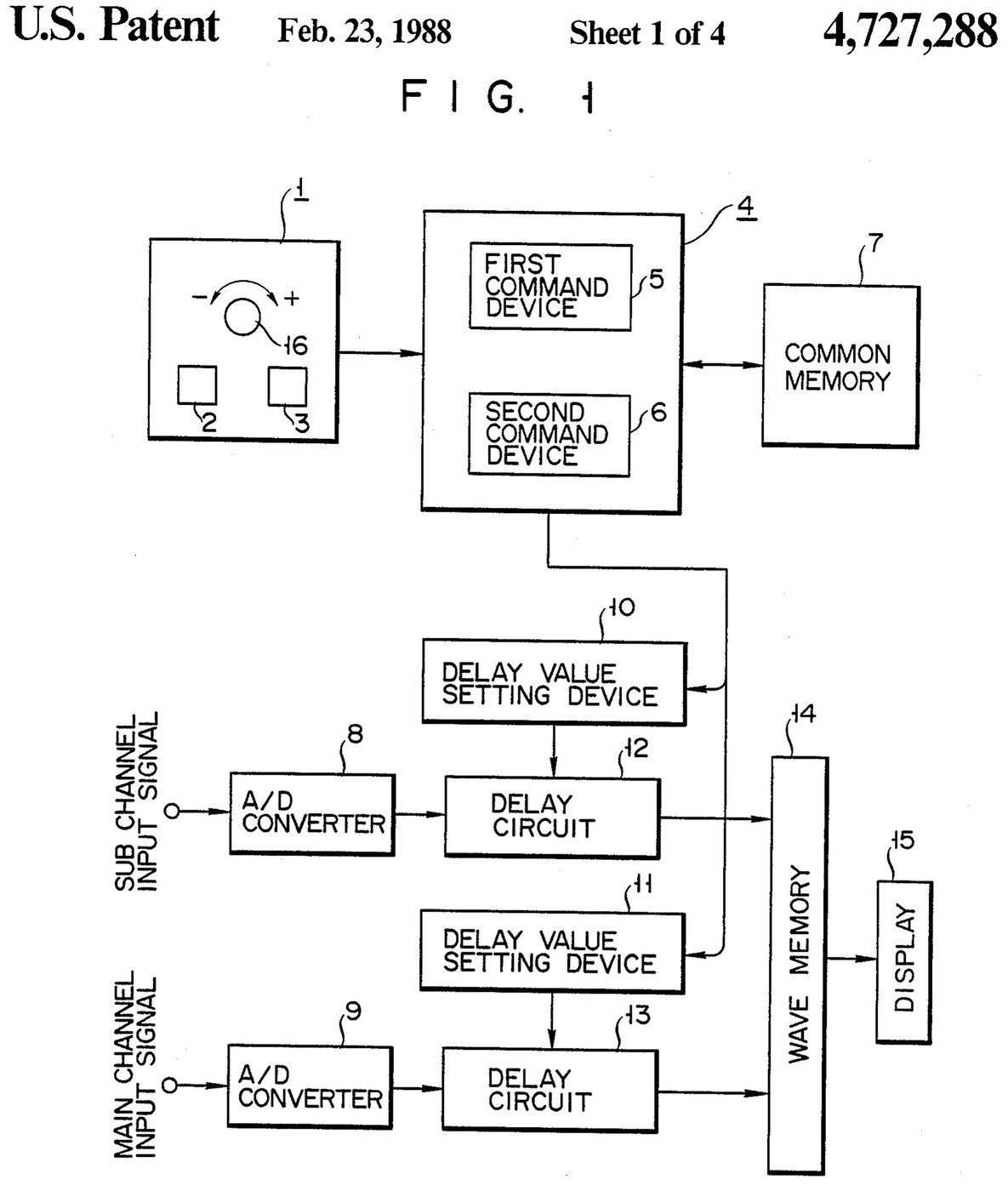

Oscilloscope: Two-Channel Digital, with a Delay per Channel and a Common Delay (Anritsu, US 4,727,288, 1988)
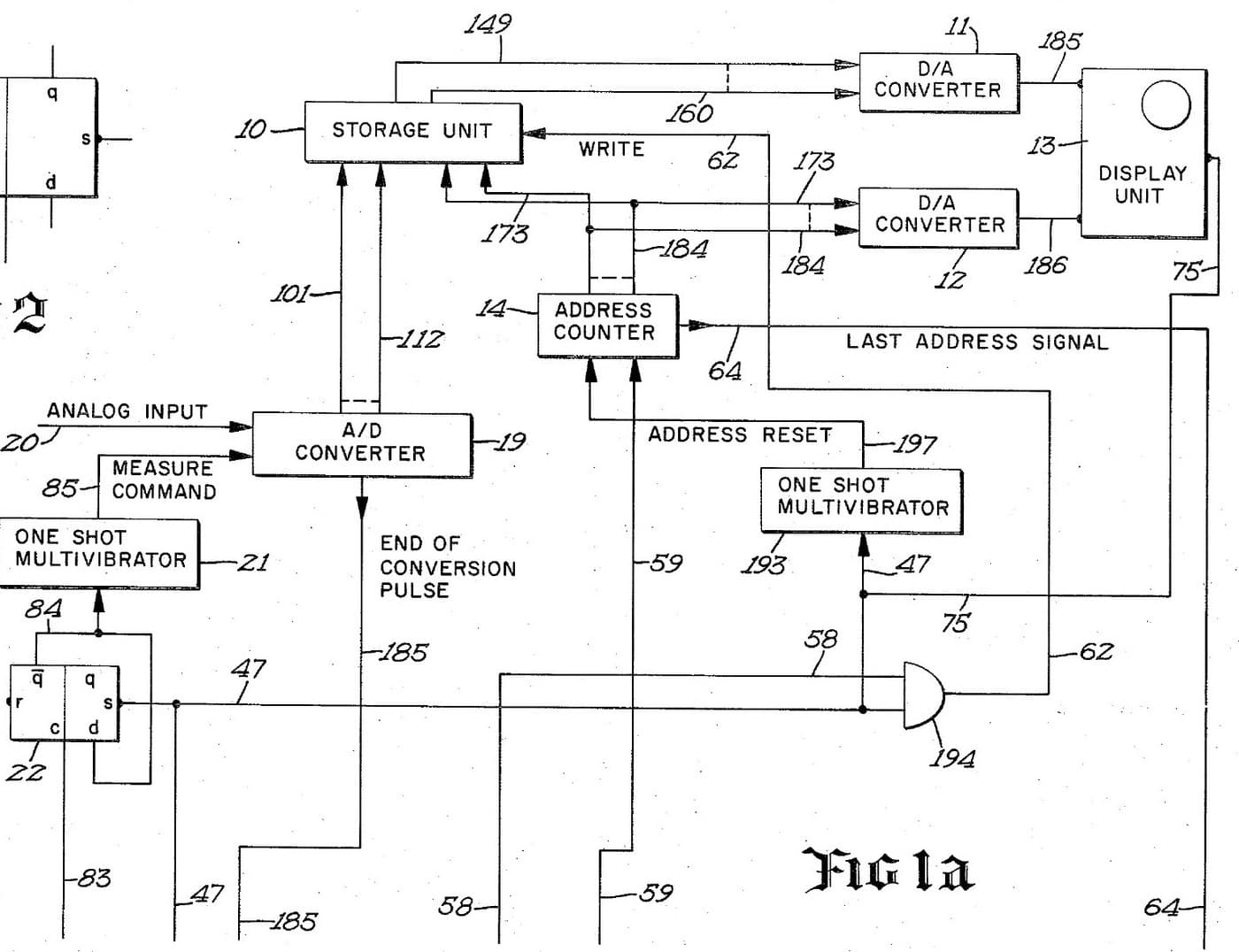
A two-channel digital oscilloscope. Each channel has its own converter and delay circuit. One knob, with a main and a sub button, sets the delays. The sub button shifts only the sub channel's wave, so you can line it up against the main one. The main button shifts both waves together and keeps the gap between them.
Result: a 2-channel digital oscilloscope that can move both traces along the time base without losing their phase difference.
Source: K. Nakatsugawa et al. (Anritsu), US 4,727,288 (1988). Unknown: sample rate, bandwidth, memory size and the display. Picture: the patent drawing.
Experte
Unknown
Anweisungen
1
1
Convert the two channels
Convert the two channels
Bring the main channel and the sub channel each to its own analog-to-digital converter. Ours: BNC sockets. Not given: the sample rate, the bandwidth.
Materialien für diesen Schritt:
 Analog-Digital-Wandler2 main and sub converters
 Koaxialstecker-Satz (BNC / SO-239)1 input sockets
Benötigte Werkzeuge:
 Lötkolben
 Abisolierzange
2
2
Delay, store and display
Delay, store and display
Pass each channel's digital signal through its own delay circuit, whose delay is set by its own delay value setting device. Store both delayed signals in a wave memory and show them on the display. Ours: logic ICs for the delay circuits and setting devices, IC memory, and a CRT driven through D/A converters. Not given: how the delay circuits are built, the memory size, the display.
Materialien für diesen Schritt:
 Logik-IC-Sortiment1 delay circuits and setting devices
 Halbleiterspeicher1 wave memory
 Digital-Analog-Umsetzer2 display drive
 Kathodenstrahlröhre1 display
Benötigte Werkzeuge:
LötkolbenAbisolierzange3
3
Build the delay panel and processor
Build the delay panel and processor
Make a delay operation panel with a main switch, a sub switch and one dial, with an encoder on the dial so each turn is read as a change in its output. Connect the panel to a microprocessor with a common memory that holds the sub channel's delay S in one area and the main channel's delay M in another. Mount it all in a case with its supply. Ours: push buttons, an aluminium case, a DC supply.
Materialien für diesen Schritt:
 Drucktaster2 main and sub switches
 Drehgeber1 delay dial
 Mikroprozessor1 command devicesHalbleiterspeicher1 common memory
 Aluminiumgehäuse1 case
Benötigte Werkzeuge:
 Gleichstromnetzgerät
 StandbohrmaschineLötkolben
4
4
Program the two commands
Program the two commands
When the dial turns, read the encoder change e and which switch is held. Sub switch: add e to S, set the sum in the sub channel's setting device and store it back as the new S. Main switch: add e to both M and S, set M + e in the main channel's device and S + e in the sub channel's, and store both back. The main command so moves both channels by the same amount and keeps their relative delay.
Benötigte Werkzeuge:
Lötkolben5
5
Compare two waves
Compare two waves
Feed two signals in. Hold the sub switch and turn the dial to slide the sub channel's wave against the main one. Then hold the main switch and turn the dial: both waves move along the time base together, with the phase difference between them unchanged. Test it with a known signal.
Benötigte Werkzeuge:
 Funktionsgenerator
Materialien
10- 2 main and sub convertersPlatzhalter
- 1 input socketsPlatzhalter
- 1 delay circuits and setting devicesPlatzhalter
- 1 common memoryPlatzhalter
- 2 display drivePlatzhalter
- 1 displayPlatzhalter
- Platzhalter
- Platzhalter
- 1 command devicesPlatzhalter
- 1 casePlatzhalter
Dieser Bauplan stellt her

Verwandte Blueprints
Diese Blueprints teilen Wissen — Techniken, Materialien oder Prinzipien
CC0 Gemeinfrei
Dieser Blueprint ist unter CC0 veröffentlicht. Sie dürfen dieses Werk für jeden Zweck frei kopieren, ändern, verbreiten und verwenden, ohne um Erlaubnis zu fragen.
Unterstützen Sie den Maker, indem Sie Produkte über seinen Blueprint kaufen, wo er eine Maker-Provision von Anbietern festgelegt, verdient. Oder erstellen Sie eine neue Iteration dieses Blueprints und verbinden Sie ihn in Ihrem eigenen Blueprint, um Einnahmen zu teilen.