هنر
زیبایی و سلامت
صنایع دستی
فرهنگ و تاریخ
سرگرمی
محیط زیست
غذا و نوشیدنی
مهندسی معکوس
علوم
ورزش
فناوری
پوشیدنیها
ترجمهشده
BLUEPRINT NFT
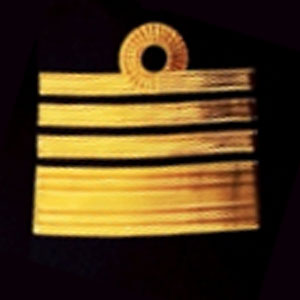

چشمک زن LED — اولین پروژه Arduino شما
کلاسیک اولین پروژه الکترونیکی! یک مدار چشمک زن LED را با استفاده از Arduino، یک breadboard، یک مقاومت و یک LED ساخت کنید. برای مبتدیان مطلق کامل است — نیازی به لحیم کاری نیست.
دستورالعملها
1
1
اجزای خود را جمع آوری کنید
اجزای خود را جمع آوری کنید
تمام اجزای ذکر شده در زیر را جمع آوری کنید. نیازی به لحیم کاری نیست — همه چیز به برد فنری متصل می شود.
مواد مورد نیاز این مرحله:
 کیت مخترع SparkFun - V3.21 کیت
ابزارهای مورد نیاز:
 رایانه با Arduino IDE
2
2
نمودار مدار
نمودار مدار
سیگنال از Arduino Pin 13 → مقاومت 220Ω (R1) → LED (D1) → GND جریان مییابد. مقاومت جریان را برای محافظت از LED محدود میکند.
مواد مورد نیاز این مرحله:
 Arduino Uno R31 قطعه
 الایدی ۵ میلیمتری1 قطعه
 جعبه مقاومت یکچهارم وات1 قطعه
3
3
آن را سیمکشی کنید
آن را سیمکشی کنید
- LED را در برد بدون لحیمکاری وارد کنید — پایه بلند (آند +) در یک ردیف، پایه کوتاه (کاتد −) در ردیف بعدی.
- یک پایه مقاومت 220Ω را در همان ردیف کاتد LED وارد کنید. پایه دیگر در یک ردیف جداگانه.
- سیم جامپر از ردیف آند LED → پین 13 آردوینو.
- سیم جامپر از ردیف آزاد مقاومت → GND آردوینو.
مواد مورد نیاز این مرحله:
الایدی ۵ میلیمتری1 قطعهجعبه مقاومت یکچهارم وات1 قطعه بردبورد1 قطعه
 سیم رابط2 قطعه
4
4
آپلود کد چشمکزن
آپلود کد چشمکزن
Arduino را از طریق USB متصل کنید. Arduino IDE را باز کنید، Tools → Board → Arduino Uno را انتخاب کنید، کد را جایگذاری کرده و روی Upload کلیک کنید.
blink.inoarduino
مواد مورد نیاز این مرحله:
Arduino Uno R31 قطعهابزارهای مورد نیاز:
رایانه با Arduino IDE کابل USB-B
5
5
PCB طرحبندی (مرجع)
PCB طرحبندی (مرجع)
این نمایش مدار به صورت طرحبندی PCB است. برای این پروژه ضروری نیست — برد نمونهای کاملاً کار میکند — اما نشان میدهد که همین مدار اگر به عنوان یک برد واقعی ساخته شود، چگونه به نظر میرسید.
6
6
آزمایش و تجربه
آزمایش و تجربه
LED چشمک میزند؟ تبریک میگویم! شما به تازگی سختافزار را برنامهریزی کردید.
رفع مشکل:
آزمایشهای بعدی:
رفع مشکل:
- LED روشن نمیشود؟ LED را برگردانید — پایه بلند به سمت Pin 13.
- LED روشن میماند؟ بررسی کنید که کد با موفقیت آپلود شده است.
- هیچ اتفاقی نمیافتد؟ تأیید کنید که سیمکشی با شماتیک در مرحله 2 مطابقت دارد.
آزمایشهای بعدی:
- مقادیر
delay()را تغییر دهید تا سرعت چشمک را کنترل کنید - یک LED دوم را در Pin 12 اضافه کنید
- با یک RGB LED جایگزین کنید (بخش SIK Circuit 3 را ببینید)
مواد
6- کیت مخترع SparkFun - V3.210% کمیسیون1 کیت$106.94
- جایگزین
- جایگزین
- 1 قطعهجایگزین
- جایگزین
- جایگزین
ابزارهای لازم
3- جایگزین
- 1 vendor sell this, none ship to you yetجایگزین
- Optional, pre-made jumper wires do not need strippingجایگزین
مجموع تخمینی
آنچه سازنده خریده است. موادی که بدون قیمت نشان داده شدهاند را از هر جا که بخرید تهیه میکنید.
CC0 مالکیت عمومی
این نقشه تحت مجوز CC0 منتشر شده است. شما آزاد هستید آن را کپی، ویرایش، توزیع و برای هر هدفی بدون نیاز به اجازه استفاده کنید.
با خرید محصولات از طریق نقشه از سازنده حمایت کنید و او کمیسیون سازنده تعیین شده توسط فروشندگان، دریافت میکند یا یک نسخه جدید از این نقشه ایجاد کنید و آن را به عنوان اتصال در نقشه خود قرار دهید تا درآمد به اشتراک گذاشته شود.