アート
美容とウェルネス
工芸
文化と歴史
エンターテインメント
環境
食品と飲料
リバースエンジニアリング
科学
スポーツ
テクノロジー
ウェアラブル
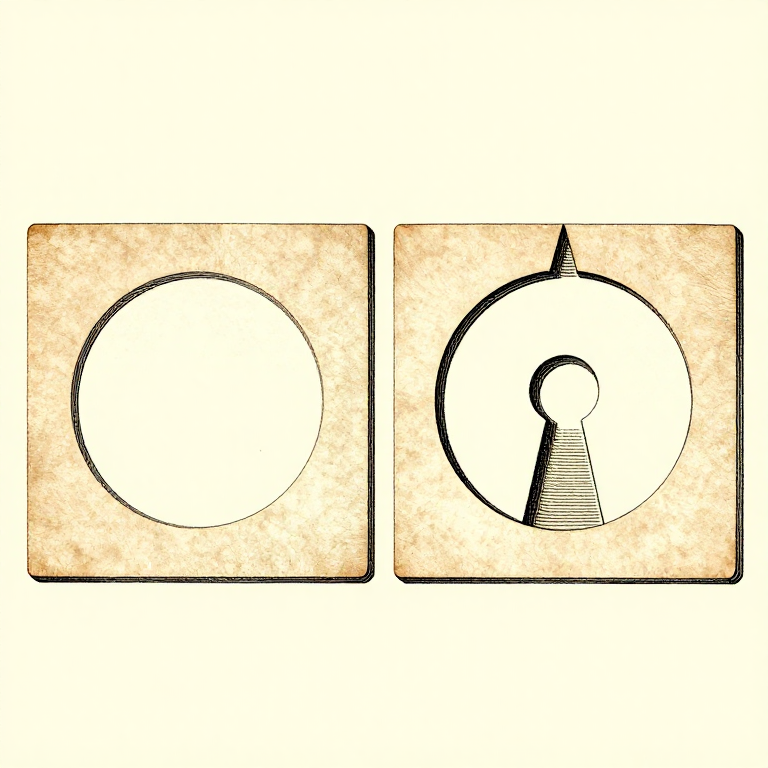


Designing For the Process: A Printable Part Is a Different Shape
A model drawn without thinking about printing can usually be printed. A model drawn WITH the process in mind prints faster, stronger, with no supports and a better surface — from the same amount of design effort.
Every rung before this one is a constraint: layers are weak in one direction, overhangs have a limit, holes come out small, corners warp, walls carry the load. Design is where those stop being problems to work around and become the rules the shape is drawn to.
That is the same move as designing a casting with draft angles, or a timber frame with wood movement allowed for. The process has a grain, and a good design runs with it.
上級者
4 hours
手順
1
1
Chamfer the bottom, fillet the rest
Chamfer the bottom, fillet the rest
A 45-degree CHAMFER on the bottom edge of a part is self-supporting, removes the elephant-foot bulge, and makes the part easier to insert into anything. It is close to free and almost always an improvement.
Fillets elsewhere reduce stress concentration and warping, exactly as a radiused corner does on any other part. Internal corners especially: a sharp internal corner is where a printed part cracks.
But do NOT fillet the bottom edge — a bottom fillet is an overhang that starts at 90 degrees, which is the one angle nothing can print. Chamfer at the bottom, fillet above it, and that single rule removes a lot of support material.
このステップの材料:
 3D プリント用フィラメント(PLA)1 個
必要な工具:
 デスクトップパソコン
 3MF ファイル用スライサーソフト
 バリ取り工具
2
2
Turn overhangs into bridges and teardrops
Turn overhangs into bridges and teardrops
A horizontal hole printed round has an unsupported arch at the top that sags. Printed as a TEARDROP — a circle with a 45-degree point on top — it is entirely self-supporting and needs no support at all.
A hexagonal hole does the same job and takes a nut. So does simply making the top of the hole a flat bridge rather than a curve, which prints well for the reasons the overhang rung gives.
The general form: wherever the model has a surface between 45 and 90 degrees, ask whether it can become a chamfer, a bridge, or a shape with a point on top. Nearly always it can, and nearly always the result is better than supporting it.
このステップの材料:
3D プリント用フィラメント(PLA)1 個必要な工具:
デスクトップパソコン3MF ファイル用スライサーソフト デジタルノギス 6インチ
3
3
Split the part where splitting helps
Split the part where splitting helps
A part that needs supports, or warps, or is too tall to be stable, can often be cut into two pieces that each print flat and are then glued or bolted.
Put the split where a joint is natural — at a change of section, behind a flange — and add a locating feature, a peg and socket or a dovetail, so the two halves cannot be assembled wrong. Design the clearance into one side only, as the tolerance rung sets out.
Splitting also lets each half be oriented for its own load path, which the orientation rung says is the highest-leverage decision available. A part split into two well-oriented halves can be stronger than the same part printed whole.
このステップの材料:
3D プリント用フィラメント(PLA)1 個必要な工具:
デスクトップパソコン3MF ファイル用スライサーソフトデジタルノギス 6インチバリ取り工具4
4
Use real hardware where it belongs
Use real hardware where it belongs
Printed threads are weak, printed bearings wear, and printed springs creep. Heat-set brass inserts, steel pins, real bearings and real fasteners cost very little and remove the weakest parts of a printed assembly.
Design the pocket for them from the start: a straight bore for an insert, a captive hex pocket for a nut, a shoulder for a bearing to seat against. A pocket designed in prints perfectly; one drilled afterwards splits the part along a layer.
Which is the whole argument of this batch. The printer is one process among several, it has specific strengths and specific limits, and the best results come from using it for what it is good at and something else for the rest.
このステップの材料:
3D プリント用フィラメント(PLA)1 個 カーボン入り PETG フィラメント1 個
必要な工具:
デスクトップパソコンデジタルノギス 6インチ 3D プリンターの工具セット
関連ブループリント
これらのブループリントは知識を共有しています — 技術、材料、原理
CC0 パブリックドメイン
このブループリントはCC0で公開されています。許可を求めずに、自由にコピー、修正、配布、あらゆる目的で使用できます。
メイカーを応援するには、ブループリント経由で製品を購入してください。メイカーには メイカーコミッション がベンダーにより設定されています。または、このブループリントの新しいイテレーションを作成し、自分のブループリントにコネクションとして含めて収益を共有できます。