कला
सुन्दरता र कल्याण
हस्तकला
संस्कृति र इतिहास
मनोरञ्जन
वातावरण
खाना र पेय
रिभर्स इन्जिनियरिङ
विज्ञान
खेलकुद
प्रविधि
पहिर्न मिल्ने
अनुवादित
BLUEPRINT NFT


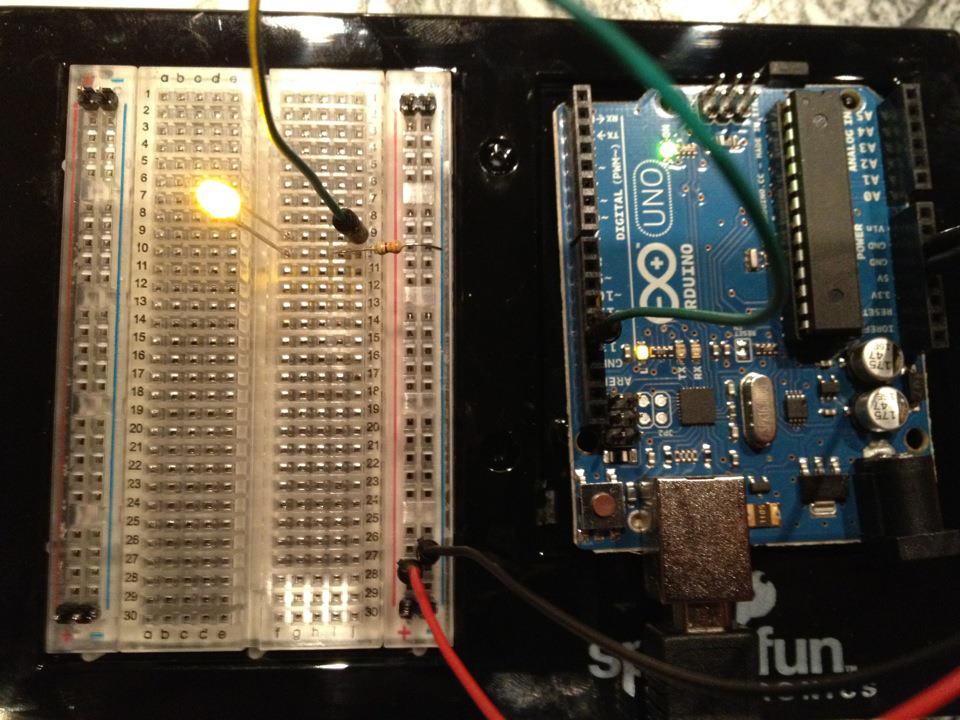
झलमलाउँदै LED — तपाईंको पहिलो Arduino परियोजना
क्लासिक पहिलो इलेक्ट्रोनिक्स परियोजना! Arduino, ब्रेडबोर्ड, प्रतिरोधक, र एकल LED को उपयोग गरेर झलमलाउँदै LED सर्किट बनाउनुहोस्। बिल्कुल शुरुवातीहरूको लागि परिपूर्ण — कुनै सोल्डरिङ आवश्यक छैन।
निर्देशनहरू
1
1
आपके घटकहरू जमा गर्नुहोस्
आपके घटकहरू जमा गर्नुहोस्
तलको सूचीबद्ध सभी घटकहरू सংग्रह गर्नुहोस्। कुनै焊接को आवश्यकता छैन — सबै कुरा ब्रेडबोर्डमा प्लग हुन्छ।
यस चरणका सामग्री:
 SparkFun Inventor's Kit - V3.21 किट
चाहिने औजार:
 Arduino IDE भएको कम्प्युटर
2
2
सर्किट योजनाबद्ध
सर्किट योजनाबद्ध
सिग्नल Arduino Pin 13 → 220Ω प्रतिरोधक (R1) → LED (D1) → GND बाट प्रवाह हुन्छ। प्रतिरोधकले LED को सुरक्षा गर्न करेन्ट सीमित गर्छ।
यस चरणका सामग्री:
 Arduino Uno R31 टुक्रा
 ५ मिमिको एलईडी1 टुक्रा
 १/४ वाटको प्रतिरोधक सेट1 टुक्रा
3
3
यसलाई वायर गर्नुहोस्
यसलाई वायर गर्नुहोस्
- LED लाई ब्रेडबोर्डमा घुसाउनुहोस् — लामो खुट्टा (anode +) एक पङ्क्तिमा, छोटो खुट्टा (cathode −) अर्कोमा।
- 220Ω resistor को एक खुट्टा LED cathode जस्तै पङ्क्तिमा घुसाउनुहोस्। अर्को खुट्टा अलग पङ्क्तिमा।
- Jumper wire LED anode पङ्क्तिबाट → Arduino Pin 13 सम्म।
- Jumper wire resistor खाली पङ्क्तिबाट → Arduino GND सम्म।
यस चरणका सामग्री:
५ मिमिको एलईडी1 टुक्रा१/४ वाटको प्रतिरोधक सेट1 टुक्रा ब्रेडबोर्ड1 टुक्रा
 जम्पर तार2 टुक्रा
4
4
Blink कोड अपलोड गर्नुहोस्
Blink कोड अपलोड गर्नुहोस्
USB मार्फत Arduino जडान गर्नुहोस्। Arduino IDE खोल्नुहोस्, Tools → Board → Arduino Uno चयन गर्नुहोस्, कोड पेस्ट गर्नुहोस् र Upload मा क्लिक गर्नुहोस्।
blink.inoarduino
यस चरणका सामग्री:
Arduino Uno R31 टुक्राचाहिने औजार:
Arduino IDE भएको कम्प्युटर USB-B केबल
5
5
PCB लेआउट (संदर्भ)
PCB लेआउट (संदर्भ)
यसले सर्किटलाई PCB लेआउटको रूपमा देखाउँछ। यस प्रकल्पको लागि आवश्यक छैन — ब्रेडबोर्ड पूर्णतया काम गर्छ — तर यसले देखाउँछ कि एउटा वास्तविक बोर्डको रूपमा निर्मित गरिएको भए एउटै सर्किट कस्तो देखिन्थ्यो।
6
6
परीक्षण र प्रयोग
परीक्षण र प्रयोग
LED झिमझिमिएको छ? बधाई छ! तपाईंले भर्खास्ट प्रोग्राम गर्नु भएको छ।
समस्या समाधान:
अगलो प्रयोगहरु:
समस्या समाधान:
- LED उज्ज्वल हुन सकेको छैन? LED पलट गर्नुहोस् — लामो खुट्टा Pin 13 तर्फ।
- LED सधैं अन छ? कोड सफलतापूर्वक अपलोड भएको जाँच गर्नुहोस्।
- केहि भएन? तार जोडिएको स्केमेटिक चरण २ सँग मेल खाँदो जाँच गर्नुहोस्।
अगलो प्रयोगहरु:
delay()मानहरु परिवर्तन गरी झिमझिमको गति नियन्त्रण गर्नुहोस्- Pin 12 मा दोस्रो LED जोड्नुहोस्
- RGB LED सँग बदल्नुहोस् (देख्नुहोस् SIK Circuit 3)
सामग्री
6- SparkFun Inventor's Kit - V3.210% कमिसन1 किट$106.94
- प्लेसहोल्डर
- प्लेसहोल्डर
- 1 टुक्राप्लेसहोल्डर
- प्लेसहोल्डर
- प्लेसहोल्डर
आवश्यक उपकरणहरू
3- प्लेसहोल्डर
- 1 vendor sell this, none ship to you yetप्लेसहोल्डर
- Optional, pre-made jumper wires do not need strippingप्लेसहोल्डर
अनुमानित जम्मा
बनाउनेले किनेको कुरा। मूल्य नदेखिएका सामग्री तपाईंले जहाँबाट किन्नुहुन्छ त्यहीँबाट पाइन्छ।
CC0 सार्वजनिक डोमेन
यो ब्लुप्रिन्ट CC0 अन्तर्गत जारी गरिएको छ। तपाईं अनुमति नसोधी प्रतिलिपि, परिमार्जन, वितरण र प्रयोग गर्न सक्नुहुन्छ।
ब्लुप्रिन्ट मार्फत उत्पादनहरू किनेर सिर्जनाकर्तालाई सहयोग गर्नुहोस् सिर्जनाकर्ता कमिसन विक्रेताले तोकेको, वा यो ब्लुप्रिन्टको नयाँ संस्करण बनाउनुहोस् र आम्दानी बाँड्न आफ्नो ब्लुप्रिन्टमा जडानको रूपमा समावेश गर्नुहोस्।